
A user who cannot access Outlook has an IT problem. Twenty employees losing access every Monday morning is something else.
The second situation points to a wider weakness: perhaps identity policies are inconsistent, an integration is failing, or the same temporary fix has been applied several times without anyone investigating why the problem keeps coming back.
That distinction matters when discussing information technology issues.
Some technology problems are isolated and easy to correct. Others reveal gaps in monitoring, security, network management, recovery planning, or ownership. Those are the issues that quietly consume support hours and eventually interrupt business operations.
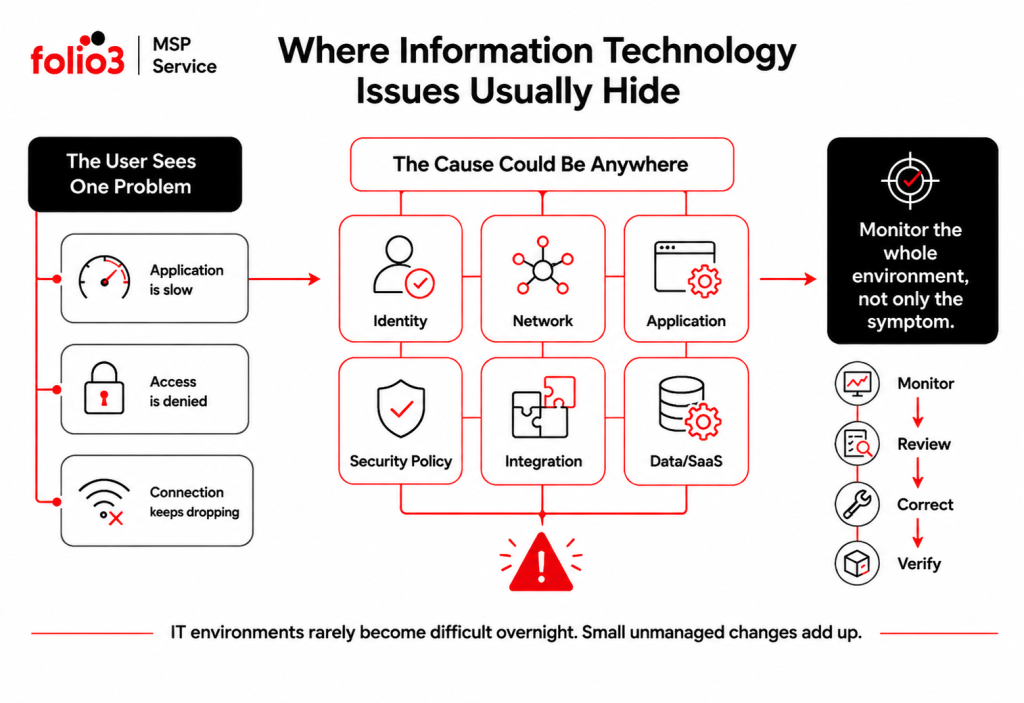
Here are the information technology issues businesses tend to struggle with most, why they happen, and what should be done about them.
Why Information Technology Issues Keep Coming Back
Recurring problems rarely survive because nobody knows how to restart an application or reset a password.
They survive because support stops once the employee can work again.
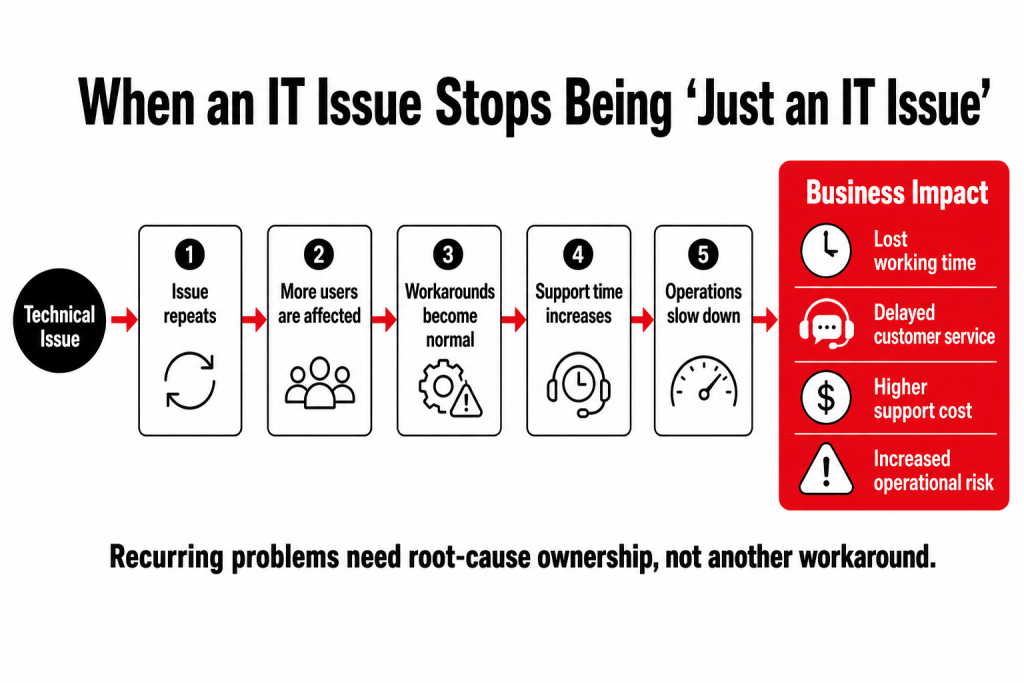
Imagine a department that loses access to a shared application twice a month. Each time, support reconnects the service and closes the ticket. After six incidents, the business has six resolved tickets and one unresolved problem.
A better IT operation connects those incidents. It looks at timestamps, affected users, service logs, network conditions, identity changes, and application dependencies until a pattern appears.
This is where proactive IT maintenance becomes useful. Monitoring and ticket history should help IT find developing problems before another employee has to report them.
1. Recurring IT Incidents With No Root-Cause Fix
The same VPN disconnects. The same application freezes. The same shared folder disappears.
People eventually learn the workaround, which can make the problem look less serious than it is.
Recurring incidents cost time in small pieces. Ten employees losing fifteen minutes every week may never produce one dramatic outage, but the wasted time adds up.
What should happen instead?
Repeated tickets should trigger a root-cause review rather than another identical fix.
The review should compare:
- Which users are affected
- Whether incidents happen at similar times
- Which applications or services are involved
- Recent configuration or policy changes
- Monitoring alerts around the same period
- Whether another site or user group sees the same behavior
The goal is to correct the shared cause and then watch for recurrence.
2. Access Has Grown Faster Than Anyone Is Reviewing It
Access tends to spread quietly.
An employee joins Finance, later moves to Operations, helps another team for three months, and gains access to several SaaS platforms along the way. Years later, some of those permissions may still exist.
The problem gets worse when organizations use separate identities across Microsoft 365, VPNs, business applications, and vendor portals.
These information technology issues often stay invisible because everything appears to work.
Until an account is compromised.
CISA recommends requiring multifactor authentication for business systems such as email, file storage, administrative accounts, and remote access, with phishing-resistant MFA preferred where available. CISA’s MFA guidance also recommends starting with privileged users and people handling sensitive data.
What should be reviewed?
Access reviews should look at administrative privileges, shared accounts, former employees, contractors, SaaS roles, VPN access, MFA coverage, and users whose responsibilities have changed.
Identity management works best when permissions follow job roles instead of accumulating through individual requests.
3. Updates Are Being Deployed, but Nobody Is Checking What Failed
“Updates are automatic” sounds reassuring.
It is not the same as knowing that updates were installed successfully.
Some systems may be offline. Others may fail repeatedly. An application compatibility issue may cause a team to postpone an update and never return to it.
Microsoft provides dedicated Windows Update troubleshooting because failed deployments can result from several causes, including update services, system configuration, or device-specific problems. Microsoft’s Windows Update troubleshooting guidance also recommends resolving failures rather than assuming deployment completed across every device.
A managed patching process should show which systems are current, which failed, which are excluded, and why.
That last part matters.
An exception without an owner has a habit of becoming permanent.
4. The Network Is Online, but Employees Still Cannot Work Properly
Network problems do not always cause a clean outage.
Calls break up. Applications hesitate. Remote sessions disconnect. One office feels slower than another.
Everything is technically “up.”
Those information technology issues are difficult to diagnose without performance data. Network monitoring should look at latency, packet loss, bandwidth demand, VPN stability, routing, and conditions by location.
A complaint that always comes from the same conference room points somewhere different from a problem affecting every branch at 3:00 p.m.
Managed network support also becomes useful when several vendors are involved. The ISP may say its circuit is healthy while the application vendor says its service is online. Someone still has to investigate the path between them.
5. Migration Costs Increase Without a Clear Reason
Data migration spending can creep upward without one obvious event.
A project creates several resources. Nobody retires the test environment afterward. Storage grows. Licences remain assigned to inactive users. Another department creates its own subscription.
Then finance asks why this month costs more than the last one.
The answer should not require three days of investigation.
Folio3’s current managed IT offering includes governance reviews, cost optimization, and migration planning.
6. Security Alerts Exist, but Response Ownership Is Unclear
A company can have plenty of security products and still struggle with security operations.
An alert comes in. The endpoint platform flags a device. A sign-in looks suspicious. An employee reports a phishing message.
- Who investigates it?
- Who isolates the affected account?
- Who checks whether another user received the same message?
- Who closes the alert?
CISA’s business guidance recommends a combination of phishing protection, MFA, software updates, logging, backups, and data protection rather than relying on one security measure.
The hard part is operational ownership.
Security alerts should have a severity, an assigned responder, an escalation path, and a record of what was checked. Otherwise, a dashboard can show risk without anyone reducing it.
7. Backups Are Successful, but Recovery Is Still a Question Mark
A green backup status is useful.
It does not answer the question that matters during an outage: can the business get the service back?
Data may restore, but the application might not. Authentication may fail. Integrations may need manual work. Recovery may take twelve hours when the business expected two.
Backup and recovery planning should establish:
- Which services need to return first
- How long each one may remain unavailable
- How much recent data can be lost
- Who authorizes recovery
- Which dependencies need to come back with the service
- When the last recovery test was completed
CISA includes business-data backups among its core cybersecurity recommendations and specifically provides guidance around recovery preparation.
Testing is the part that turns a backup plan into evidence.
8. Different Vendors Own Different Pieces of the Same Problem
Modern IT environments are full of specialists.
One company manages the internet connection. Another supports the business application. Microsoft provides the productivity platform. A cybersecurity provider watches alerts. Internal IT manages user access.
That arrangement can work until one issue crosses two or three of those boundaries.
Then the customer becomes the project manager.
A good IT operating model assigns someone to coordinate the complete incident. That person may not personally fix every component, but they collect evidence, contact the relevant vendors, follow escalation, test the proposed correction, and keep the user informed.
This is one reason fragmented support creates persistent information technology issues even when each individual supplier is technically meeting its contract.
9. SaaS Applications Are Being Added Without Enough Oversight
Buying a new SaaS platform is easy.
Understanding what it connects to is harder.
A new application may introduce another identity store, new permissions, data exports, API connections, recurring licences, retention requirements, and another vendor relationship.
Six months later, nobody remembers who approved it.
SaaS governance should document the business owner, technical owner, users, data involved, authentication method, integrations, renewal date, and offboarding process.
The application list should also be reviewed for duplication.
Two teams paying for different products that perform almost the same job is not a technical failure. It is still an IT management problem.
10. Migrations Are Planned Around the Platform Instead of the Business Process
A migration can be technically successful and still frustrate users.
Email moved correctly, but a shared mailbox is missing.
The database arrived intact, but an application integration still points to the old environment.
Users exist in the new tenant, but several permissions did not follow.
Migration planning should begin by documenting the business process and everything connected to it.
Depending on the project, the move may involve servers and operating systems, data, databases, applications, email, networks, storage, Active Directory, Microsoft Entra ID, virtual workloads, or complete tenant consolidation.
Discovery should happen before cutover. Testing should happen after it.
11. Nobody Has a 12-Month Technology Plan
Some information technology issues are created by decisions that were never made.
A platform approaches end of support. A major contract renewal appears unexpectedly. Migration spending keeps increasing. A security recommendation has been open for nine months because nobody allocated a budget.
IT becomes expensive when every decision becomes urgent.
A useful technology roadmap should show upcoming projects, security priorities, migration requirements, service renewals, recovery work, budget requirements, and dependencies.
It should also explain what happens if something is postponed.
Folio3’s current IT Strategy & vCTO offering includes roadmaps, budgeting, risk reviews, vendor decisions, and executive reporting.
Which Information Technology Issues Should Be Fixed First?
A long list of problems needs an order.
Start with anything that could expose sensitive information, interrupt a critical business service, prevent recovery, or affect a large number of employees.
Then look at frequency.
An issue that causes a ten-minute interruption every day may deserve more attention than an inconvenient problem that happens twice a year.
A practical priority model considers:
| Question | Why it matters |
| How many users are affected? | Shows the operational reach |
| Which business process depends on it? | Connects the issue to real work |
| Is sensitive data involved? | Raises security and compliance priority |
| Is there a reliable workaround? | Changes urgency |
| Does the issue keep returning? | Points to unresolved root cause |
| Can the affected service be recovered? | Shows continuity risk |
| What happens if action is delayed? | Helps management prioritize investment |
The output should be a queue of decisions, not a bigger spreadsheet.
How Do You Reduce Information Technology Issues Over Time?
The best measure of IT management is not how quickly the team can fix the same problem for the sixth time.
It is whether a seventh incident happens.
That requires a few habits: central monitoring, consistent access reviews, controlled updates, documented ownership, recovery testing, and recurring-ticket analysis.
Monthly reporting should show what changed.
Which problems returned? Which risks remain open? What failed? What was corrected? What needs management approval next?
Ticket volume alone will not answer those questions.
Where Managed IT Services Fit
Internal IT teams can handle much of this work. The challenge is often time.
User support, onboarding, vendor tickets, security alerts, network problems, and projects all compete for the same working day. Preventive work is easy to postpone because nothing is currently broken.
Managed IT services can take ownership of defined operational areas while the internal team keeps business context and decision-making.
Folio3 describes IT management as ongoing support, monitoring, security, maintenance, optimization, and strategic oversight rather than waiting for problems to affect employees or customers.
How Folio3 Helps Address Information Technology Issues
Folio3’s managed IT model covers the main areas where recurring technology problems tend to originate.
Managed IT Support
Folio3 provides 24/7 helpdesk support, monitoring, update management, vendor coordination, and performance reporting. Repeated incidents can be reviewed alongside monitoring data instead of being treated as unrelated tickets.
Cybersecurity
Cybersecurity support covers zero-trust planning, managed firewall and VPN services, endpoint detection, SOC monitoring, incident response, security-awareness training, and compliance-focused controls.
Data Migrations
Folio3 migration work covers servers, operating systems, applications, databases, email, data, storage, networks, directory environments, virtual workloads, and tenant consolidation, with dependencies and post-move validation built into the plan.
IT Strategy & vCTO
Roadmaps, budgeting, vendor reviews, risk decisions, and management reporting help turn technical findings into planned work instead of leaving them open until they become urgent.
Network & Infrastructure
Folio3 supports LAN and WAN environments, SD-WAN, Wi-Fi planning, firewall, routing and switching management, network monitoring, and connectivity between locations.
Disaster Recovery
Disaster recovery work includes backup validation, recovery planning, RTO and RPO requirements, business continuity documentation, ransomware recovery preparation, and recovery testing.
Fix the Pattern, Not Just the Ticket
Most information technology issues begin small.
A login problem. A slow application. A failed update. A connection that drops occasionally.
The real trouble starts when the same issue becomes normal.
Finding those patterns requires visibility across users, applications, identities, networks, hosted environments, security controls, vendors, and recovery processes.
Folio3’s managed IT services bring those areas into one operating model, with support available across day-to-day issues and the systems causing them.
Frequently Asked Questions
Look for repetition across users, locations, applications, or time. If several incidents share the same pattern, treat them as one investigation rather than separate tickets.
Yes. Discovery usually becomes part of onboarding, with the provider rebuilding information about services, access, vendors, configurations, and dependencies before higher-risk changes are made.
One team should own coordination. That team gathers evidence, contacts the relevant providers, follows the case through escalation, and verifies the service after each party completes its work.
Keep the report short. Each risk should state the affected service, business impact, current control, required action, owner, and target date.
Yes. The MSP can own selected functions such as monitoring, cybersecurity, network operations, hosted environments, recovery, or escalations while the internal team keeps business-facing responsibilities.
When the fix requires wider design changes, migration, new policies, several teams, or a planned budget, repeatedly reopening support tickets is a poor substitute for a project with an owner and deadline.