
At 8:45 a.m., a shared application starts responding slowly. At 9:10, users begin reporting timeouts. By 9:30, an entire department is unable to work.
The warning signs were probably visible earlier.
Storage may have been approaching its limit. A service may have been restarting repeatedly. An update may have failed on several systems. The problem only became urgent when employees felt the impact.
Proactive IT maintenance finds and addresses those conditions before they turn into larger incidents. It combines monitoring, scheduled updates, access reviews, backup testing, configuration checks, and root-cause investigation within one managed process.
The aim is simple: fewer avoidable interruptions and less time spent fixing the same problem again.
What Is Proactive IT Maintenance?
Proactive IT maintenance is the planned monitoring, review, testing, and upkeep of business technology before users report a failure.
It covers the systems employees depend on every day:
- Business applications and SaaS platforms
- User identities and permissions
- Networks and remote-access services
- Endpoint security and compliance
- Backups and recovery processes
- Software updates and vulnerability remediation
- Monitoring, documentation, and vendor coordination
The word “proactive” matters. A monitoring platform can generate hundreds of alerts and still provide little value if nobody owns the response.
Useful maintenance connects every meaningful warning to an action, an owner, and a method for checking whether the correction worked.
Proactive vs. Reactive IT Maintenance
Reactive support begins after something stops working. Proactive maintenance looks for conditions that typically precede failure.
| Reactive IT support | Proactive IT maintenance |
| Begins when a user reports an issue | Uses monitoring and scheduled reviews |
| Focuses on restoring the affected service | Investigates why the issue happened |
| Treats similar tickets separately | Groups repeated incidents to find patterns |
| Installs updates after a problem appears | Uses controlled update schedules |
| Assumes completed backups are usable | Tests whether data and services can be restored |
| Reviews access during an incident or audit | Checks permissions on a defined schedule |
| Produces ticket counts | Reports risks, trends, actions, and outcomes |
Reactive support still has a place. Unexpected incidents happen.
The problem starts when every issue is handled reactively, including the ones that have already happened three times.
What Proactive IT Maintenance Should Include
Monitoring That Leads to Action
Monitoring should tell the support team what is changing across the environment.
Useful signals include service availability, application response time, failed processes, storage use, network latency, backup results, update status, security events, and certificate expiry.
The alert itself is not the result.
A storage warning should trigger investigation before the application runs out of space. A failed backup should remain open until the job succeeds and the cause is understood. A service that restarts every night deserves attention even if users have not complained yet.
Context makes monitoring useful. Ten failed login attempts against one account mean something different from hundreds of attempts against several administrative accounts.
Controlled Patch and Update Management
Updates need a schedule, a testing approach, and a way to identify failures.
Microsoft allows organizations to control how and when Windows updates are deployed through tools such as Microsoft Intune, mobile device management policies, and Group Policy. Windows Update reporting can also show which managed devices are compliant or still missing updates.
A practical update process should answer:
- Which systems are included?
- Which updates require testing?
- When can restarts occur?
- Which failures need escalation?
- How are offline systems handled?
- What is the rollback plan if an update affects an application?
Automatic updates help, but automation needs oversight. A system that has been offline for two months will not become compliant because a policy exists.
Identity and Access Reviews
Access tends to accumulate.
An employee changes departments but keeps permissions from the previous role. A temporary administrative account remains active. A former supplier still has access to a shared platform.
Regular access reviews should cover:
- Administrative accounts
- Shared mailboxes and shared accounts
- Remote access and VPN permissions
- SaaS application roles
- Security and distribution groups
- Former employees and contractors
- Accounts excluded from multifactor authentication
- Service accounts with broad permissions
CISA recommends applying multifactor authentication across business systems such as email, file storage, and remote access.
Access maintenance should follow business ownership. IT can enforce permissions, but the relevant manager should confirm who still needs them.
Application and SaaS Maintenance
Applications often fail at the connections between systems.
A business platform may depend on single sign-on, an API, email delivery, a scheduled data import, and a database. Each component can appear healthy on its own while the complete process fails.
Proactive maintenance should document:
- The business and technical owner
- Authentication method
- Connected systems
- Data location
- Vendor escalation route
- Renewal date
- Backup or recovery method
- Known compatibility requirements
- Planned changes
This is especially useful before an update or migration. An undocumented integration has a habit of introducing itself during the cutover.
Network and Remote-Access Health
A network can be online and still perform badly.
Dropped calls, unstable remote sessions, slow uploads, and weak wireless coverage usually leave measurable evidence. Latency, packet loss, bandwidth demand, VPN failures, firewall events, and performance by location can help isolate the cause.
Proactive network reviews should also check whether temporary configuration changes are still required. Firewall rules, VPN access, and routing exceptions often outlive the issue that created them.
Repeated complaints from the same room, site, or time of day should be treated as a pattern. Restarting the router every week is not a maintenance plan.
Backup Validation and Recovery Testing
A successful backup notification confirms that the job ran. It does not confirm that the business can recover.
A proper recovery test should check whether the data is complete, the application starts, users can authenticate, integrations reconnect, and the service returns within the agreed timeframe.
The business should define two targets:
- Recovery Time Objective: How quickly the service must return
- Recovery Point Objective: How much recent data may be lost
CISA guidance for MSPs and smaller businesses recommends protected backups and documented restoration practices as part of operational resilience.
The maintenance report should include the date and result of the latest restore test. “Backups running” is too vague.
Migration Reviews
Successful migrations require ongoing reviews after workloads are moved. A migrated environment can still develop security, cost, and operational challenges if resources, permissions, and configurations are not regularly assessed.
Post-migration reviews should examine:
- Business continuity requirements
- Migrated workload performance and dependencies
- Resource ownership and accountability
- User access and administrative permissions
- Security configurations and compliance requirements
- Unused resources, services, and licences
- Data retention and storage requirements
- Backup and recovery readiness
- Environment documentation and governance standards
Documentation and Change Control
Good documentation reduces the time spent rediscovering the same environment.
Records should cover applications, owners, vendors, access methods, network dependencies, recovery procedures, administrative processes, and approved changes.
Documentation also needs maintenance. A network diagram from three years ago can be more misleading than having no diagram at all.
Changes should record:
- What is being changed
- Why it is required
- Which systems may be affected
- Who approved it
- When it will happen
- How the result will be tested
- How the change will be reversed
That may sound formal for a small change. The level of detail can vary. The ownership should not.
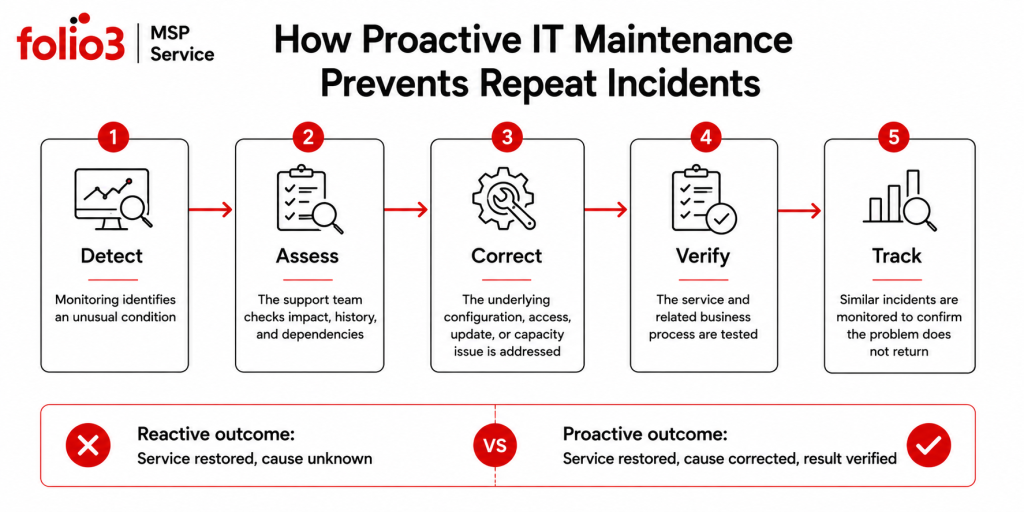
How Proactive IT Maintenance Works in Practice
A maintenance program needs a repeatable workflow.
| Stage | What happens | Evidence |
| Detect | Monitoring, ticket patterns, or scheduled reviews identify a condition | Alert, report, or recurring incident record |
| Assess | Impact, cause, dependencies, and urgency are reviewed | Technical notes and risk classification |
| Correct | The assigned owner completes the required action | Change, remediation, or vendor case |
| Verify | The service and affected business process are tested | Test result or monitoring confirmation |
| Review | The issue is checked for recurrence and wider impact | Trend report and follow-up action |
The verification stage is often skipped.
A service starts responding again, so the ticket is closed. Nobody checks whether another site, user group, or integration remains affected.
That is how temporary workarounds become permanent operating procedures.
What Should Be Automated?
Automation works well for repeatable tasks with predictable rules.
Examples include monitoring thresholds, update deployment, compliance reporting, backup-job checks, certificate-expiry warnings, and alerts for unusual account activity.
Human review is still needed when the task involves business impact, competing priorities, or incomplete information.
A monitoring tool can identify that storage usage is rising. It cannot always decide whether the business should archive data, change retention, extend capacity, or modify the application generating the data.
Automation should remove repetitive checking. It should not remove judgment.
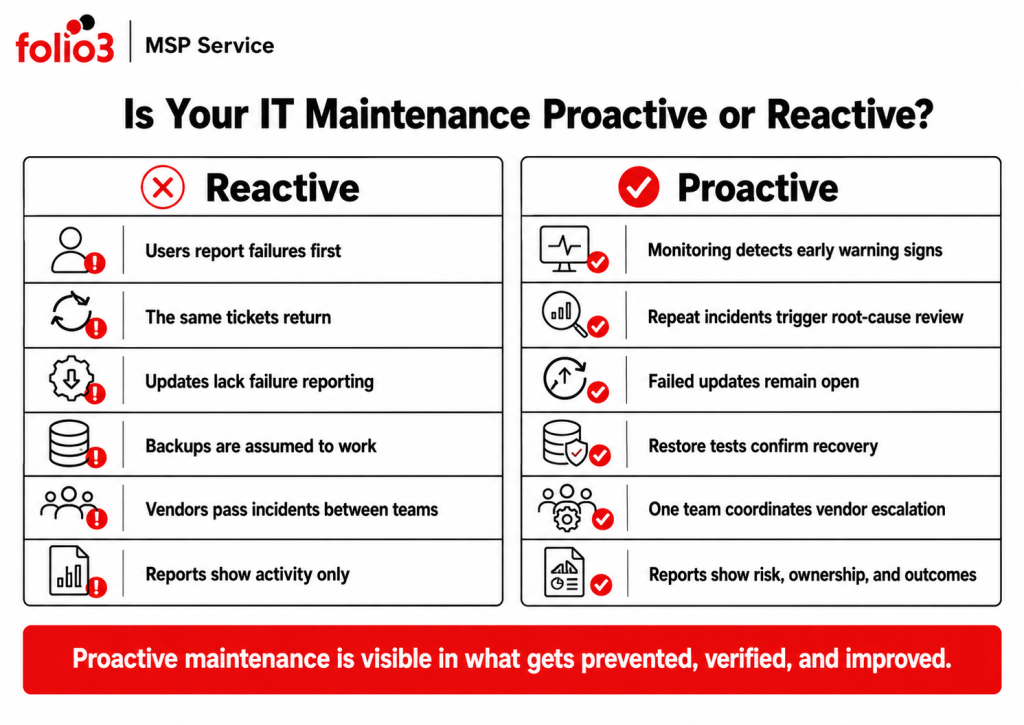
Signs Your IT Support Is Still Reactive
A business may have a support contract and still lack effective proactive IT maintenance.
Look for these warning signs:
- The same tickets appear every month
- Users report failures before the monitoring platform does
- Alerts remain open without assigned owners
- Updates are deployed, but failures are not reported
- Access is reviewed only when an employee leaves
- Backups run, but restoration has not been tested
- Vendor problems are passed back to the customer
- Reports list activity without showing open risk
- Planned maintenance is repeatedly delayed by daily support work
One or two of these may reflect a temporary gap. Several at once usually point to an operating model built around ticket closure rather than prevention.
Can Proactive IT Maintenance Be Managed Internally?
Yes, provided the responsibilities are clear and the team has enough time to complete them.
An internal team may know the environment better than any external provider. The difficulty is capacity. Daily support, onboarding, projects, vendor issues, and urgent requests often push scheduled maintenance to the bottom of the queue.
An MSP can take responsibility for selected areas while the internal team keeps business ownership and strategic control.
The split might look like this:
- The MSP handles monitoring, updates, security alerts, backup checks, network escalation, and reporting.
- The internal team manages application decisions, business priorities, and employee relationships.
- Both teams share responsibility for major changes, migrations, and recovery exercises.
Write the split down. “We thought they were handling it” is a common sentence after an incident.
How Folio3 Supports Proactive IT Maintenance
Folio3’s current managed IT portfolio covers Managed IT Support, Cybersecurity, IT Strategy and vCTO, Network and Infrastructure, and Disaster Recovery.
Managed IT Support
Folio3 provides 24/7 helpdesk coverage, monitoring, update management, vendor coordination, escalation, and performance reporting.
Support tickets can be reviewed alongside monitoring data and incident history. This helps identify when several user issues share one application, identity, network, or configuration cause.
Cybersecurity Solutions
Cybersecurity support covers zero-trust planning, endpoint detection and response, managed firewall and VPN services, security monitoring, incident response, employee awareness, and compliance-readiness work.
These services connect security alerts with assigned investigation, remediation, and recovery responsibilities.
Migration Solutions
Migration support covers servers, operating systems, data, databases, applications, email, networks, storage, Active Directory, Microsoft Entra ID, virtual workloads, and tenant consolidation, with dependencies, testing, rollback, and post-migration checks built into the plan.
IT Strategy and vCTO
IT Strategy and vCTO services connect maintenance findings with budgeting, risk decisions, vendor planning, technology roadmaps, and future projects.
This matters when a recurring operational issue requires investment rather than another temporary fix.
Network and Infrastructure
Folio3’s network services cover LAN and WAN design, SD-WAN, wireless planning, routing, switching, firewall management, VPN connectivity, performance monitoring, and communication between business locations.
Network maintenance focuses on measurable performance, configuration control, and defined escalation.
Disaster Recovery
Disaster recovery support includes backup validation, RTO and RPO planning, ransomware recovery preparation, continuity documentation, restore testing, and recovery exercises.
The purpose is to confirm which services can be restored, in which order, and within what timeframe.
Frequently Asked Questions
Yes. Updates, restarts, and higher-risk changes can be placed within approved maintenance windows. The schedule should also define who is available to test the affected service after the work.
The process should include testing, backups, rollback steps, and vendor escalation. Failed updates should remain tracked until the application is stable and the next update approach has been agreed.
Basic visibility can begin quickly once access and monitoring tools are in place. Reliable alert thresholds and dependency mapping usually improve over the first few reporting cycles as the provider learns normal behaviour.
Yes. The MSP can collect logs, test connectivity, open vendor cases, coordinate follow-up, and validate the proposed fix. The application vendor may make the final change, but the customer should not have to manage the entire conversation.
The report should show failed updates, open alerts, backup and restore results, repeated incidents, access findings, cloud-cost changes, vendor issues, and upcoming work. Each unresolved item should have an owner and next action.
Usually not. Many problems can be reduced through better configuration, monitoring, permissions, update control, documentation, and ownership. Replacement becomes relevant when the current system cannot meet support, security, performance, integration, or recovery requirements.