
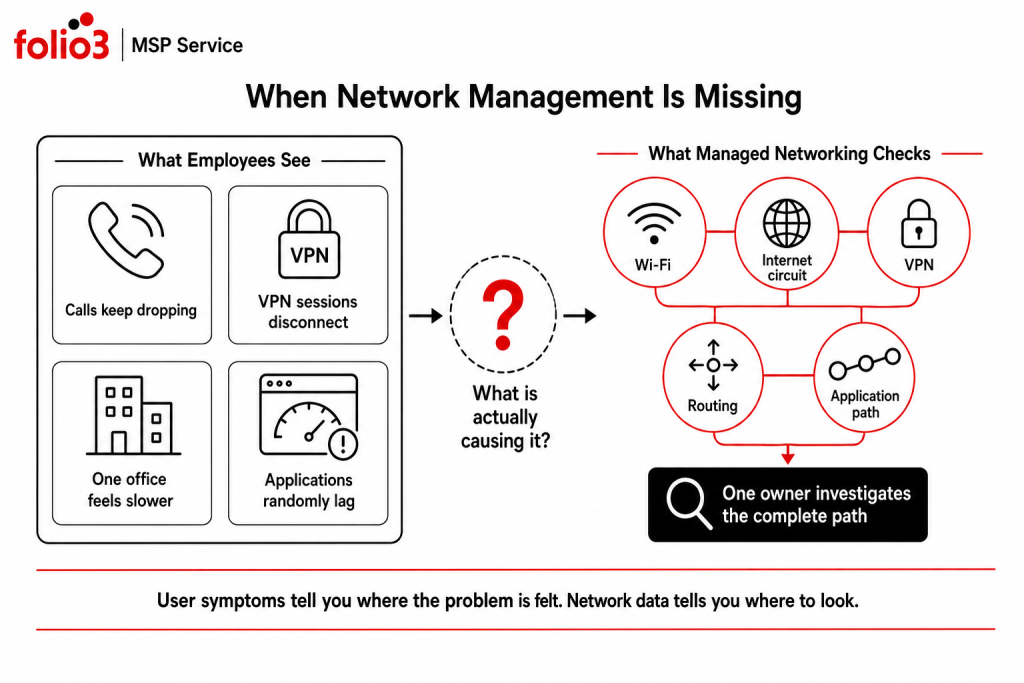
The internet is technically online, but Teams calls keep breaking up.
The VPN works for some employees and drops twice a day for others. One office can open an application immediately; another waits 20 seconds for the same page. Nobody is quite sure whether to call the ISP, firewall provider, application vendor, or internal IT team.
This is where managed networking starts to make sense.
So, what are managed network services?
Managed network services give a business ongoing technical management of its network rather than support only when something stops working. They can cover network monitoring, LAN and WAN management, Wi-Fi, SD-WAN, VPNs, firewalls, routing, switching, internet connectivity, branch networks, and performance analysis.
The value is fairly practical. Someone knows what normal network behavior looks like, notices when it changes, investigates the cause, and owns the problem through resolution.
What Are Managed Network Services in Day-to-Day Operations?
The term can sound broader than it needs to.
A managed network provider looks after the connections employees depend on to reach applications, colleagues, files, and other offices.
That may mean tracking packet loss between two locations in the morning, reviewing a VPN failure after lunch, and working with an ISP on a branch outage later that afternoon.
For companies with several sites, the job gets harder. A WAN connects separate local networks, which means performance problems can sit within the office, the carrier connection, the route between sites, or the application at the other end. Cisco describes a WAN as a collection of LANs or other networks communicating with one another.
Managed networking gives those moving parts one place to be monitored and investigated.
What Is Usually Included in Managed Network Services?
There is no universal package, and there probably should not be. A company with one office has different requirements from a business operating 12 locations with remote workers and several platforms.
The service should follow the network.
Network Monitoring That Shows What Is Actually Wrong
“Everything is slow” is one of the least useful network tickets an engineer can receive.
Monitoring adds evidence.
The network team can look at latency, packet loss, reachability, bandwidth use, VPN status, traffic paths, and performance over time. The difference becomes obvious when a complaint repeats.
Suppose employees at one branch report slow access every afternoon. The internet circuit never goes fully offline, so a basic availability check shows nothing. Performance monitoring, however, shows packet loss rising at roughly the same time each day.
Now there is a pattern.
LAN and WAN Management
The LAN handles connectivity within an office. The WAN carries traffic between separate networks and locations.
Both need consistent administration.
A managed provider can maintain network configurations, routing, segmentation, site connectivity, and communication between business locations. This becomes particularly useful when different offices were set up at different times and have slowly developed their own configurations.
Network changes also need a record.
A routing exception created during troubleshooting may solve the immediate problem. Six months later, someone needs to know why it still exists.
SD-WAN Management
SD-WAN gives distributed businesses more control over how traffic moves between locations, applications, and available connections.
Cisco explains that SD-WAN applies centralized policy and can steer traffic across different network links based on current conditions. It also gives administrators a wider view of WAN behavior instead of managing each connection separately. Cisco’s SD-WAN overview covers the architecture in more detail.
For a managed service provider, SD-WAN work may involve policy configuration, branch onboarding, traffic management, connection monitoring, failover checks, and performance analysis.
Consider a branch with two internet connections. One starts losing packets.
A properly configured SD-WAN policy can direct priority traffic onto the healthier path while the underlying fault is investigated. The employees may never know the primary circuit had a problem.
That is a much better outcome than 40 people raising tickets.
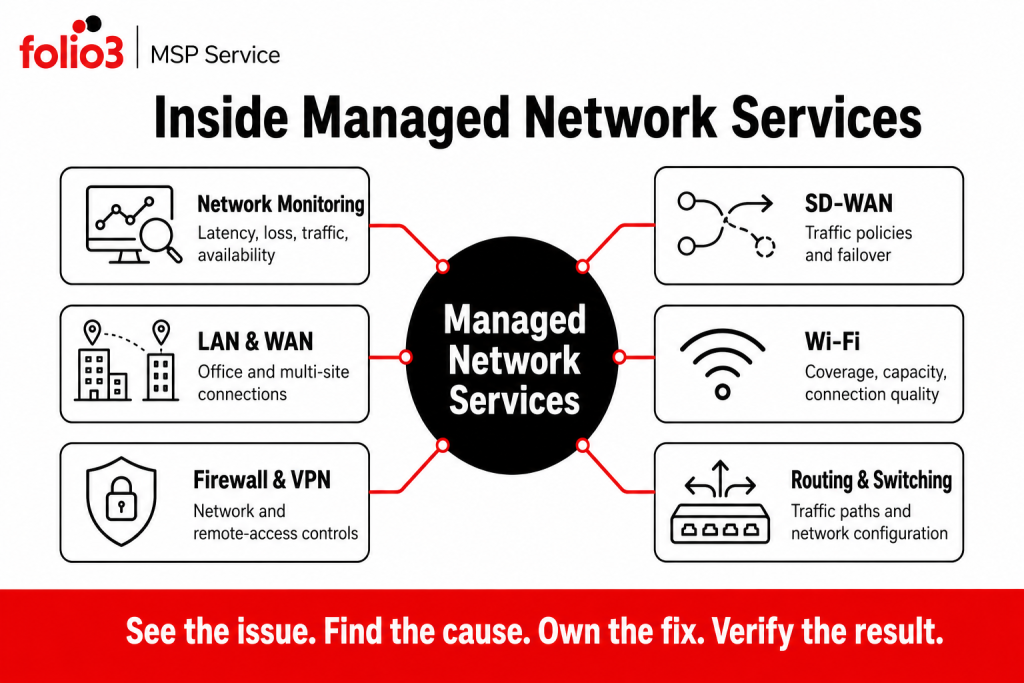
Wi-Fi Problems Need More Than a Signal Check
A full Wi-Fi signal icon does not mean the connection is good.
One access point may have too many active devices. A meeting room may suffer from interference. Employees moving through the office may have poor roaming between access points.
Those problems can feel random until somebody compares where and when they happen.
Managed Wi-Fi services can review connection quality, coverage, capacity, authentication failures, user density, and performance by area.
The location of the complaint matters.
Ten complaints from the same conference room tell you something. Ten complaints spread evenly across the building tell you something else.
Folio3 currently includes wireless network planning alongside LAN/WAN architecture, SD-WAN, network monitoring, firewall, routing and switching management, and branch connectivity within its Network & Infrastructure services.
Firewall and VPN Management Need Regular Cleanup
Network access tends to accumulate.
A vendor receives temporary VPN access. A firewall exception is added for an application rollout. Another rule is created while troubleshooting a database connection.
Temporary does not always stay temporary.
Managed network services can keep firewall rules, VPN access, configuration changes, logs, and remote-access policies under review.
Remote access also needs stronger authentication than a password alone. CISA recommends MFA for remote network access and privileged or administrative access, with phishing-resistant methods preferred where possible.
Folio3 includes managed firewall and VPN services within its cybersecurity offering, while firewall, routing, and switching management also sit within its network services.
The overlap makes sense. A firewall rule is both a network configuration and a security decision.
Multi-Site Networks Create a Different Support Problem
Imagine a company with offices in San Jose, Dallas, Chicago, and New York.
The Dallas team suddenly loses access to a business application.
The application vendor says its service is healthy. The ISP says the circuit is online. Other offices can still reach the platform.
Now what?
The useful questions are more specific:
- Can Dallas reach other external applications?
- Is the site-to-site connection stable?
- Has latency changed?
- Did a backup circuit take over?
- Is the application taking a different route from ordinary internet traffic?
- Are other users on the same connection affected?
Managed network services give the support team enough visibility to compare these conditions instead of asking each provider whether its individual service looks green.
Folio3’s Network & Infrastructure Management currently covers LAN/WAN architecture, SD-WAN, wireless planning, network monitoring and performance analytics, firewall/routing/switching management, and multi-site or branch-office connectivity.
Remote Work Changed What “Inside the Network” Means
The old network perimeter has become harder to define.
Employees work from home. Contractors may connect directly to business applications without ever entering an office.
Network location alone can no longer decide whether access should be trusted.
NIST SP 800-207 describes zero trust as protecting resources rather than assuming trust because a user or system happens to sit on a particular network. Authentication and authorization are evaluated before access to enterprise resources is established.
That changes day-to-day network management.
VPN policies, firewall rules, application access, user identity, segmentation, and security monitoring have to work together.
For businesses already using managed IT support, this is one reason it helps to connect network management with cybersecurity and identity services. Folio3 currently covers Network & Infrastructure Management, Cybersecurity Management, and Identity & Access Management within the same wider managed IT portfolio.
Managed Network Services vs. Calling IT When the Network Breaks
The difference shows up between incidents.
| Traditional network support | Managed network services |
| Begins after someone reports a problem | Monitoring runs before users report a failure |
| Works from the visible symptom | Uses performance data to trace the cause |
| May investigate one location at a time | Compares conditions across sites |
| Reviews configurations when needed | Tracks configuration as normal operational work |
| Customer may chase the ISP | Provider can coordinate escalation |
| Ticket closure ends the work | Repeated incidents can trigger further review |
Reactive support still matters. An ISP can have an outage at 10:00 a.m. tomorrow and somebody will need to respond.
Managed networking deals with the other 99 percent of the time too.
Which Network Problems Benefit Most From Ongoing Management?
Some faults are one-offs.
Others keep appearing because nobody has had enough visibility to find the pattern.
Managed network services are particularly useful when a business sees recurring VPN disconnections, inconsistent branch performance, packet loss, overloaded wireless areas, configuration drift, unexplained bandwidth use, routing problems, or repeated carrier faults.
Take VPN complaints.
Five users report disconnects during the same hour. If those tickets are treated independently, five troubleshooting sessions may follow. A network team looking across the service can check whether the failures share the same gateway, carrier, policy, location, or time window.
That saves a lot of pointless troubleshooting.
Microsoft’s Connection Monitor applies this type of continuous connectivity testing to Azure and hybrid environments, with measurements that include latency and packet loss.
When Does a Business Need Managed Network Services?
Company size is a poor way to answer this.
Complexity tells you more.
A 40-person company with one office and a handful of SaaS applications may have fairly simple networking requirements. Another 40-person company could operate three branches, support remote employees, run a hosted line-of-business application, use multiple internet carriers, and rely on VPN access every day.
The second environment requires much more attention.
Managed network services become useful when employees depend heavily on applications, multiple locations share systems, remote access is business-critical, network performance is difficult to measure, or several vendors are involved every time something goes wrong.
The clearest warning sign is often internal IT spending more time proving whose fault a network problem is than fixing it.
What Should a Managed Network Provider Actually Own?
Ask this before signing the contract:
- If a branch loses connectivity at 9:00 a.m., who gets the alert?
- Who checks the firewall?
- Who contacts the ISP?
- Who follows the carrier ticket?
- Who tells employees what is happening?
- Who verifies the connection when the provider says it has been restored?
Clear ownership matters more than a long feature list.
The provider should also know which locations, internet connections, VPNs, network services, business-critical applications, and external carriers are included in scope.
A useful report should then tell management what happened across that environment. Availability, recurring faults, latency, packet loss, VPN reliability, carrier incidents, significant configuration changes, and unresolved risks are much more useful than a page announcing that 37 tickets were closed.
What Should You Measure?
Network uptime alone can hide a frustrating network.
A connection that stays technically online while dropping packets can still make calls unstable and applications painful to use.
Useful measures may include:
- Availability
- Latency
- Packet loss
- Bandwidth utilization
- VPN connection failures
- Recurring incidents by site
- ISP incidents
- Performance by application path
- Time to detect a fault
- Time to restore normal service
Do not collect metrics because the monitoring platform can produce them.
Track the ones that explain how employees and business applications are actually affected.
How Do Managed Network Services Fit With an MSP?
Network problems regularly cross technical boundaries.
A user cannot access Microsoft 365. The network might be responsible. So might DNS, authentication, a firewall policy, VPN configuration, or Microsoft itself.
Passing the ticket between five specialists does not help the employee.
This is where a wider managed IT service can reduce handoffs. Folio3’s current portfolio includes Managed IT Support, Cybersecurity Management, IT Strategy & vCTO, Network & Infrastructure Management, Disaster Recovery, VoIP, Database Management, and Identity & Access Management.
That wider view makes network support more useful when the final cause sits outside the network.
How Folio3 Supports Managed Network Services
Folio3’s Network & Infrastructure Management covers LAN and WAN architecture, SD-WAN deployment and management, wireless network planning, performance monitoring, firewall/routing/switching management, and connectivity between branch locations.
Network incidents can also be handled alongside Folio3’s Managed IT Support, Cybersecurity, IT Strategy & vCTO, identity services, and Disaster Recovery when the root cause crosses into another part of the environment.
That matters because the person experiencing the problem does not care which technical layer caused it.
They just need it fixed.
What Are Managed Network Services Really Buying You?
The technology itself is familiar.
Routers route. Firewalls filter traffic. VPNs provide remote connectivity. Wi-Fi keeps employees connected. SD-WAN manages traffic across distributed networks.
Managed network services add something those products cannot provide on their own: day-to-day ownership.
Someone watches the network when everything appears normal. Someone investigates when performance starts drifting. Someone coordinates the carrier instead of sending the customer away with a ticket number. Someone checks that the fix actually worked.
That is the practical answer to what are managed network services.
Frequently Asked Questions
Yes. The MSP can manage the network around the existing carrier and handle troubleshooting or escalation where included in scope. Changing managed service providers does not automatically require changing the internet provider.
That depends on the number of sites, network services, carriers, VPNs, and available documentation. A single-office assessment can be relatively focused, while a multi-site environment needs more discovery and performance data before recommendations are made.
Yes, provided the required access and monitoring architecture are available. The service design should account for different carriers, time zones, support arrangements, and local network dependencies.
Discovery becomes part of onboarding. The provider can rebuild the network map from configuration data, interviews, monitoring, carrier information, and existing records before making higher-risk changes.
Yes. Scope can be limited to selected locations, SD-WAN, Wi-Fi, VPN services, network monitoring, or another agreed area while the internal team manages the rest.
Start with the problem you are trying to solve. Multiple locations, unreliable primary links, difficult WAN administration, application-performance issues, or a need for better traffic control can justify an SD-WAN assessment; installing it without a defined problem adds another system to manage.
The network team should provide evidence showing whether connectivity is healthy and, where vendor coordination is included, work with the application provider through resolution. The customer should not have to translate technical findings between vendors.