
A company can receive hundreds of IT reports and still have very little idea what is happening with its technology.
The helpdesk has ticket numbers. Security platforms have alerts. Finance has software invoices. The network team has performance dashboards, and somebody probably has a spreadsheet containing renewals, vendors, and applications.
Individually, each source tells part of the story. Leadership still needs answers to much simpler questions: What is getting worse? Where are we spending more than expected? Which problems keep coming back? What needs a decision this quarter? Which risk has been sitting open for three months because nobody owns it?
This is one of the more useful reasons businesses adopt it management solutions. The goal is not to create another dashboard. The goal is to turn day-to-day technical activity into information that somebody can use to make a decision.
A Green Dashboard Does Not Mean IT Is in Good Shape
Technical dashboards are very good at answering technical questions.
Is the server online? Did the backup job finish? Is the internet connection responding? Are endpoint agents reporting? Did the ticket close within SLA?
Those signals matter, but they can create an incomplete picture.
Imagine a company where 99% of support tickets are closed within target. That sounds healthy. A closer look shows that thirty employees have opened the same application issue during the past two months, each ticket was closed with the same workaround, and nobody has investigated why the issue keeps returning.
The SLA report is green. The operating problem is still there.
Atlassian makes a similar point in its guidance on IT metrics: teams can track large numbers of measurements without necessarily measuring what matters to the business. It recommends aligning IT metrics with actual business goals rather than optimizing numbers simply because they are easy to collect.
A useful management report therefore needs context around the number.
Ticket volume increased by 18%. Why?
Security findings declined. Were they fixed, accepted, or simply reclassified?
The question after every metric should be fairly predictable: What does this mean, and does somebody need to act?
The Monthly IT Review Should Answer Six Questions
A good technology review does not need fifty pages.
It needs to answer the questions leadership repeatedly needs for planning, budgeting, risk, and operations.
1. Where Are Employees Losing Time?
Support reporting becomes useful when it shows patterns rather than a scoreboard of closed tickets.
Which applications generate the most incidents? Are particular departments experiencing repeated login problems? Has one office reported an unusual increase in connectivity issues? Which tickets are being reopened after they were supposedly resolved?
That type of analysis can reveal a problem that individual tickets hide.
Atlassian’s incident-management guidance connects incident response with problem management for exactly this reason. Repeated incidents can point toward a shared underlying cause that deserves investigation rather than another isolated fix.
A monthly review might therefore show:
| Support signal | Management question |
| Password requests increased sharply | Did an authentication policy or onboarding process change? |
| One application generates 22% of incidents | Does the application need remediation or vendor escalation? |
| One location reports repeated connection problems | Is network performance degrading at that site? |
| Ticket reopen rate increased | Are problems being closed before the underlying issue is resolved? |
| Executive support requests increased | Is a business-critical workflow becoming unreliable? |
That tells leadership considerably more than “412 tickets closed this month.”
2. What Changed in the Technology Environment?
IT environments rarely remain still for an entire month.
New users arrive. Applications are introduced. SaaS subscriptions are purchased. Accounts change. New integrations appear. Systems reach end-of-support dates. A project adds another service that somebody now needs to own.
Without a reliable inventory, these changes become difficult to see as a whole.
CIS places enterprise asset inventory at the very start of its current Controls because organizations need to know which assets exist across local, remote, virtual, and hosted environments before they can consistently manage and protect them. Its software inventory guidance applies the same principle to operating systems and applications.
IBM’s IT asset management guidance takes the subject beyond inventory, connecting technical assets with financial, contractual, licensing, and lifecycle information.
For management purposes, the interesting question is not how many things the business owns. It is what changed and whether those changes created a new responsibility.
A new SaaS application means another owner, licence commitment, access model, renewal date, and data relationship. An application reaching end of support becomes a planning item long before it becomes an emergency.
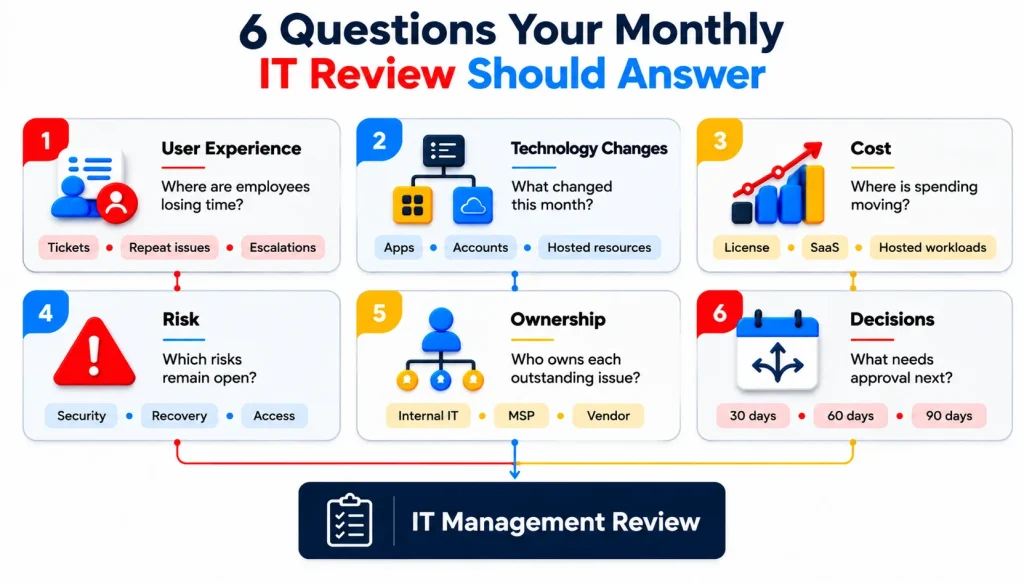
3. Where Is Technology Spending Moving?
Technology budgets rarely change because of one dramatic purchase.
Costs accumulate quietly.
A SaaS licence gets added for twenty users. Another team starts using a hosted service. A testing environment stays active longer than planned. A renewal automatically increases. An application that once had seventy users now has thirty, but the licence count never changed.
Looking only at the total IT budget does not expose those patterns.
A useful monthly cost review can show whether spending is changing because the business is growing, because consumption has changed, or because nobody reviewed a resource after it was created.
Those are very different explanations.
Cost reporting should include ownership
A cost without an owner is difficult to challenge.
If a hosted workload costs $2,000 each month, somebody should know which service it supports and whether that level of spending is expected. If an application has 150 licences but only 90 active users, that deserves a conversation with the application owner before renewal.
IBM’s software asset management guidance connects software inventory with licensing, usage, compliance, and cost decisions across both traditional software and SaaS environments.
The purpose is not to make every IT expense smaller.
Sometimes higher spending is exactly what the business intended. Good reporting makes the reason visible.
4. Which Risks Are Staying Open Too Long?
Some risks become more expensive because nobody decides what to do with them.
An old application remains unsupported. A privileged account has excessive permissions. A backup gap remains unresolved. One office still has a single internet path. A security configuration exception survives month after month because the original project owner has moved on.
These items rarely appear in ordinary support reporting.
They need their own management view.
CIS Control 4 focuses on establishing and maintaining secure configurations for enterprise systems and software. That word maintaining matters because a setting that was correct when deployed can become outdated as applications, users, or requirements change.
A useful risk register should avoid vague descriptions such as “security needs improvement.” It should state the actual condition, affected service, business impact, owner, next action, and target date.
For example:
| Open issue | Better management view |
| Old database version | Finance reporting database reaches vendor support deadline in November; upgrade decision required by September |
| Backup gap | One Tier 1 application has no validated restore process; DR test scheduled |
| Excessive access | Five permanent administrator accounts identified; access review assigned to system owner |
| Connectivity risk | Branch relies on one carrier; alternate-path proposal awaiting budget approval |
The report turns technical risk into work that can be assigned and tracked.
5. Are Vendors Solving Problems or Passing Them Between Each Other?
Modern IT environments depend on multiple providers.
An MSP may operate day-to-day support. A specialist company supports an application. An internet carrier owns the WAN circuit. Another vendor manages a SaaS product. An external development team maintains an integration.
This arrangement can work well until a problem sits between two services.
The application vendor says the system is healthy. The network provider reports that the circuit is online. The user still cannot complete the task.
ServiceNow describes IT operations management as the processes and services used to plan, build, operate, and support technology services across an organization. Its ITOM guidance focuses heavily on understanding the services, components, and dependencies that sit underneath business operations.
That dependency view is useful when several vendors are involved.
One provider may eventually make the technical change, but somebody still needs to own the incident from the business’s perspective.
A monthly management review should therefore include unresolved vendor cases, recurring third-party problems, contract or renewal concerns, and incidents where ownership remains unclear.
This is less glamorous than architecture planning.
It is also where a surprising amount of operational time disappears.
6. What Decision Will Become Urgent If Nobody Makes It Now?
The best IT reports look forward.
A certificate expires next month. A critical licence renews in sixty days. A software version reaches end of support later this year. The business plans to open another office. Finance wants to adopt a new platform. A customer contract introduces a security requirement that the current environment does not meet.
None of these items is necessarily an incident today.
Waiting can turn them into one.
This is where it management solutions should connect operational information with an actual technology roadmap. Current problems tell you what needs attention now. Upcoming changes tell you what needs a decision before it becomes urgent.
A useful 90-day view may include:
- Renewals and contract decisions
- Significant access or security reviews
- Planned migrations
- Capacity concerns
- Application upgrades
- Compliance-related work
- Recovery testing
- Network changes
- Software or service decommissioning
- Budget approvals
This turns the monthly IT meeting into a planning session rather than a historical report.
IT Management Solutions Should Connect Several Operating Views
There is rarely one system that manages everything equally well.
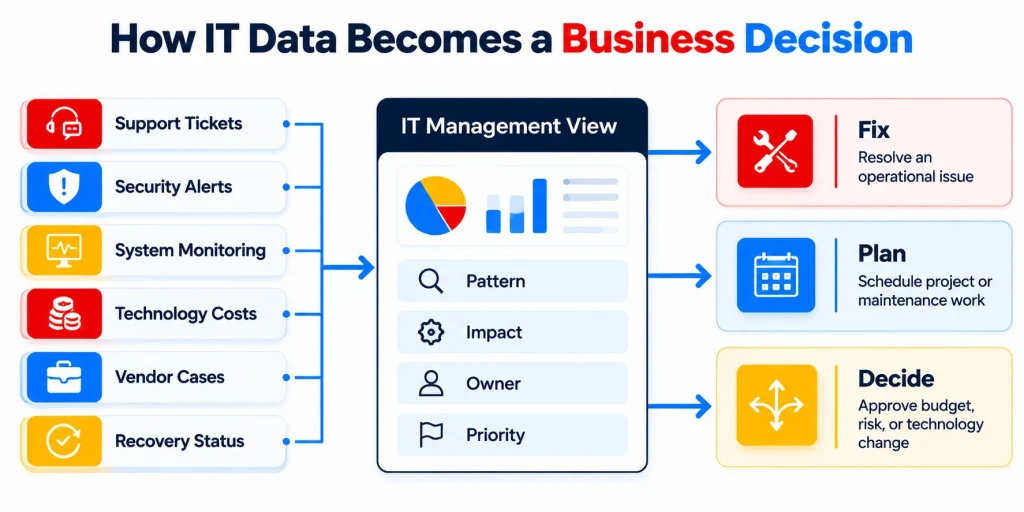
A business may use a service desk for incidents, an endpoint platform for device management, identity tools for access, monitoring for infrastructure, security platforms for alerts, and financial data for SaaS and hosted spending.
The management layer connects those views.
A practical operating model might look like this:
| Management area | What leadership should receive |
| Support | Recurring issues, high-impact incidents, service trends |
| Security | Significant findings, overdue remediation, access risks |
| Infrastructure | Availability, performance trends, capacity concerns |
| Network | Site health, recurring degradation, major carrier issues |
| Applications | Ownership, support issues, upcoming lifecycle events |
| Cost | Material changes, underused services, renewals |
| Recovery | Failed jobs, validation status, upcoming tests |
| Vendors | Open escalations, service concerns, renewals |
| Strategy | Decisions and projects required in the next 90 days |
That is much closer to technology management than a folder full of exported reports.
IT Reviews Need Different Cadences for Different Decisions
Not everything belongs in the monthly meeting.
A serious security incident cannot wait three weeks because the executive IT review happens on the first Monday of the month. A licence renewal six months away does not need to dominate the daily operations call.
A useful management model separates cadence according to urgency.
Daily operational review
The operational team watches active incidents, critical security events, major service degradation, failed recovery jobs, and urgent escalations.
Weekly service review
This is where recurring support patterns, open vendor cases, failed changes, outstanding maintenance, and active project dependencies can be reviewed.
Monthly management review
The monthly meeting should bring together service trends, meaningful risk, cost changes, recurring problems, ownership gaps, and decisions required from management.
Quarterly technology review
Quarterly conversations can deal with budgets, roadmap progress, larger architecture changes, vendor strategy, major renewals, resilience, and technology priorities for the next six to twelve months.
This keeps urgent operations urgent without making every conversation feel like an incident call.
Where an MSP Changes the Management Model
An internal IT team may already have excellent knowledge of the business.
The difficulty comes when that team is expected to maintain the whole operating picture while also handling support, security, access, networks, hosted workloads, vendors, recovery, and projects.
Some tasks naturally receive attention because they are urgent.
Management work tends to get lost.
Asset records become stale. Strategic reviews are postponed. Vendor cases stay open longer than they should. Cost reviews happen only when Finance asks a question. Repeated support issues remain isolated incidents because nobody has time to compare them.
An MSP can provide an operating layer around those responsibilities while the internal team keeps business ownership and strategic context.
IBM’s definition of ITSM describes this wider discipline as planning, implementing, managing, and optimizing technology services around user and business requirements.
That is also a better description of managed IT than “someone you call when the computer breaks.”
How Folio3 Brings IT Management Into One Operating View
Folio3’s current Managed IT Services model covers Managed IT Support, Cybersecurity Management, hosted-environment security and cost optimization, IT Strategy & vCTO, Network & Infrastructure Management, Disaster Recovery, Database Management, and Identity & Access Management.
Those areas provide the inputs that a useful management review needs.
Managed IT Support Shows Where Work Is Breaking Down
Folio3’s Managed IT Support includes proactive helpdesk coverage, patching, monitoring, and vendor coordination.
The management value comes from seeing patterns across that work. Repeated support demand can expose an application, access, configuration, or vendor issue that deserves a permanent fix.
Cybersecurity Management Keeps Risk Visible
Security findings need owners and deadlines like any other operational issue.
Folio3’s cybersecurity offering includes endpoint, firewall, phishing, SOC, incident-response, and access controls. This gives security reporting somewhere to connect with remediation rather than leaving the management team with an alert count.
Hosted-Environment Management Adds Cost and Governance Context
Technology spending becomes harder to explain as more services move into hosted and SaaS environments.
Folio3’s current offering includes security and financial audits, governance reviews, cost optimization, migration assessments, and ongoing management. Those activities can feed a management view showing where cost, risk, and ownership need attention.
Network & Infrastructure Management Adds Service Context
Network performance should appear in management reporting when it affects employees, locations, or critical applications.
Folio3 manages LAN, WAN, SD-WAN, Wi-Fi, firewall, routing, switching, and performance monitoring within its current Network & Infrastructure service.
The useful report does not need to show every interface metric. It needs to show whether connectivity is affecting the business and what is being done about it.
Disaster Recovery Keeps Readiness on the Agenda
Recovery work is easy to postpone because it competes with operational problems that are happening today.
Folio3’s Disaster Recovery and Business Continuity capabilities include backup management, failover readiness, DR testing, and RTO/RPO commitments.
A regular management review can keep failed backups, overdue recovery tests, and resilience gaps visible before an outage forces the conversation.
IT Strategy & vCTO Turns Findings Into a Roadmap
Some management findings cannot be fixed through normal operations.
An application may need replacement. A network needs redesign. A cost issue requires architecture work. A security finding may need budget. A major renewal might force a platform decision.
Folio3’s IT Strategy & vCTO service includes roadmaps, budgeting, risk reviews, vendor selection, and executive reporting.
This gives operational findings somewhere to go once the solution needs a business decision.
The Best IT Report Should Make the Next Decision Easier
Good IT management is surprisingly easy to recognize.
Leadership knows where technology is causing friction. Major risks have owners. Spending changes can be explained. Vendors are being followed up. Recovery readiness is visible. The next ninety days of technology decisions are already on the calendar.
Nobody needs to read twelve dashboards to find that information.
That is where it management solutions provide real value. They give a business a consistent operating view across support, risk, systems, costs, vendors, recovery, and planning, then connect that view to the people responsible for taking action.
The point of the monthly IT review is not proving that IT has been busy.
It is helping the business decide what deserves attention next.
Frequently Asked Questions
You can begin with the information available today, but trends become more useful once several reporting periods can be compared. The first few months should focus on establishing a baseline for support demand, spending, open risk, system performance, and recurring issues rather than forcing conclusions from limited data.
No. Combining every platform into one interface can create a large integration project without improving decisions. The more important requirement is having a management process that brings together the relevant information when a business or operational question crosses several systems.
Executives usually need business-impact measures rather than raw technical telemetry. Service disruption, recurring problems, material cost changes, risk, recovery readiness, major vendor concerns, roadmap progress, and decisions requiring approval are more useful than large collections of low-level infrastructure metrics.
Yes. An internal team can retain technology ownership and business decision-making while an MSP provides monitoring, operational management, reporting, technical escalation, and specialist support. Responsibility boundaries should be agreed during onboarding.
Operational data should be monitored continuously, while management-level reviews are usually more useful on a monthly cycle. Larger technology-roadmap, budget, and architecture decisions can then be reviewed quarterly or when a significant business change requires them.
The first step is usually to identify which provider owns each service and which information each can supply. The management layer can then bring major incidents, service levels, renewals, risks, and outstanding actions into one review without requiring every vendor to use the same platform.
The timeline depends on how many systems, providers, locations, and data sources are involved. Early reporting can begin once core monitoring, support, security, recovery, and ownership information has been gathered, while trend analysis improves as more operational history becomes available.