
A company can have modern applications, several security tools, and a sizeable technology budget while still dealing with slow connections, recurring access problems, and failed backups.
The missing piece is usually coordination.
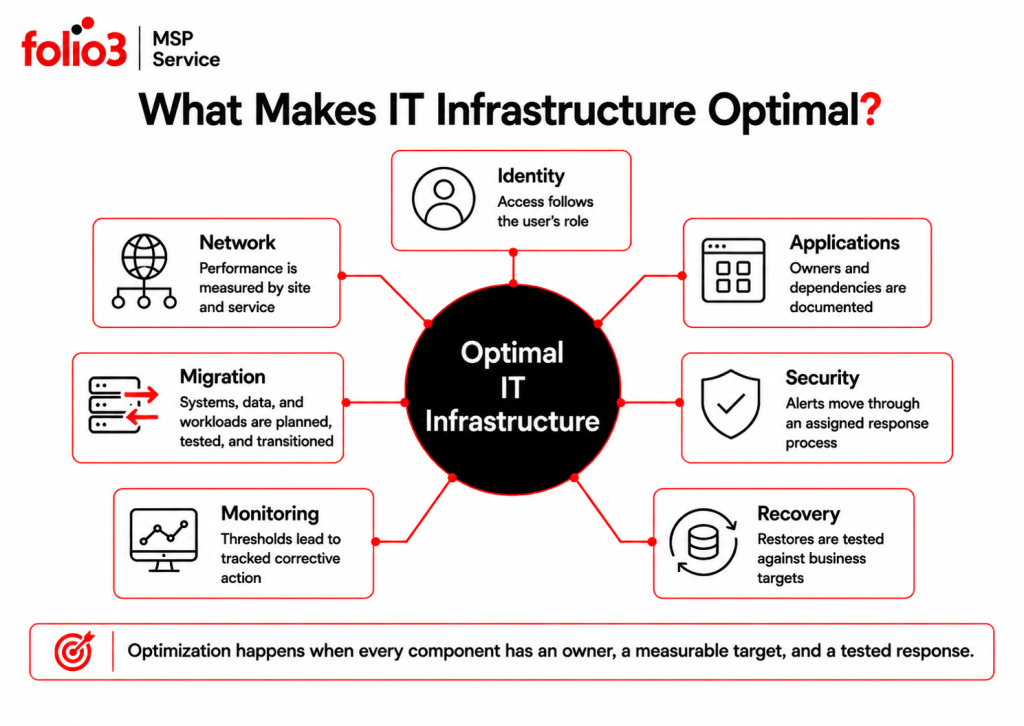
Optimal IT infrastructure connects applications, identities, networks, security controls, monitoring, and recovery processes around the way the business actually works. Each system has an owner. Dependencies are documented. Problems are detected early, and changes are planned before they reach production.
The goal is not to install every available tool. It is to create an environment that employees can rely on, administrators can understand, and the business can afford to operate.
What Does Optimal IT Infrastructure Mean?
Optimal IT infrastructure is a technology environment designed around business requirements for availability, performance, security, cost, and recovery.
“Optimal” does not mean perfect. It means suitable for the organization’s current needs and flexible enough to support the changes it can reasonably expect.
A professional-services firm may care most about secure remote access, Microsoft 365 availability, document control, and client-data protection. A multi-site operation may place greater weight on network performance, branch connectivity, application availability, and recovery time.
The right design depends on the business. The standards for judging it are more consistent.
An optimal IT infrastructure should be:
- Available when employees and customers need it
- Monitored closely enough to detect developing issues
- Protected through identity, network, application, and data controls
- Documented so that support does not depend on one person
- Recoverable within agreed business timeframes
- Costed against real usage and business value
- Capable of supporting planned growth and change
Microsoft’s Azure Well-Architected Framework uses five related areas to assess workloads: reliability, security, cost optimization, operational excellence, and performance efficiency. Those areas are a useful starting point even when the environment is not entirely hosted in Azure.
Start With the Business, Not the Technology
Infrastructure decisions often begin with products. A team selects a platform, moves data into it, and works out ownership later.
That order causes trouble.
Start by identifying the services the business cannot operate without. For each one, document the users, data, authentication method, network path, connected applications, vendor, support owner, and acceptable downtime.
Take a customer-management platform as an example. It may depend on Microsoft Entra ID for authentication, an email platform for notifications, a database for records, an API connection to finance software, and a stable internet connection.
The platform itself can be online while employees remain unable to use it.
A dependency map makes that visible.
| Business service | Supporting dependencies | Questions to answer |
| Email and collaboration | Identity, DNS, internet access, security policies | Who manages access, delivery issues, and compromised accounts? |
| Customer platform | Authentication, database, APIs, vendor service | Which integrations must work before the service is considered available? |
| Remote working | Internet, VPN, identity, device compliance | How are access failures monitored and escalated? |
| Shared business data | Permissions, storage, applications, backup | Who owns access and how quickly can deleted data be restored? |
| Finance applications | Identity, database, network, exports | Which reports and processes have fixed deadlines? |
This work is not glamorous. It is useful.
Core Requirements for Optimal IT Infrastructure
- Clear Identity and Access Control
Most employees now use one work identity across email, files, SaaS applications, and remote access.
That makes identity a practical control point.
Access should follow the employee’s role rather than a collection of individual requests made over several years. Joiner, mover, and leaver procedures should cover all connected applications, not only the main directory.
An identity review should answer:
- Which accounts have administrative rights?
- Does multifactor authentication cover sensitive services?
- Are shared accounts still in use?
- Do former employees retain access anywhere?
- Which applications rely on local accounts outside central identity management?
- Who approves access to sensitive data?
An optimal IT infrastructure keeps these answers current. It does not wait for an incident or audit to discover them.
- A Network Designed Around Actual Usage
The network connects employees to everything else. A weak network makes healthy applications appear slow and stable platforms feel unreliable.
Performance should be measured by location, service, and time. A wireless complaint limited to one meeting room suggests a different problem from company-wide slowness every afternoon.
Network planning should account for internet capacity, remote access, video calls, application traffic, wireless coverage, branch connectivity, firewalls, routing, VPN use, and changes in employee working patterns.
Monitoring should look beyond whether a circuit is online. Latency, packet loss, bandwidth use, connection failures, and configuration changes provide a much better picture of user experience.
The design also needs ownership. When an internet provider, firewall vendor, application company, and internal team are all involved, one party should coordinate the incident from start to finish.
- Applications With Documented Dependencies
Business applications rarely operate alone.
A line-of-business platform may rely on single sign-on, email delivery, database access, file storage, scheduled integrations, and third-party APIs. These connections tend to receive less attention than the main application until one of them fails.
Document the following for each critical application:
- Business and technical owners
- Authentication method
- Data location
- Connected systems
- Required service accounts
- Backup and recovery method
- Vendor escalation process
- Maintenance and renewal dates
- Acceptable downtime
- Known limitations
This record speeds up support and reduces risk during upgrades or migrations.
It also exposes unnecessary complexity. Two applications may perform the same job, or an old integration may still have access despite no longer being used.
- Managed Migrations
During migration, temporary resources may be created for testing, duplicate workloads may remain active, user licences may not be updated, and storage can continue growing without clear ownership or retention reviews.
Over time, these overlooked items can increase costs, create security gaps, and make the migrated environment harder to manage.
Post-migration reviews help identify unnecessary resources, validate ownership, optimize configurations, and ensure workloads, data, permissions, and services continue supporting business requirements. Cost optimization should always consider dependencies, recovery needs, compliance requirements, and future scalability before making changes.
- Security Built Into Daily Operations
Security problems are often operational problems wearing a different label.
A security platform stops reporting. An alert remains unassigned. An employee changes role but keeps old permissions. A temporary firewall rule becomes permanent because nobody recorded why it was added.
Security controls need continuing ownership.
The NIST Cybersecurity Framework 2.0 organizes cybersecurity risk management into Govern, Identify, Protect, Detect, Respond, and Recover. The addition of Govern places policies, ownership, risk decisions, and oversight directly alongside technical controls.
For most businesses, security operations should cover:
- Identity and administrative access
- Multifactor authentication
- Endpoint detection and response
- Firewall and VPN management
- Vulnerability and update status
- Email protection
- Security-event investigation
- Incident escalation
- User awareness
- Recovery preparation
The real test is whether a detected problem reaches someone who can act on it.
- Monitoring That Leads to Action
Monitoring tools can collect thousands of signals. An optimal environment turns the useful ones into owned work.
Relevant monitoring may include service availability, application performance, storage use, update failures, backup results, security events, certificate expiry, network health, and account activity.
Every important alert should have:
- A threshold
- An owner
- A response procedure
- An escalation route
- A method for confirming closure
Without those five pieces, monitoring becomes a growing notification list.
Context matters too. A single failed login is different from hundreds of failed attempts across several accounts. Storage reaching 80 percent may be harmless for one system and urgent for another that grows rapidly every month.
- Recovery That Has Been Tested
A completed backup job proves that a process ran. It does not prove that the business can recover.
Recovery planning should define which services return first, how long each service may remain unavailable, how much recent data may be lost, and who authorizes failover.
These requirements are usually expressed through:
- Recovery Time Objective: The target time for restoring a service
- Recovery Point Objective: The maximum acceptable amount of data loss measured in time
Testing should include more than restoring one sample file. Critical systems may require application recovery, identity checks, data validation, integration testing, and confirmation that users can complete the required business process.
CISA’s ransomware guidance recommends testing backup procedures regularly. It also treats recovery planning as part of ransomware preparation rather than an activity left until after an incident.
An optimal IT infrastructure records the most recent test result, any failure, and the corrective action that followed.
- Cost and Capacity Based on Evidence
Infrastructure spending tends to grow in small increments.
A SaaS licence is added for one employee. A test workload stays active after the project ends. Storage retention expands. A premium feature is enabled but rarely used.
None of those decisions looks significant by itself. Together, they affect the technology budget.
Cost reviews should connect spending to owners, workloads, users, and business outcomes. Cutting cost without that context can remove capacity or controls the organization still needs.
The same rule applies to performance. Capacity should be reviewed as a trend rather than a single measurement. Database growth, network demand, backup duration, application response time, and licence use can show when a limit is approaching.
Optimal does not mean cheapest. It means the cost can be explained.
How to Assess Your Current IT Infrastructure
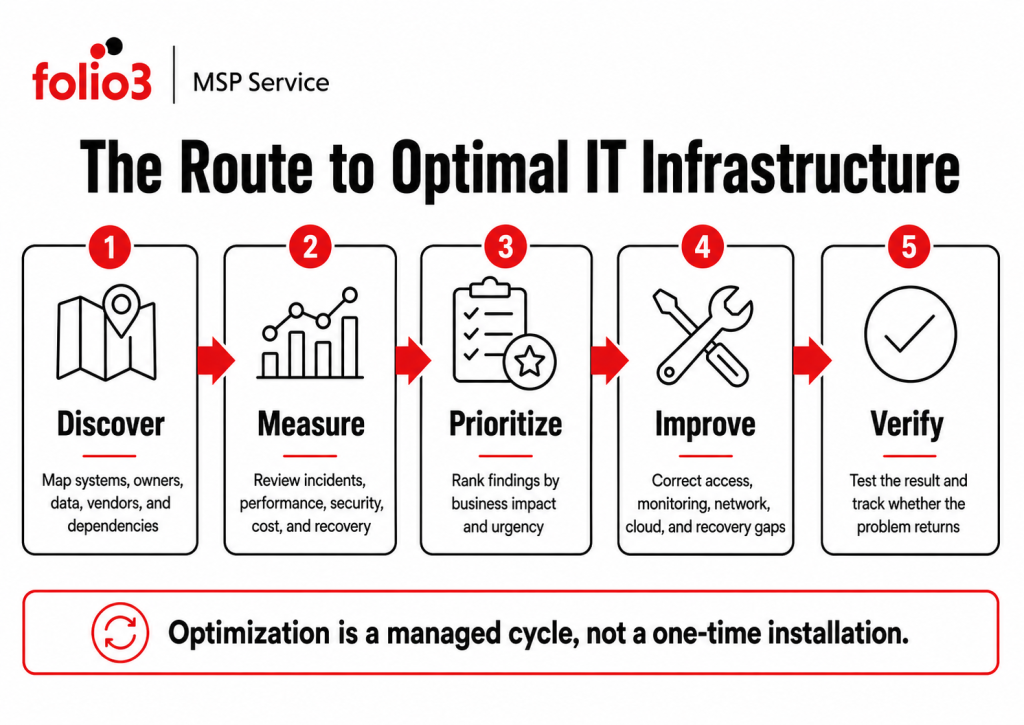
An infrastructure assessment should produce priorities, not a catalogue of everything the company uses.
Start with the services that affect revenue, customers, regulated information, employee access, or fixed operational deadlines.
- Map the Current Environment
Create one record of applications, identities, SaaS products, network services, data locations, security controls, vendors, and recovery methods.
The first version may be incomplete. That is normal.
Missing ownership and documentation are findings in their own right.
- Collect Baseline Data
Look at performance and operational history over time.
Useful evidence includes:
- Availability and performance records
- Repeat support tickets
- Security alerts and unresolved findings
- Update and compliance status
- Backup and restore-test results
- User-access reviews
- Vendor incidents
- Migration or change failures
One bad day should not define the entire assessment. Patterns carry more weight.
- Prioritize by Business Impact
A long list of technical findings needs a business filter.
For each issue, consider:
- Which service is affected?
- How many users depend on it?
- Could it expose sensitive data?
- Would it prevent recovery?
- Is there a workaround?
- How likely is the issue to occur?
- What happens if action is delayed?
The highest-priority issue may not be the one with the most technical detail. An undocumented recovery process for a customer-facing platform may deserve attention before a minor performance complaint.
- Turn Findings Into a Roadmap
A usable roadmap separates urgent corrections from planned improvement.
| Timeframe | Typical focus |
| Immediate | Exposed access, failed backups, unresolved security incidents, unavailable critical services |
| Next 30–90 days | Monitoring gaps, permission cleanup, documentation, recurring faults |
| Next 3–12 months | Network changes, major migrations, application consolidation, recovery exercises |
| Ongoing | Performance review, access recertification, security monitoring, cost governance, roadmap updates |
Every action should have an owner, target date, dependency, and expected result.
“Improve security” is not an action. “Require MFA for all administrative and remote-access accounts by 30 September” is.
Signs Your Infrastructure Is Not Optimized
Poor infrastructure does not always fail dramatically. It often creates friction that employees accept as normal.
Common signs include:
- The same incidents return after temporary fixes
- Support depends on one employee or vendor contact
- Different teams maintain separate system lists
- Access reviews happen only when someone leaves
- Security alerts remain open without an owner
- Migrations reveal undocumented integrations
- Backups run, but restore tests are missing
- Network complaints are discussed without performance data
- Management receives technical reports without priorities
These signs point to weak coordination. Buying another tool will not fix that by itself.
Optimization Does Not Require One Large Project
Trying to redesign everything at once usually creates unnecessary risk.
A phased approach works better.
Begin with visibility. Map the critical services, owners, dependencies, access paths, monitoring coverage, and recovery methods.
Then address immediate exposure. This may include unprotected administrative access, backup failures, or recurring service interruptions.
The next phase can deal with structural issues such as application duplication, network design, tenant consolidation, migration planning, or unclear vendor responsibilities.
Measure the result after each phase. Ticket recurrence, service availability, restored performance, unresolved security findings, and user-access exceptions provide useful evidence.
An optimal IT infrastructure develops through repeated review. Business priorities change, employees move between roles, applications are replaced, and new services are introduced.
The environment needs to keep up.
How Folio3 Supports Optimal IT Infrastructure
Folio3’s managed IT portfolio covers managed support, cybersecurity, IT Strategy and vCTO, network design and SD-WAN, and disaster recovery.
- Managed IT Support
Folio3 provides 24/7 helpdesk coverage, proactive monitoring, remote and onsite support, automated patch and update management, vendor coordination, and monthly performance reporting.
Support activity can be reviewed alongside system monitoring and incident history. That helps separate one-time user problems from recurring application, identity, network, or service issues.
- Cybersecurity
Cybersecurity services cover zero-trust planning, endpoint detection and response, managed firewalls and VPNs, security-awareness training, SOC monitoring, incident response, and regulatory-readiness support.
These services connect protective controls with the investigation and recovery processes needed when a control fails.
- Migration
Migration work can include server and operating-system migration, data migration, database migration, application migration, email migration, network migration, storage migration, Active Directory and domain migration, P2V, V2V, and V2C virtualization migration, and complete workload or tenant migration during consolidation, restructuring, mergers, or acquisitions.
- IT Strategy and vCTO
IT Strategy and vCTO support connects operational findings with budgeting, total cost of ownership, technology roadmaps, management reporting, vendor decisions, and future projects.
This gives infrastructure work a business owner and funding path instead of leaving technical recommendations open indefinitely.
- Network Design and SD-WAN
Network services include LAN and WAN architecture, SD-WAN deployment and management, wireless planning, network monitoring, routing, switching, firewall management, and multi-site connectivity.
The service focuses on measurable performance and resilience across offices, users, applications, and remote connections.
- Disaster Recovery
Disaster recovery support includes backup validation, RTO and RPO planning, ransomware recovery preparation, business-continuity documentation, recovery drills, and failover testing.
The objective is to confirm that priority services can be restored within agreed business targets.
Build Infrastructure That Is Easier to Run
An optimal IT infrastructure gives the business fewer surprises.
Employees know where to get help. Administrators can see how systems connect. Security alerts have owners. Migration costs can be traced to their source. Recovery plans have been tested rather than assumed.
Frequently Asked Questions
Most discovery work uses configuration records, monitoring data, service reports, and interviews. Any live testing that could affect production should be approved and scheduled separately.
The assessment should document each vendor’s responsibility, escalation route, access, and service dependencies. One party should still own coordination when an incident crosses vendor boundaries.
Use before-and-after measures such as repeated ticket volume, availability, response time, unresolved security findings, restore-test results, cloud-cost variance, and access exceptions. The right measures depend on the business service being improved.
Yes. Better configuration, access control, monitoring, documentation, cost governance, and vendor ownership can correct many problems. Replacement becomes relevant when the existing platform cannot meet the required performance, security, integration, support, or recovery targets.
The level of planning should match the application’s business importance. Critical systems need documented recovery targets and testing, while lower-impact applications may use simpler restoration procedures.