
Most employees never think about IT infrastructure when it is working properly. They open Microsoft 365, join a Teams meeting, access the CRM, run a report, and move on with their day.
The infrastructure becomes visible when one of those actions takes too long.
A report suddenly takes 40 seconds instead of five. One office struggles with an application that performs normally everywhere else. Employees can reach the internet but cannot authenticate to a business platform. The application vendor says everything looks healthy, yet users are still waiting.
These situations are easier to understand when the environment is viewed as a connected system rather than a collection of products.
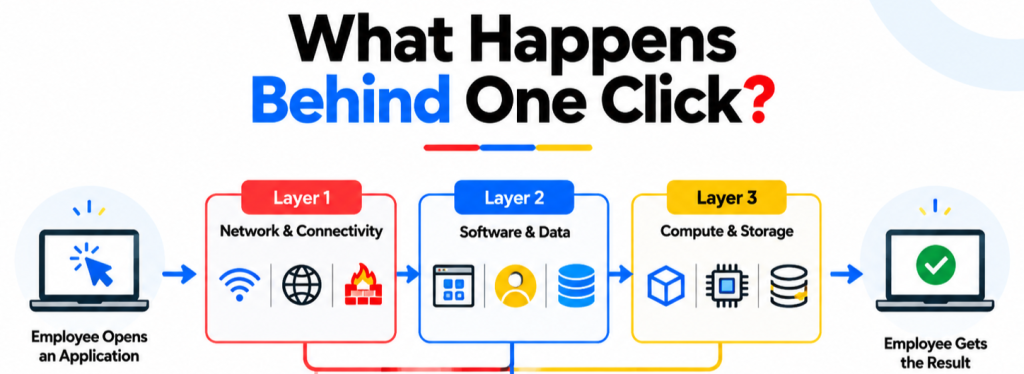
A practical way to describe the 3 primary components of IT infrastructure is to group them into compute and storage, software and data, and network connectivity. IBM similarly describes IT infrastructure as the hardware, software, and networking components organizations use to operate their technology environments. IBM’s IT infrastructure overview provides a useful foundation for this model.
Those three components explain where technology runs, what it does, and how people reach it. The more useful conversation begins when we look at how they depend on one another.
A Practical View of the 3 Primary Components of IT Infrastructure
There is no need to turn infrastructure into an enormous list of every router, database, laptop and application. Grouping the environment by function makes architecture discussions easier.
| Infrastructure layer | Typical examples | What it provides |
| Compute & Storage | Virtual machines, servers, storage resources | Processing capacity and a place for workloads and data to run |
| Software & Data | Operating systems, databases, ERP, CRM, SaaS, business applications | Business logic, workflows, transactions, and information |
| Network & Connectivity | LAN, WAN, Wi-Fi, VPN, routing, switching, internet connectivity | Communication between users, locations, applications, and hosted resources |
This model is useful because the three layers answer different questions.
Compute determines whether the workload has sufficient resources. Software determines what the workload actually does. Connectivity determines whether users and dependent systems can reach it.
A problem in any one of them can make the other two appear broken.
Compute and Storage Determine How Much Work the Environment Can Handle
The compute layer is where processing happens.
In an on-premises environment, that may mean servers and virtualization platforms. Hosted environments replace some of the physical responsibility with services such as virtual machines and managed compute.
The underlying requirement is still there. Applications need CPU, memory, storage, and enough capacity to deal with changes in demand.
The interesting part is that more capacity is not automatically better infrastructure.
A virtual machine sized far beyond what an application needs can waste money. A resource that looked perfectly adequate two years ago may become a bottleneck as transaction volume grows. Storage can also become the constraint long before the application itself fails.
AWS addresses this wider architectural balance through its Well-Architected Framework, which evaluates workloads across operational excellence, security, reliability, performance efficiency, cost optimization, and sustainability.
That is a useful way to think about compute.
A healthy workload is not simply one that is switched on. It should have enough capacity, recover appropriately, perform within business expectations, and avoid consuming resources with no clear purpose.
Software and Data Are Where Infrastructure Becomes Business-Critical
Compute becomes useful when software begins doing business work.
That includes operating systems and databases, but also the applications employees interact with every day: Microsoft 365, ERP platforms, CRMs, financial applications, SaaS tools, portals, reporting systems, and line-of-business software.
A single application can depend on far more infrastructure than the user sees.
Consider an order-management platform. A user may see one login page, but the underlying process could depend on an identity provider, application service, database, storage location, API integration, email service, and several external SaaS connections.
If one dependency fails, employees simply report that “the application is down.”
That is why application management needs dependency information rather than a flat application inventory.
Data creates another set of dependencies
Applications need information to be useful.
That information may sit in relational databases, object storage, SaaS platforms, file repositories, or several places at once. Data location affects access, application performance, backup, recovery, governance, and cost.
A migration therefore needs more than an application checklist.
If an application moves but its database remains behind, network latency may change. If authentication changes, service accounts may fail. If a database is migrated without the reporting integration that depends on it, the application can appear functional while an important business process stops working.
This is why infrastructure planning works better when applications and data are mapped to the business processes they support.
Network and Connectivity Decide Whether Everything Can Reach Everything Else
A healthy application and correctly sized workload are still useless if employees cannot reach them reliably.
That makes connectivity the third part of the 3 primary components of IT infrastructure, although modern networking covers far more than the office switch and internet router.
IBM describes network infrastructure as the combination of hardware and software used to enable communication between users, applications, and devices. IBM’s network infrastructure guide also points to monitoring, maintenance, management, and security as parts of maintaining network availability and performance.
For a modern business, this layer can include office LANs, Wi-Fi, WAN connections, VPNs, routing, switching, firewalls, and communication between multiple locations.
The user’s experience depends heavily on the quality of those paths.
A network can remain online while performing badly. Latency may increase. Packet loss may appear intermittently. One internet path might be congested while another is healthy. An access point can remain reachable even while too many users compete for capacity.
That distinction is especially relevant for businesses that depend on SaaS and hosted applications.
Cisco describes a WAN as a network connecting separate local networks, while SD-WAN adds centralized policy and traffic management across available connectivity options.
A company operating multiple offices therefore needs more than a binary answer to “Is the internet working?”
It needs to know how well critical applications can be reached from each location.
Migration Services Require More Than Moving Systems
Migration services can make an infrastructure transition look straightforward from the outside. Servers are moved, applications are transferred, data is migrated, and users are eventually redirected to the new environment.
The responsibility does not end when the migration is complete.
A successful migration also requires understanding dependencies, access, security, performance, data protection, and ownership across the environments involved.
A business may be migrating:
- A legacy application to a newer on-premises platform
- Servers between data centers
- Applications between infrastructure environments
- Databases to new platforms
- File shares to a new storage environment
- Business applications to SaaS platforms
- Multiple workloads as part of a broader modernization project
Employees experience the result simply as “IT.”
The migration team, however, needs to understand how each system connects to the others and what could be affected during the transition.
This is why modern migration services involve more than transferring data or provisioning new infrastructure. They require dependency mapping, migration sequencing, access planning, testing, backup validation, cutover planning, and post-migration verification.
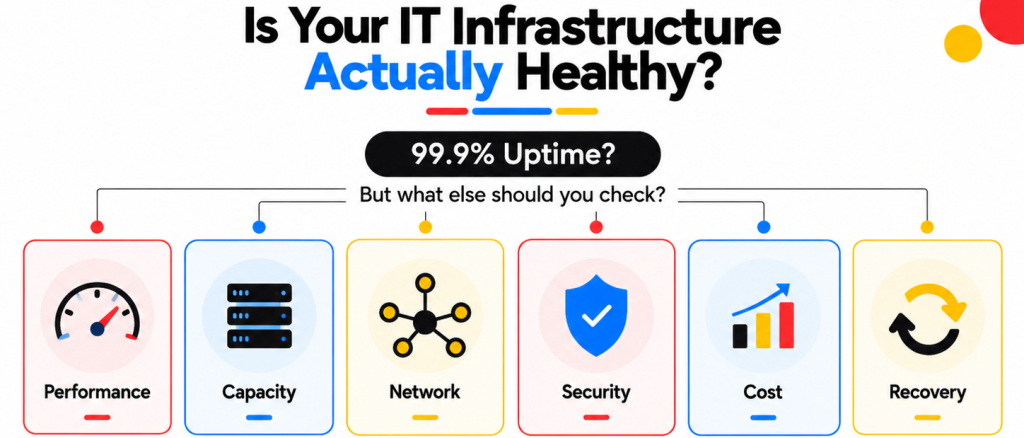
Infrastructure Health Cannot Be Reduced to Uptime
Uptime is useful.
It is also a very narrow measure.
An application can remain available while employees experience unacceptable response times. A network can remain connected while packet loss disrupts voice calls. A backup system can complete every night while the recovery process has never been tested.
AWS’s Well-Architected Framework recognizes these trade-offs by evaluating systems against six separate concerns rather than a single availability metric.
For business infrastructure, that translates into a more useful health model:
| Area | What a useful review should ask |
| Performance | Are applications responding within the level users need? |
| Capacity | Which workloads are approaching CPU, memory, storage, or network limits? |
| Reliability | Which services have single points of failure or weak recovery options? |
| Security | Are access and protection controls applied consistently across the environment? |
| Cost | Are hosted resources still appropriately sized and actively used? |
| Monitoring | Can IT detect abnormal behavior before users report it? |
| Recovery | Can the complete business service return after a serious failure? |
| Ownership | Does every critical service have someone responsible for its operation and escalation? |
This produces a much better picture than counting how many systems are currently green.
Infrastructure Should Be Designed Around Business Services
A technical inventory tells you what the company owns.
A service map tells you what the business depends on.
That difference matters.
A CRM may be classified as one application in an inventory, but operating it could require an identity platform, a database, several integrations, email delivery, network connectivity, and a hosted environment. If the CRM supports sales operations, those technical components collectively support one business capability.
Infrastructure planning becomes much more useful when priorities follow that business dependency.
A minor failure affecting a test workload should not receive the same attention as a problem affecting customer billing or payroll.
An MSP should therefore know more than which systems exist.
It should understand which systems matter most, what they depend on, how their performance is measured, and what should happen if they fail.
Infrastructure Also Needs to Change as the Business Changes
Architecture that worked well for a 50-person business may become awkward at 300 employees.
The company adds locations. SaaS use increases. Remote access becomes more common. An acquisition brings another tenant and another set of applications. Customer-facing workloads receive more traffic.
The original infrastructure may still work. Its assumptions have changed.
Capacity planning should therefore be continuous rather than something completed during the original deployment.
AWS makes a recommendation within its reliability guidance by including demand changes, monitoring, failure detection, testing, and recovery within the ongoing architecture process.
Infrastructure planning therefore needs regular checkpoints.
Growth itself should trigger a review.
Security and Monitoring Sit Across All Three Components
Security does not fit neatly into only one of the 3 primary components of IT infrastructure.
It crosses all of them.
Compute workloads need appropriate configuration and protection. Applications and databases need access controls. Network traffic needs filtering and monitoring. SaaS platforms depend on identity policies. Administrative accounts need stronger controls than ordinary users.
Monitoring behaves in much the same way.
Microsoft’s Well-Architected guidance explicitly recommends a monitoring stack that gathers infrastructure and application telemetry to support reliability, performance, security, and cost decisions.
This makes both security and observability better understood as management layers running across the infrastructure rather than separate boxes attached at the end.
That distinction also affects MSP operations.
A security alert may begin with an identity event and require investigation of the endpoint, application, hosted workload, and network connection before the incident makes sense.
The boundaries between infrastructure disciplines are getting thinner.
Recovery Has to Bring Back the Whole Business Service
Infrastructure planning is incomplete until it answers what happens when something fails badly.
Backing up a database is useful. If the corresponding application cannot authenticate after restoration, the business service is still unavailable.
AWS includes proven recovery processes, failure management, resiliency testing, and configuration management within its reliability guidance.
For a business, recovery planning should therefore start with the service.
Which application needs to return first? Which database does it need? Which identities authenticate users? Which network path must be available? Which integrations have to reconnect?
That gives the recovery plan a usable sequence.
When Does Managing IT Infrastructure Become an MSP Job?
Some companies can manage these responsibilities completely in-house.
The pressure usually appears as the environment spreads across more systems and more owners.
Internal IT may understand the business extremely well but still have to divide its time between employee support, security alerts, application administration, migrations, network problems, hosted environments, vendor cases, and strategic projects.
Infrastructure reviews are easy to postpone because they rarely arrive with a flashing red deadline.
An MSP becomes useful when the business needs consistent ownership around monitoring, performance, network operations, security, hosted environments, recovery, and vendor escalation while the internal team keeps its business knowledge and decision-making role.
The boundary should be explicit.
Who responds when monitoring detects unusual latency? Who reviews an unresolved security finding? Who contacts the ISP during a branch problem? Who checks whether recovery requirements have changed after a new application is introduced?
Infrastructure becomes easier to run when those questions already have answers.
How Folio3 MSP Supports the Wider Infrastructure Environment
Folio3’s current managed IT offering covers Managed IT Support, Cybersecurity Solutions, Azure/AWS/GCP management, IT Strategy & vCTO, Network Design, and Disaster Recovery, allowing infrastructure issues to be handled across several technical areas rather than stopping at the first system boundary. Folio3 Managed IT Services currently positions these capabilities as part of its wider managed technology portfolio.
Managed IT Support
Folio3’s managed support can provide day-to-day technical assistance, monitoring, patch management, vendor coordination, and operational support around the wider environment.
This becomes useful when support activity reveals an infrastructure issue rather than an isolated user problem.
Network & Infrastructure
Network management connects office and remote users with business applications and hosted resources. Folio3’s current offering includes network design within its core MSP service portfolio.
For businesses with distributed locations, this can help connect connectivity problems with the applications and hosted workloads relying on them.
Migration Services
Folio3 migration work covers servers, operating systems, applications, databases, email, data, storage, networks, directory environments, virtual workloads, and tenant consolidation, with dependencies and post-move validation built into the plan.
Cybersecurity
Folio3’s current MSP portfolio includes cybersecurity alongside infrastructure management, with areas such as zero-trust architecture, endpoint detection, managed firewall capabilities, and compliance support listed on its site.
That helps security decisions remain connected to the infrastructure they are protecting.
Disaster Recovery
Folio3 also includes disaster recovery and backup within its core service portfolio.
Recovery planning is most useful when it follows complete services and their dependencies rather than backing up individual systems without understanding what has to return with them.
IT Strategy & vCTO
Infrastructure findings often lead to decisions that cannot be completed through routine support.
A workload may need migration. Network architecture may need changing. An application may be reaching the end of its practical life.
Folio3’s IT Strategy & vCTO offering is designed to connect infrastructure decisions with budgeting, planning, and longer-term technology direction.
Good Infrastructure Should Feel Boring to the People Using It
The 3 primary components of IT infrastructure provide a convenient framework for understanding what sits underneath everyday business technology.
Compute and storage provide resources. Software and data perform business work. Networks provide the connections between people and systems.
The quality of the environment depends on what happens around those components.
Can IT see a performance change before users begin reporting it? Do application owners know their dependencies? Can hosted-resource costs be explained? Does the network perform consistently from every location? Can a critical service be recovered with its database, identity, and connectivity intact?
Those are better tests of infrastructure health than counting devices or checking whether everything currently shows green.
For businesses that no longer want to manage those dependencies through separate support queues and vendor relationships, Folio3 MSP can bring support, cybersecurity, hosted environments, networking, recovery, and technology planning into the same operating model.
Frequently Asked Questions
Business-critical applications should at least have enough documentation to identify ownership, hosting, data sources, identity dependencies, network requirements, major integrations, monitoring, and recovery expectations. The amount of detail should match the importance and complexity of the service.
Start with correlated telemetry rather than assumptions. Infrastructure metrics, application response data, logs, traces, latency, and network data can help isolate where behavior changed; both Microsoft and Google recommend cross-layer observability for this reason.
Uptime only measures one aspect of service health. Performance, reliability, security, cost, capacity, and recovery also affect whether a workload meets business requirements; AWS uses multi-pillar frameworks to evaluate these broader concerns.
Yes. A managed model can cover operational responsibilities across local systems, hosted workloads, network connectivity, security, applications, and vendor relationships, provided the agreed scope and access boundaries are documented.