
Technology problems rarely appear all at once. They usually begin with slower devices, recurring login issues, delayed software updates, unreliable backups, or employees waiting too long for support.
As the business grows, these smaller issues begin to affect productivity, security, budgets, and customer service. At that point, relying on reactive fixes is no longer enough.
IT management services provide ongoing support, monitoring, maintenance, security oversight, asset management, vendor coordination, and technology planning. Instead of waiting for systems to fail, businesses can identify and address problems before they interrupt operations.
What Are IT Management Services?
IT management services are outsourced technology functions that help a business operate, maintain, monitor, secure, and plan its IT environment.
Depending on the business, IT management services may include:
- Helpdesk and end-user support
- Device, server, and network monitoring
- Software and operating-system patching
- Microsoft 365 administration
- Identity and access management
- Cybersecurity monitoring
- Backup and disaster recovery
- Hardware and software asset tracking
- Vendor management
- IT budgeting and planning
IT management services can support an internal IT team or manage day-to-day technology operations for a business without dedicated IT staff.
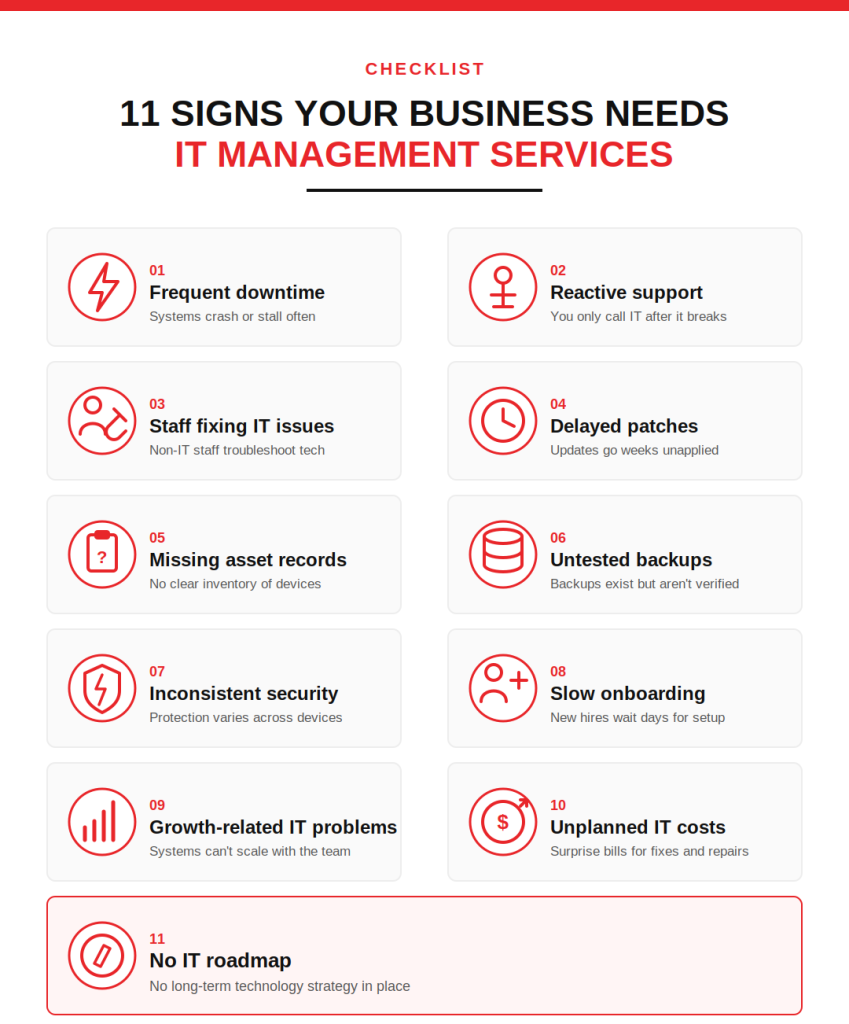
Signs You Need IT Management Services:
Your business may need IT management services when:
- Downtime is becoming frequent
- IT problems are addressed only after users complain
- Employees lose time troubleshooting technology
- Software updates and security patches are delayed
- Devices, licences, and warranties are not properly tracked
- Backups are not regularly tested
- Security controls differ between users and devices
- New starters take too long to set up
- Technology costs are difficult to forecast
- Multiple vendors operate without central coordination
- There is no documented IT roadmap
Let’s look at each sign more closely.
1. Recurring Downtime Is Affecting Work
An occasional technical issue is expected. Repeated outages are not.
Common warning signs include:
- Servers disconnecting without explanation
- Business applications becoming unavailable
- Wi-Fi dropping during working hours
- Remote employees losing access
- Files taking too long to open
- Printers repeatedly going offline
- Microsoft 365 or email issues affecting several users
Recurring downtime often indicates an unresolved infrastructure, capacity, configuration, or hardware problem.
IT management services introduce continuous monitoring, incident tracking, and root-cause analysis. This helps identify whether repeated interruptions are being caused by ageing equipment, network congestion, failed updates, storage limits, or poorly configured systems.
2. IT Support Is Entirely Reactive
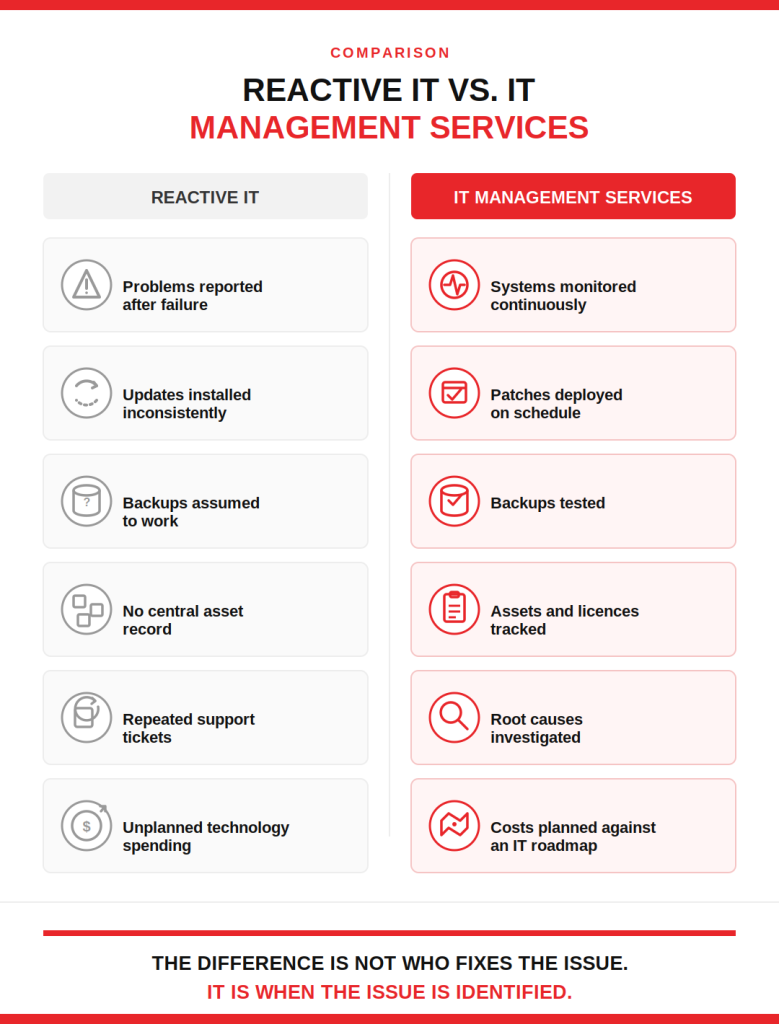
A reactive support model waits for someone to report a problem.
By then, an employee may already be unable to work, a customer request may be delayed, or an important system may have stopped responding.
A managed approach tracks:
- Device health
- Server capacity
- Failed services
- Storage availability
- Backup status
- Security alerts
- Patch compliance
- Network performance
IT management services use this information to address developing problems rather than relying only on user-reported tickets.
A high volume of recurring tickets is also a warning sign. If the same password, software, connectivity, or performance issues keep returning, the underlying cause has not been resolved.
3. Employees Are Acting as Informal IT Support
When there is no dependable support process, employees often turn to the colleague who “knows computers.”
That person may spend hours:
- Resetting passwords
- Installing applications
- Troubleshooting printers
- Configuring new laptops
- Contacting software vendors
- Attempting to recover deleted files
This work pulls employees away from their actual responsibilities and creates inconsistent fixes. It may also result in employees receiving administrative access they do not need.
IT management services provide a defined support channel, escalation process, and documented resolution history. Employees know where to report an issue, while internal teams can remain focused on their assigned work.
4. Software Updates and Security Patches Are Delayed
Unpatched operating systems, applications, browsers, firewalls, and network devices can leave known security weaknesses exposed.
The CISA StopRansomware Guide recommends maintaining an asset inventory, regularly patching operating systems and software, and keeping reliable backups as part of ransomware risk reduction.
Updates may be falling behind when:
- Devices regularly display restart reminders
- Employees choose when or whether updates install
- Servers are updated without a maintenance schedule
- Firmware versions are not tracked
- Unsupported applications remain in use
- There is no patch-compliance report
IT management services establish testing, approval, deployment, restart, and reporting procedures for updates. Critical systems can be patched within controlled maintenance windows rather than updated without planning.
5. You Do Not Have an Accurate IT Asset Inventory
A business cannot manage equipment and software it has not documented.
An IT asset inventory should record information such as:
- Device owner
- Device model and serial number
- Operating-system version
- Warranty status
- Installed software
- Security status
- Office or remote location
- Replacement date
- Licence allocation
CISA describes continuous asset visibility as a basic condition for managing cybersecurity risk because asset information supports patching, configuration management, vulnerability remediation, and technology lifecycle decisions.
Without an accurate inventory, businesses may continue paying for unused licences, overlook unsupported devices, or discover missing equipment only after an employee leaves.
IT management services maintain records throughout the device lifecycle, from procurement and deployment to reassignment and disposal.
6. Backups Exist, but No One Tests Them
A completed backup notification does not prove the data can be restored.
Backup problems often remain unnoticed until the business needs to recover from:
- Ransomware
- Accidental deletion
- Hardware failure
- Database corruption
- Microsoft 365 data loss
- Server failure
- A failed software update
CISA recommends frequent backups and protection against deletion or overwriting, while its ransomware guidance also emphasizes recovery planning and tested restoration procedures.
IT management services should verify:
- Which systems and data are protected
- How often backups run
- Whether jobs complete successfully
- How long data is retained
- Where backup copies are stored
- Whether critical files and systems can be restored
- Whether recovery targets match business requirements
If no one can provide the date and outcome of the most recent restore test, backup management needs attention.
7. Security Controls Are Inconsistent
One employee may use multifactor authentication while another does not. Some devices may have current endpoint protection while others are not reporting. Former employees may still appear in groups, shared mailboxes, or business applications.
Inconsistent controls create gaps that are difficult to detect without central oversight.
The NIST Cybersecurity Framework 2.0 organizes cybersecurity activities around six functions: Govern, Identify, Protect, Detect, Respond, and Recover. These functions reinforce that security requires documented ownership, asset knowledge, preventive controls, monitoring, response, and recovery; not a single security product.
IT management services can standardize:
- Multifactor authentication
- Device security policies
- Administrative access
- User onboarding and offboarding
- Endpoint protection
- Encryption
- Email security
- Security-alert handling
- Access reviews
The objective is to apply the required controls consistently and document exceptions.
8. New Starters and Leavers Create Repeated Problems
New employees should receive the correct accounts, devices, applications, permissions, and security policies before or shortly after their start date.
Leavers should have access removed through a documented process.
Warning signs include:
- Accounts created after the employee starts
- Missing access to files or applications
- Managers deciding permissions without a defined role model
- Old accounts remaining active
- Business data stored only on a former employee’s device
- Licences continuing to be billed after departure
IT management services establish repeatable onboarding and offboarding procedures. These procedures can include approval records, role-based access, device preparation, licence allocation, mailbox handling, data retention, and access removal.
9. Business Growth Is Outpacing the IT Environment
Technology that supported 20 employees may not support 80 employees across several offices and remote locations.
Growth can expose limitations in:
- Internet connectivity
- Wi-Fi coverage
- File storage
- Server capacity
- Application licensing
- Identity management
- Remote access
- Support availability
- Backup capacity
- Security controls
Hiring more employees without reviewing infrastructure can create slower systems, inconsistent configurations, and rising support demand.
IT management services help forecast how new hires, locations, applications, and workloads will affect the environment. Technology changes can then be planned before capacity becomes an operational problem.
10. Technology Costs Are Difficult to Explain
Unexpected IT spending often results from a lack of lifecycle planning.
Examples include:
- Emergency hardware purchases
- Duplicate software subscriptions
- Renewals approved without usage reviews
- Expired warranties
- Unplanned storage upgrades
- High support costs for ageing systems
- Multiple vendors billing for overlapping work
IT management services establish an inventory of recurring costs, renewal dates, equipment lifecycles, and planned projects.
This does not eliminate unexpected costs, but it separates planned investment from preventable emergency spending.
11. There Is No IT Roadmap
Day-to-day support keeps the business running, but it does not determine where the IT environment should be in one, two, or three years.
An IT roadmap should address:
- Ageing devices and servers
- Unsupported software
- Business continuity
- Cybersecurity priorities
- Microsoft 365 governance
- Infrastructure capacity
- Technology budgets
- New locations
- Business application requirements
Microsoft explains that products reaching the end of support may stop receiving security updates, non-security updates, and assisted support. Lifecycle planning is therefore necessary to identify replacement or migration work before support ends.
IT management services connect technical decisions with business plans. Instead of replacing systems only after failure, the business receives documented priorities, timelines, costs, and dependencies.
Do You Need IT Management Services if You Already Have an IT Team?
Yes, in some cases.
IT management services do not always replace internal IT staff. They can provide additional capacity, specialist knowledge, monitoring tools, after-hours coverage, project support, or escalation assistance.
A co-managed model may be suitable when the internal team:
- Is overwhelmed by daily tickets
- Needs support outside business hours
- Cannot monitor every device and server
- Requires cybersecurity expertise
- Needs help with a migration or infrastructure project
- Wants external support for backup, patching, or vendor management
The internal team retains business knowledge and decision-making authority, while the provider manages agreed operational functions.
What Should IT Management Services Include?
The service scope should be documented before the agreement begins.
A practical service should define:
| Service area | Expected coverage |
| User support | Helpdesk, remote troubleshooting, escalation, and ticket records |
| Monitoring | Servers, devices, storage, services, backups, and network health |
| Maintenance | Patching, updates, firmware, and scheduled restarts |
| Security | Identity controls, endpoint protection, alerts, access reviews, and reporting |
| Asset management | Hardware, software, licences, warranties, and replacement dates |
| Backup and recovery | Backup monitoring, retention, restore testing, and recovery procedures |
| Vendor coordination | Internet providers, software vendors, hardware suppliers, and support contracts |
| Planning | Budgets, lifecycle reviews, risk priorities, and technology roadmaps |
Service response times, coverage hours, escalation procedures, exclusions, and reporting frequency should also be documented.
Folio3 IT Management Services
Folio3 provides IT management services for businesses that need structured support, documented technology operations, and fewer preventable interruptions.
Managed IT Support
Folio3 manages user requests, device issues, application access, Microsoft 365 problems, printer faults, connectivity issues, and technical escalations through a centralized support process.
Infrastructure Monitoring and Maintenance
Servers, endpoints, storage, backups, and network components can be monitored for performance, capacity, service failures, and configuration issues.
Scheduled maintenance covers operating-system updates, application patches, firmware reviews, and restart coordination.
IT Asset and Licence Management
Folio3 maintains records for devices, software, warranties, ownership, licence allocation, and replacement dates.
These records support procurement decisions, onboarding, offboarding, cost reviews, and security investigations.
Cybersecurity Management
Security support can cover endpoint protection, multifactor authentication, identity and access reviews, security policies, vulnerability remediation, email protection, and incident coordination.
Controls are selected according to the organization’s systems, users, data, and risk requirements.
Backup and Disaster Recovery
Folio3 reviews backup coverage, job status, retention, storage locations, recovery requirements, and restore testing.
The process identifies whether critical systems can be recovered within the time required by the business.
Microsoft 365 and Identity Administration
Support includes account administration, licence management, group membership, mailbox access, SharePoint permissions, Teams configuration, user onboarding, and leaver processing.
Technology Planning and vCIO Support
Folio3’s virtual CIO support connects operational IT requirements with business priorities.
Planning may include:
- Technology budgets
- Hardware replacement schedules
- Security priorities
- Vendor reviews
- Infrastructure projects
- Business continuity
- Compliance preparation
- Governance and cost-optimization reviews
- On-premises migration assessments
Vendor Coordination
Folio3 can coordinate with internet providers, software suppliers, hardware vendors, telecom providers, and specialist application support teams.
This creates one point of ownership when an issue involves several vendors.
Frequently Asked Questions
IT management services provide ongoing support, monitoring, maintenance, security, backup oversight, asset management, vendor coordination, and technology planning for a business.
A business should consider outsourcing when recurring problems affect work, internal staff lack capacity, systems are not consistently monitored, or there is no documented process for patching, backups, security, and technology planning.
Yes. A provider can manage selected responsibilities such as helpdesk support, monitoring, patching, backups, cybersecurity, projects, or after-hours coverage while the internal team retains strategic control.
Break-fix support responds after a problem occurs. IT management services add monitoring, maintenance, reporting, asset management, security oversight, and forward planning.
Small businesses may benefit when employees depend on technology but the organization cannot justify hiring specialists for support, security, infrastructure, backup, and technology planning separately.
Ask about response times, coverage hours, monitoring, patching, cybersecurity, backup testing, reporting, escalation, onboarding, exclusions, data ownership, and exit procedures.