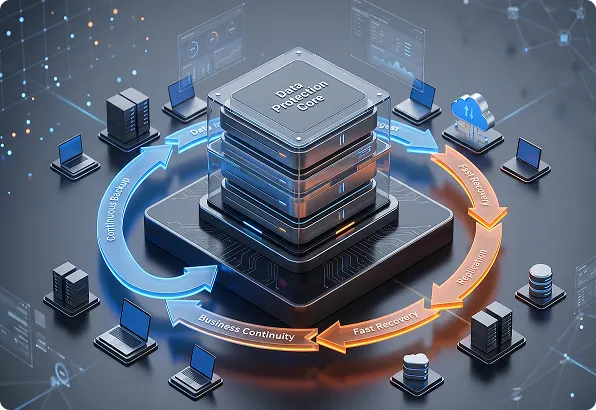
Ransomware or one wrong click can take critical systems offline in minutes. Folio3 data backup and disaster recovery services keep your data protected and your business running, with validated backups, defined recovery targets and tested response plans.
Backup and disaster recovery services restore data, systems, applications and infrastructure after a disruption.
Having backups is only part of it. The real goal is proof that critical services can be restored within agreed recovery targets.
A complete recovery plan should define:
Which systems are business-critical
How much downtime is acceptable
How much data loss you can tolerate
Where backups are stored
How recovery will be validated
Who is responsible during an incident
Backup Monitoring
A backup job marked “complete” isn’t always a backup you can restore.
Folio3 managed backup and disaster recovery services check backup activity every day to catch:
Alerts are reviewed, and unresolved failures are escalated for action.
This can include:
Failed or incomplete jobs
Retention policy gaps
Missing recovery points
Systems left out of protection
Backup agent issues
Security policy validation
Storage capacity problems
Cutover and rollback planning
Outcome
Backup problems found and fixed long before you need to recover.
Recovery Targets
Recovery planning starts with clear targets.
Recovery Time Objective (RTO) is how quickly a service must be restored.
Recovery Point Objective (RPO) is how much recent data the business can afford to lose.
Folio3 helps set RTO and RPO commitments based on:
Business impact
Recovery technology
System criticality
Regulatory requirements
How often data changes
Available budget
Application dependencies
Outcome
Recovery priorities set by business need, not assumptions.
Keeping every backup in one place puts all of them at risk from a single incident.
The design can follow the 3-2-1 backup rule: three copies of your data, on two types of media, with one copy kept off-site.
Folio3 designs layered backup protection using:
Retention policies
Off-site backup storage
Immutable backup options
Hosted backup environments
Geographic separation
Encrypted data transfer
Access restrictions
Outcome
Stronger protection against site loss and ransomware.
Ransomware Readiness
Ransomware recovery takes more than restoring a few files.
Planned exercises confirm that systems can be restored without bringing back infected files or compromised accounts.
Folio3 prepares you for ransomware incidents by reviewing:
Backup isolation
Containment procedures
Immutable recovery points
Clean restore environments
Privileged access
Communication responsibilities
Recovery order
Recovery testing
OUTCOME
A tested recovery plan for ransomware attacks.
Continuity Planning
Disaster recovery restores technology. A business continuity plan sets out how your organization keeps operating while systems are down.
Folio3 helps document:
Critical business processes
Communication procedures
Recovery priorities
Technology dependencies
Department responsibilities
Vendor contacts
Alternative working arrangements
Escalation paths
Outcome
Clear steps for keeping essential operations running during a disruption.
A system may need a short RTO but tolerate a longer RPO, or the reverse. Set recovery targets for each critical service rather than one target for the whole environment.
Recovery metric
What it measures
Example
RTO
Maximum acceptable service downtime
Restore the application within 30 minutes
RPO
Maximum acceptable service downtime
Recover data from no more than 15 minutes before the incident
01
Review systems, applications, data, backup tools, dependencies and current recovery gaps.
02
Rank workloads by business impact and recovery urgency.
03
Set RTO, RPO, retention, recovery order, ownership and escalation requirements.
04
Configure the right on-site, off-site and hosted backup controls.
05
Run recovery exercises to validate data, systems, access and dependencies.
06
Update the plan when infrastructure, applications, staff or business needs change.
Protect critical data, cut downtime and restore operations fast with tested disaster recovery and data backup services from Folio3.
Services can include daily backup validation, RTO and RPO planning, multi-location backup design, ransomware recovery testing and business continuity planning.
RTO is how quickly a system must be back online. RPO is how much recent data the business can afford to lose.
Critical backup jobs should be checked regularly. Folio3 runs automated daily validation to catch failures and missing recovery points.
No. Backups need testing to confirm that data, applications, permissions and dependencies restore correctly.
Yes. Planning can cover backup isolation, immutable copies, containment, clean recovery environments, restore order and testing.
Yes, ideally. Keeping backups in more than one location means a single incident can’t take out every recovery copy.
It depends on how critical each system is and how much risk the business carries. Plans should also be retested after major infrastructure or application changes.
It explains how essential operations continue while technology, facilities or normal processes are disrupted.
Yes. Critical applications usually need shorter RTO and RPO targets than lower-priority systems.
Recovery speed depends on system size, dependencies, backup design and the RTO agreed for each service. Those targets are set and tested with you before an incident happens.
LET’S TALK IT
Whether you need additional IT capacity, stronger security, infrastructure support, migration assistance, or a more proactive operating model, share a few details with our team.
We’ll use the information to understand your current setup and connect you with the right Managed IT specialists.
The right team, from day one
Your inquiry is routed to a specialist who understands your priorities.