
Infrastructure improvement has an expensive reputation.
Mention modernization in a planning meeting and people quickly picture large migrations, major architecture projects, lengthy maintenance windows, and a budget request nobody was expecting. Sometimes that level of work is justified. Quite often, it is not the place to begin.
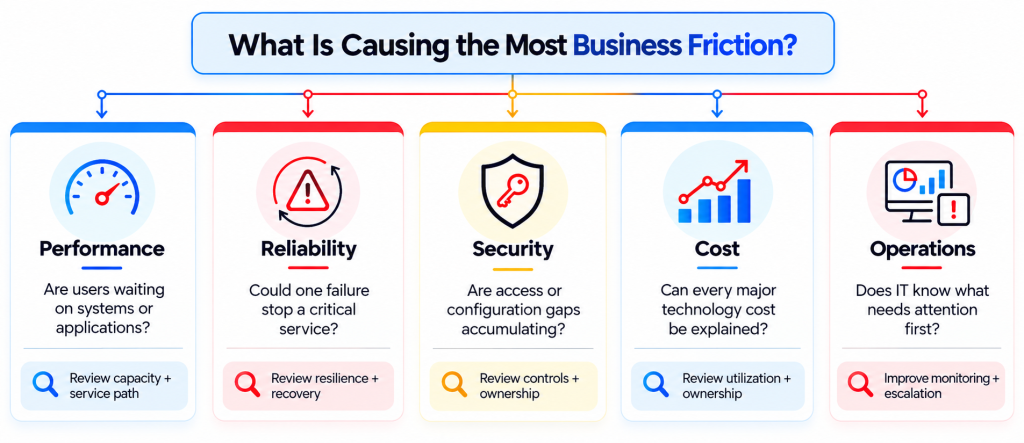
A business can make meaningful improvements by first understanding where its existing environment is creating friction. One office may have a network problem that makes a perfectly healthy application feel slow. SaaS subscriptions may have multiplied without clear ownership. Backup jobs may be completing successfully without a recent recovery test.
These problems do not require the entire environment to be replaced at once.
A practical answer to How To Improve Business IT Infrastructure is to improve the weakest operational links in a deliberate order. Start with visibility, identify what is hurting employees or creating risk, correct structural issues, and only then decide which systems genuinely require modernization.
That approach also makes investment decisions easier. Instead of proposing “an infrastructure upgrade,” IT can explain exactly which service is affected, what is causing the problem, what needs to change, and what result the business should expect afterward.
Infrastructure Improvement Should Start With Evidence
Technology teams can usually name several things they would like to improve.
The network needs an upgrade. The environment needs better monitoring. An application should move. More services should be automated. Access needs cleaning up.
The problem is deciding where to start.
A useful infrastructure review begins with evidence from the existing environment. That includes service tickets, performance data, security findings, application ownership, network behaviour, hosted-resource usage, recovery results, and known business changes.
AWS’s Well-Architected Framework uses a similar measurement approach. It evaluates workloads across operational excellence, security, reliability, performance efficiency, cost optimization, and sustainability rather than assuming one architectural improvement automatically produces a healthy environment.
That gives infrastructure improvement a useful rule: avoid upgrading technology simply because something newer exists. Upgrade when the existing design no longer meets a measurable operational, security, cost, capacity, or recovery requirement.
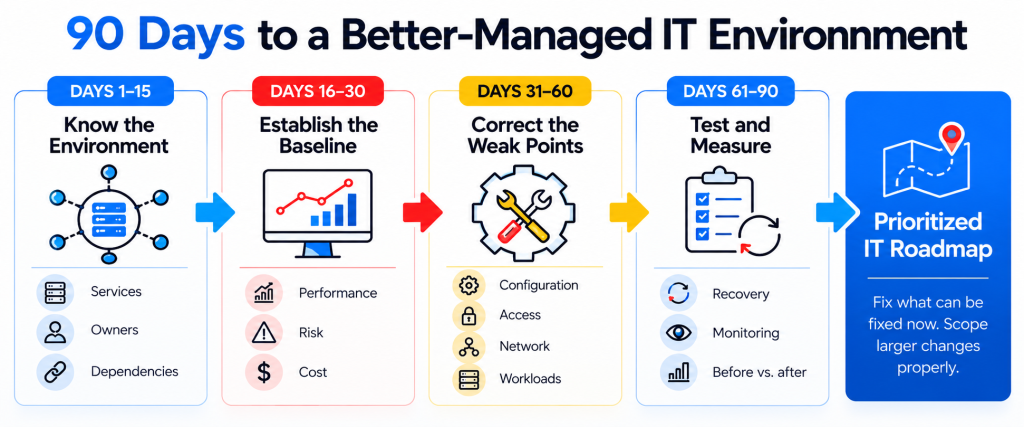
What a 90-Day Infrastructure Improvement Plan Looks Like
Ninety days is long enough to make real changes without turning the work into an open-ended transformation program.
The exact sequence will differ between businesses, but the structure can look like this:
| Period | Main objective | Typical output |
| Days 1–15 | Establish the current state | Service inventory, dependencies, owners, known gaps |
| Days 16–30 | Establish performance and risk baselines | Network, capacity, support, security, and recovery findings |
| Days 31–60 | Correct structural problems | Configuration, access, application, network, and cost improvements |
| Days 61–75 | Test resilience and operating processes | Recovery tests, monitoring improvements, escalation reviews |
| Days 76–90 | Measure results and plan larger work | Before/after findings and a prioritized roadmap |
This structure keeps the work grounded.
Some findings can be fixed during the 90-day period. Others may become properly scoped projects. A database migration, network redesign, tenant consolidation, or major application move should not be squeezed into a quick-fix program simply to claim that everything has been completed.
Days 1–15: Build a Service Map Before You Change Anything
Knowing how many servers or applications the company has is useful.
Knowing what the business depends on is more useful.
Start by identifying important business services and then mapping the technology underneath them. A CRM might depend on user identities, a SaaS platform, an integration, email delivery, and network connectivity. Finance may rely on several applications and a database rather than one obvious “finance system.”
This service-based approach exposes dependencies that ordinary asset lists hide.
CIS places enterprise asset inventory at the beginning of its current security controls because organizations need to know which endpoints, servers, network equipment, hosted resources, and other assets exist before they can consistently manage and protect them.
The inventory should answer more than “What do we have?”
For each important service, identify:
- Business owner
- Technical owner
- Main application or platform
- Authentication dependency
- Data location
- Network dependency
- Key integrations
- Support vendor
- Backup or recovery requirement
- Known risks or planned changes
This does not need to become a hundred-column spreadsheet.
It needs to make troubleshooting and planning less dependent on somebody remembering how everything fits together.
Days 16–30: Establish What Normal Looks Like
You cannot prove that infrastructure improved if you never recorded how it behaved before the work started.
Establish a baseline.
For network services, that may include latency, packet loss, WAN utilization, Wi-Fi performance, VPN behaviour, and recurring site-specific complaints. For hosted workloads, review CPU, memory, storage, response time, and usage patterns. Support data can reveal applications or departments creating an unusual volume of tickets.
Cisco defines network infrastructure as the hardware and software that enable communication between users, devices, applications, and the internet. Its current guidance also reflects how hybrid work has made reliable wired and wireless connectivity central to employee access.
The point of the baseline is comparison.
Suppose employees at one branch routinely wait 14 seconds for an application screen that opens in four seconds elsewhere. That gives the infrastructure team something specific to investigate and something specific to measure again after the change.
“Network seems slow” is difficult to manage.
“Latency to the hosted application rises from 35 ms to 160 ms between 1 p.m. and 4 p.m. at one branch” is a technical lead.
Days 31–60: Fix Structural Problems Before Adding More Technology
This is where the improvement program becomes more interesting.
Infrastructure problems are often caused by configuration and ownership rather than a lack of technology.
An application may be supported but nobody knows which department owns it. Administrator access may have accumulated over several years. A hosted workload may be significantly oversized. Development and production configurations may have drifted apart. A service could rely on a firewall exception that nobody remembers approving.
Adding another platform does little for these problems.
CIS recommends maintaining secure configurations for enterprise assets and software rather than relying on whatever configuration happens to exist after years of operational changes. Its controls also recommend keeping an accurate inventory of authorized software so unsupported and unauthorized applications can be identified.
The practical work during this phase can include access cleanup, policy correction, removal of obsolete services, standardization of configurations, ownership assignment, software review, and documentation of intentional exceptions.
This is one of the less glamorous answers to How To Improve Business IT Infrastructure.
It is also one of the more useful ones.
A tidy environment is easier to secure, support, monitor, migrate, and recover than an environment carrying years of unexplained exceptions.
Review Hosted Workloads for Waste Before Expanding Capacity
Hosted infrastructure makes it easy to add resources.
Removal receives less attention.
A development environment can remain online long after a project ends. A workload may be allocated more capacity than it uses. Storage grows without retention being reviewed. A SaaS platform keeps licences assigned to users who no longer need them.
A $3,000 monthly workload might be perfectly reasonable if it supports a critical customer service at the required performance level. Another workload costing $600 may be waste if the project it supported ended six months ago.
Ask four questions about material technology costs:
- What business service does this support?
- Who owns the cost?
- Is current utilization appropriate?
- What would happen if the resource were reduced or removed?
AWS’s cost-optimization guidance likewise recommends explicit cost ownership, regular workload reviews, proactive monitoring, and continuous optimization rather than treating cost reduction as a one-time exercise.
This creates a healthier target than simply demanding that every technology bill goes down.
Improve Monitoring by Removing Noise
More alerts do not automatically produce better monitoring.
An environment can generate hundreds of notifications while still failing to warn the team about the condition that users actually care about.
The better monitoring design starts with services.
For a customer application, monitor the indicators that help answer whether users can reach it, authenticate, retrieve data, and complete the important workflow. Infrastructure metrics such as processor, memory, disk, network, and service state still matter, but they gain value when they can be connected to the service above them.
AWS’s operational-excellence guidance recommends using observability to understand workload behaviour, performance, reliability, cost, and health, then using that information to take action when business outcomes are at risk.
The phrase take action is doing useful work there.
Every significant alert should eventually have an answer to:
- Who receives it?
- How urgent is it?
- What does it mean?
- What should the engineer check?
- When does it escalate?
- How do we know it has been resolved?
An alert sitting unread in a mailbox is monitoring only in the most technical sense.
Fix Identity and Access Before It Becomes a Migration Problem
Infrastructure work has become inseparable from identity.
Applications, hosted workloads, remote access, SaaS services, databases, and administrative platforms all depend on accounts and permissions. An otherwise well-designed environment can remain difficult to manage when access has accumulated through years of one-off requests.
Infrastructure improvement should therefore include a review of:
- Privileged accounts
- Shared administrator credentials
- Role and group assignments
- Dormant accounts
- Temporary vendor access
- Service accounts
- Authentication dependencies
- Access that remained after employees changed roles
This review becomes especially valuable before a migration.
Moving an old permission model into a new environment preserves the problem very efficiently.
Fix the access model while the current environment is being assessed. The migration plan then starts from a cleaner baseline.
This is an important part of How To Improve Business IT Infrastructure without turning the exercise into a technology-refresh campaign.
Measure Whether the Environment Actually Improved
The final stage of the 90-day program should compare the environment with the baseline established during the first month.
If the work was successful, something measurable should have changed.
Perhaps recurring application incidents decreased. WAN latency at one site improved. Hosted-resource spending became easier to explain. Security exceptions dropped. A recovery test met its target. Fewer systems lack an owner.
The exact measures depend on the starting problem.
A useful scorecard might include:
| Area | Before | After | Next action |
| Repeat application incidents | 26/month | 8/month | Continue monitoring |
| Branch packet loss | 4.2% peak | 0.3% peak | Close remediation |
| Unowned SaaS applications | 14 | 3 | Assign remaining owners |
| Unreviewed privileged accounts | 21 | 2 | Complete access review |
| Hosted resources without cost owner | 17 | 4 | Review with Finance |
| Last successful Tier 1 recovery test | 11 months ago | Tested this month | Repeat per DR schedule |
This produces a much stronger business conversation than “we optimized the infrastructure.”
It shows what changed.
The 90-Day Plan Should End With a Roadmap, Not a Victory Lap
Some findings will remain.
That is expected.
A business may discover that an application genuinely needs migration. Network architecture may need redesign. A database needs a version upgrade. An old identity arrangement requires a larger project. Several hosted environments may need consolidation.
Those findings should move into a prioritized roadmap.
Each roadmap item should have a reason, business impact, approximate timing, owner, dependencies, and enough technical context to decide whether the work belongs in normal operations or needs a dedicated project.
This stops infrastructure improvement from becoming endless.
The initial program fixes what can reasonably be corrected now and gives larger decisions somewhere to go next.
How Folio3 MSP Helps Improve Business IT Infrastructure
Improving business IT infrastructure becomes much easier to answer when the environment is reviewed across support, security, hosted resources, networks, recovery, and technology planning rather than through separate technical conversations.
Folio3’s current MSP portfolio covers those operating areas through Managed IT Support, Cybersecurity, management of hosted environments, IT Strategy & vCTO, Network & Infrastructure Management, Disaster Recovery, Database Management, and Identity & Access Management.
- Managed IT Support Creates the Operational Baseline
Folio3’s current Managed IT model includes proactive helpdesk support, monitoring, patching, escalation, and ongoing infrastructure management.
Support activity can provide useful evidence during an infrastructure assessment because recurring user problems often reveal which systems deserve deeper technical attention.
- Cybersecurity Adds Access and Configuration Review
Infrastructure improvement should reduce security debt at the same time it addresses performance and operations.
Folio3’s cybersecurity work can support the review of endpoint controls, access, security monitoring, firewall and VPN requirements, incident response, and other controls that sit across the environment.
This is particularly useful when the infrastructure assessment uncovers old permissions, inconsistent configurations, or services that lack a clear security owner.
- Hosted Environments Need Security and Financial Review
Folio3 migration work covers servers, operating systems, applications, databases, email, data, storage, networks, directory environments, virtual workloads, and tenant consolidation, with dependencies and post-move validation built into the plan.
Larger server, application, database, email, storage, identity, virtualization, or tenant migrations can then be scoped separately when the assessment shows that migration is actually the right next step.
- Network & Infrastructure Management Addresses the Service Path
Folio3’s current Network & Infrastructure service covers LAN, WAN, SD-WAN, Wi-Fi, firewalls, routing, switching, and performance monitoring across business locations.
That gives connectivity findings from the baseline stage a clear operational path, whether the problem requires configuration work, performance tuning, monitoring changes, or a larger network redesign.
- Disaster Recovery Tests the Result Under Failure
Infrastructure should be judged by how it behaves during failure as well as normal operation.
Folio3’s Disaster Recovery and Business Continuity offering includes backup management, failover readiness, DR testing, and RTO/RPO commitments.
Recovery testing provides evidence that improvements to applications, networks, hosted workloads, and databases have not left the business with an untested recovery process.
- IT Strategy & vCIO Turns Findings Into Planned Work
A 90-day review will usually find more work than should be completed during the 90 days.
Folio3’s IT Strategy & vCIO services connect technical findings with budgeting, risk decisions, technology roadmaps, and future projects.
That is the right place for infrastructure findings that require a broader business decision rather than another support ticket.
How To Improve Business IT Infrastructure Without Creating Another Giant Project
The temptation with infrastructure improvement is to start with the most visible technology.
That is rarely the best first move.
Start with a service map and current data. Identify where employees experience friction, where infrastructure is approaching capacity, where ownership is unclear, where technology spending cannot be explained, and where failure would expose a weak recovery process.
Fix the structural problems that can be fixed now.
Measure the result.
Then invest in the larger changes that the evidence actually supports.
That is a more useful answer to How To Improve Business IT Infrastructure than replacing technology according to age alone. It gives the business a reason for each investment and gives IT a baseline against which the result can be judged.
Infrastructure modernization works better when every change has a job to do.
Frequently Asked Questions
Begin by measuring the existing environment and identifying specific constraints. Configuration, access, monitoring, network routing, resource sizing, and ownership problems can often be corrected without replacing the underlying platform. Larger replacement projects should be reserved for systems where support, capacity, reliability, security, or business requirements justify them.
Collect application and service inventories, owners, support-ticket trends, network and workload performance, security findings, hosted-resource costs, vendor information, recovery results, and known business changes. This gives the assessment both technical and operational context.
Some corrective work can be completed within weeks, while migrations and architecture changes may require dedicated projects. A 60- to 90-day assessment and remediation cycle works well for establishing a baseline, fixing manageable issues, and producing a prioritized roadmap for larger work.
Look for repeated performance problems, insufficient resilience, poor coverage, architecture that no longer matches user locations, and recurring connectivity issues that configuration changes do not resolve. Cisco’s current network guidance treats architecture, design, analytics, automation, and management as related areas rather than viewing connectivity purely as hardware.
Yes. Infrastructure quality includes whether resources are appropriately sized and financially justified. The FinOps Framework specifically connects technology usage and cost with business value, ownership, forecasting, licensing, SaaS, workload optimization, and governance.
Test the business service affected by the change, not only the component that was modified. This can include performance, authentication, integrations, network access, monitoring, backups, recovery procedures, and business-user validation where appropriate.
Create a project when the change crosses several systems, requires significant downtime or migration, needs specialist engineering, carries substantial business risk, or cannot be safely completed through normal maintenance. Keep routine configuration and operational corrections within the managed service where appropriate.