
A backup notification saying “successful” at 2:00 a.m. does not tell you what will happen when the production environment is unavailable at 10:00 a.m.
Recovery brings a different set of questions. Which application comes back first? Where are the administrator credentials stored? Which backup is safe to restore? Does the application need identity, DNS, a database, or another service before users can reach it? Who has authority to fail over? How will the team know when the recovered system is actually ready for employees?
A useful disaster recovery checklist answers those questions before anyone is working under outage pressure.
It should cover the entire recovery path: recovery objectives, protected data, dependencies, access, communication, restoration order, validation, failover, and the work required after production has returned. That makes the checklist useful during a hardware failure, ransomware incident, site outage, application failure, or another event that removes access to normal systems.
The checklist below is built around that practical test: could another qualified engineer use the information available today to recover the service without guessing?
Start by Deciding What “Recovered” Actually Means
The word “recovered” gets used too casually.
A server can be online while the application is still unavailable. The application can open while its latest data is missing. The database can be restored while users cannot authenticate. A website can load while the payment integration behind it is failing.
Your disaster recovery checklist therefore needs a definition of recovery for each important business service.
For a customer-order platform, recovery might mean the application is reachable, users can authenticate, the database is available within the agreed recovery point, orders can be created, email notifications are working, and the finance integration has successfully processed a test transaction.
That is much more useful than “server restored.”
A critical application may need an RTO measured in minutes. An archive system may tolerate hours. Treating both the same usually means either overspending on the archive or underprotecting the critical application.
Checklist Item 1: Give Every Critical Service an RTO and RPO
Start with the systems the business genuinely depends on.
For each service, record its agreed RTO, RPO, business owner, technical owner, and recovery priority. The targets should be specific enough to design and test against.
A useful record might look like this:
| Business service | RTO | RPO | Recovery priority | Owner |
| Customer ordering | 30 minutes | 15 minutes | 1 | Operations |
| Finance system | 2 hours | 30 minutes | 2 | Finance |
| Internal reporting | 8 hours | 4 hours | 3 | BI Team |
| Test environment | 24 hours | 24 hours | 4 | IT |
The numbers should come from business impact, not from whichever recovery technology happens to be installed.
AWS’s DR strategy guidance shows why this matters. Backup-and-restore, pilot-light, warm-standby, and active/active approaches carry different recovery characteristics, costs, and operational requirements.
A disaster recovery checklist becomes far easier to use once the team knows which system deserves attention first.
Checklist Item 2: Map What Each Service Needs Before It Can Work
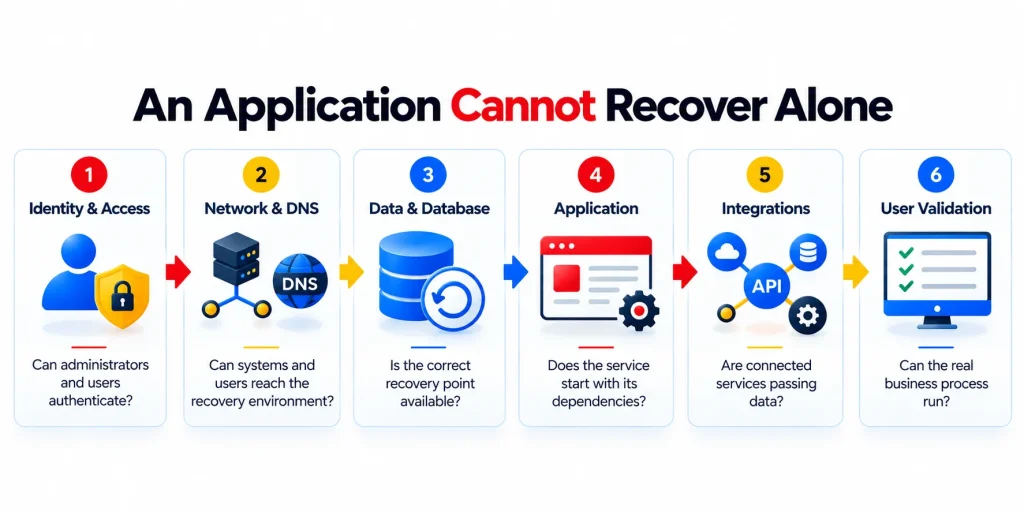
Applications have dependencies. Recovery plans often forget them.
A business application may require a database, identity service, DNS, certificates, network routes, storage, firewall policies, APIs, email delivery, or an external SaaS platform before employees can use it.
That means recovery order matters.
Restoring the application before its identity service or database may simply produce another error screen. A recovery plan should therefore document the service chain rather than treating every asset as an independent item.
IBM’s disaster recovery plan template recommends maintaining application profiles, recovery procedures, personnel details, vendor information, and the order in which applications should run during recovery.
For each critical system, record:
- What must already be available
- What depends on it afterward
- Which credentials or service accounts it uses
- Which network paths are required
- Which vendors may need to participate
- How the team confirms the dependency is healthy
This is one of the sections of a disaster recovery checklist that tends to expose surprises before the outage does.
Checklist Item 3: Know Which Backup You Would Restore Today
Having backup copies is only the beginning.
The recovery team should know where backups are stored, how long they are retained, which systems they cover, whether they are isolated from production, and which restore point would be used under different failure scenarios.
A hardware failure and a ransomware attack create very different recovery decisions.
After a hardware failure, the most recent valid backup may be the obvious choice. During ransomware recovery, the latest copy could contain encrypted or compromised data, which means the team needs to identify a known-good recovery point.
Veeam’s current backup guidance describes the classic 3-2-1 approach as maintaining three copies of data across two types of media with one copy off-site. Veeam also promotes a 3-2-1-1-0 model that adds another protected copy and aims for zero backup errors after verification.
The exact architecture will vary by environment, but the disaster recovery checklist should answer one question without hesitation:
Where is the recovery data, and can we trust it?
Checklist Item 4: Validate Backups Before You Need Them
Backup failures are easiest to fix while production is healthy.
That sounds obvious, yet recovery problems frequently involve jobs that failed silently, excluded data, expired credentials, insufficient storage, changed paths, or workloads that were added after the original backup configuration.
Daily backup validation gives the IT team a chance to find those issues early.
AWS recommends building monitoring into the backup and recovery strategy and defining what data is protected, how frequently backups occur, and how backup and restore activity is monitored.
Validation should also look beyond a green job status. The organization needs periodic restore tests that confirm protected data is usable.
The backup creates the copy.
The restore test proves the copy can do something useful.
Checklist Item 5: Protect the Recovery Credentials
A recovery plan that depends entirely on production authentication has a weak point.
If privileged identities are compromised or the primary identity service becomes unavailable, administrators still need a controlled way to reach the recovery environment, backup platform, network equipment, and other recovery systems.
Your disaster recovery checklist should identify:
- Recovery administrator accounts
- Where emergency credentials are stored
- Who is authorized to access them
- Which MFA process applies
- How emergency access is logged
- How credentials are rotated after use
The same review should include backup-console credentials, network administration, security platforms, hosted environments, and any third-party recovery portals.
An outage is a poor time to discover that the only person who can access the backup console is on holiday.
Checklist Item 6: Keep the Recovery Plan Available Outside Production
A beautifully documented recovery plan is not particularly helpful if the only copy sits inside the environment that just failed.
Keep controlled copies of critical recovery information somewhere the response team can reach independently.
IBM’s disaster action checklist specifically includes having system and operational documentation available during recovery, along with personnel information, vendor contacts, application sequence, and recovery-site requirements.
The accessible recovery pack should contain enough information to begin the response, including key contacts, service priorities, recovery credentials procedures, architecture information, vendor escalation paths, and technical runbooks.
Keep it current. A four-year-old network diagram is more dangerous than it looks because engineers may follow it confidently.
Checklist Item 7: Decide Who Can Declare a Disaster
Technical failure does not automatically mean the disaster recovery plan should be invoked.
The incident may be recoverable through normal operational procedures. In other situations, waiting too long to declare a disaster can waste valuable recovery time.
Authority needs to be clear.
The disaster recovery checklist should therefore state who can:
- Declare a disaster
- Approve failover
- Select or approve a recovery point
- Authorize rollback to production
- Communicate estimated recovery times
- Approve return to normal operations
These decisions should have named roles rather than depending on whoever happens to be online.
Checklist Item 8: Know Who Needs to Be Contacted
Recovery is rarely an IT-only exercise.
Depending on the incident, the response may involve application owners, leadership, cybersecurity staff, internet providers, hosted-service providers, software vendors, communications teams, and affected department managers.
A contact list should therefore include more than names and phone numbers.
Record what each person or organization is expected to do.
When the primary internet circuit fails, IT should already know who opens the carrier escalation and which contract details are required. When an application must be restored, the application owner should already know what validation they are expected to perform.
Checklist Item 9: Define the Recovery Sequence
During a widespread outage, several teams may want their systems restored first.
The recovery plan needs to remove that debate.
The sequence should follow business priority and technical dependency. Core network and identity services may need to return before an application. A database may need to be restored before the application layer. Certain integrations might be delayed until the core service is stable.
AWS explicitly recommends matching DR strategies to workload criticality rather than giving every application identical RTO and RPO requirements.
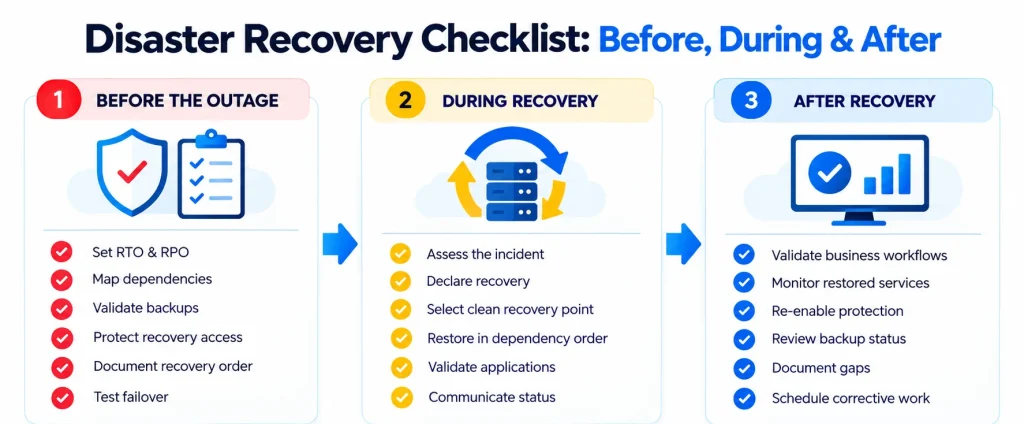
A basic recovery sequence could look like:
- Establish recovery administration and communications.
- Confirm network, DNS, identity, and other required platform services.
- Restore or fail over critical data.
- Recover Tier 1 applications in dependency order.
- Validate critical integrations.
- Allow controlled business-user testing.
- Recover lower-priority workloads.
- Continue monitoring until normal operations are confirmed.
The actual order will differ between organizations.
Writing it down is the important part.
Checklist Item 10: Have a Different Procedure for Ransomware
Ransomware recovery deserves its own branch in the disaster recovery checklist.
The source environment may be untrusted. Administrative credentials may be compromised. Backup data may need additional inspection. Bringing systems back too quickly can reintroduce the same problem into the restored environment.
The recovery process should identify how a clean recovery point will be selected, which credentials will be used, how systems will be isolated during restoration, how security validation will happen, and what must be checked before users reconnect.
AWS’s backup guidance specifically recommends incorporating ransomware protection and recovery requirements into the backup strategy rather than treating ransomware as a normal restore event.
This scenario is also where rehearsals matter most.
Teams that have never practiced cyber recovery are being asked to make several difficult security and operational decisions at the same time.
Checklist Item 11: Test Application Recovery, Not Just File Restoration
Restoring a file proves that the backup contains the file.
It does not prove that the business service can return.
A meaningful test should recover enough of the service to verify its dependencies and basic business function.
For example, a finance-system DR test could include restoring the application and data, authenticating a test user, loading a recent transaction, producing a report, validating an integration, and confirming that the application remains within the agreed recovery point.
“DR test completed” tells you very little.
“Finance application restored in 22 minutes against a 30-minute RTO, with data recovered within the 15-minute RPO” tells you whether the plan met the requirement.
Checklist Item 12: Test Failover Before Production Depends on It
Failover often looks straightforward in architecture diagrams.
The practical version may involve routing, DNS, firewall policies, certificates, application configuration, replicated data, user connections, and several manual decisions.
That is why failover needs rehearsal.
The test should record each step, owner, actual completion time, problem encountered, and result. If the documented RTO is fifteen minutes but the test takes forty-five because DNS and firewall changes are manual, the exercise has identified a real gap.
DRI International includes plan exercise/testing, assessment, and maintenance as a formal part of its Professional Practices for business continuity management.
Testing should create work afterward. Otherwise, the same weaknesses simply survive until the next drill.
The Working Disaster Recovery Checklist
The longer explanations above help define the thinking behind recovery. During an assessment, the checklist itself should be much faster to scan.
| Disaster recovery check | Ready? | Evidence to verify |
| Critical business services have owners | ☐ | Current service register |
| Recovery priority is documented | ☐ | Tier/priority list |
| RTO is defined for critical systems | ☐ | Approved recovery target |
| RPO is defined for critical data | ☐ | Approved recovery target |
| Dependencies are mapped | ☐ | Current service diagram |
| Backup scope covers production systems | ☐ | Backup inventory |
| Backup jobs are routinely validated | ☐ | Recent validation records |
| Off-site or isolated recovery copies exist | ☐ | Backup architecture |
| Recovery credentials are available | ☐ | Emergency access procedure |
| Recovery documents are accessible outside production | ☐ | Controlled off-system copy |
| Disaster declaration authority is defined | ☐ | Incident / DR procedure |
| Vendor escalation contacts are current | ☐ | Contact sheet |
| Recovery sequence is documented | ☐ | DR runbook |
| Ransomware recovery procedure exists | ☐ | Cyber recovery plan |
| Last restore test succeeded | ☐ | Test evidence |
| Last failover exercise met target | ☐ | DR drill report |
| Business owners participate in validation | ☐ | Test sign-off |
| Recovery gaps have owners and due dates | ☐ | Remediation tracker |
Do not aim for eighteen check marks at any cost.
An honest “No” with a named owner and remediation date is considerably more useful than a “Yes” nobody can prove.
Checklist Item 13: Validate the Business Process Before Announcing Recovery
One of the riskiest moments in DR comes near the end.
Systems are returning. Dashboards are green. Engineers have been working for hours. Everyone wants to announce that the incident is over.
That is when business validation needs to happen.
The application owner or another qualified representative should test the real workflow before normal use resumes. For a customer platform, that could mean creating and retrieving a transaction. Finance may need to confirm that reports and integrations behave correctly. A document system may need to confirm both permissions and file access.
This step protects the recovery team from declaring success based entirely on technical indicators.
The server may be recovered.
The business process still has to prove it.
Checklist Item 14: Monitor More Closely After Recovery
A recovered service deserves closer observation for a period after restoration.
Some problems only become visible under normal user load. Queues build. Scheduled integrations restart. Backup jobs resume. Authentication volume increases. Applications reconnect to other systems.
The team should therefore define a post-recovery monitoring window rather than returning immediately to ordinary alerting.
Watch for unusual error rates, capacity changes, authentication failures, delayed integrations, security alerts, backup failures, and user reports.
If the outage involved a cyber event, the monitoring period should also account for renewed suspicious activity.
Recovery is a process, not a power switch.
Checklist Item 15: Confirm Protection Has Been Restored Too
A disaster can leave the environment operating with temporary configurations.
A backup schedule may have been paused. Security policies may have changed. Replication could be running differently. Emergency administrator accounts may still be active. A firewall rule opened for recovery may remain in place.
These temporary conditions need a cleanup stage.
Before the incident closes, confirm that backups have resumed, monitoring is active, temporary access has been removed or reduced, protection policies are restored, and recovery copies are being generated from the new production state.
The goal is to avoid solving today’s outage by creating next month’s weakness.
Checklist Item 16: Update the Checklist After Every Drill and Real Incident
A disaster recovery checklist goes stale quietly.
Applications move. Administrators leave. Vendors change. New SaaS dependencies appear. Recovery environments drift away from production. Procedures still reference infrastructure that was retired last year..
Every recovery exercise should therefore end with a small number of concrete outputs:
- What worked?
- What took longer than expected?
- Which instruction was wrong?
- Which dependency had been missed?
- Did the team meet the RTO and RPO?
- Who owns each correction?
Then update the disaster recovery checklist while the test is still fresh.
What Does a Good DR Drill Actually, Look Like?
The best exercise is not necessarily the largest one.
Start with something the organization can learn from.
You might choose one important application and simulate the loss of its primary environment. The team receives the scenario, follows the documented plan, restores the workload, validates the data, tests authentication and integrations, records the recovery time, and hands the application to the business owner for validation.
The exercise should have a defined purpose and measurable success criteria. IBM’s DR testing guidance recommends stating what the test is designed to evaluate, defining measurable objectives, involving management, and collecting results afterward.
Once individual recovery procedures are dependable, exercises can become more demanding. Add identity failure. Remove access to the primary network. Assume the latest backup is compromised. Test failover rather than restore.
The aim is not to surprise the team for entertainment.
It is to find assumptions before they become outage delays.
How Folio3 MSP Supports Disaster Recovery Readiness
A useful disaster recovery checklist reveals gaps. The next job is keeping those gaps from remaining open.
Folio3’s disaster recovery approach focuses on measurable recovery objectives, validated backup protection, planning for different failure scenarios, and recurring testing so recovery procedures are known before they are needed.
<15-Minute Average Recovery Time Objective
Folio3’s disaster recovery offering targets an average RTO of under 15 minutes.
A recovery target only becomes meaningful when the supporting systems, data protection, recovery sequence, and testing process are designed around it. AWS likewise recommends selecting the recovery approach based on the RTO and RPO required by each workload.
Automated Daily Backup Validation
Backups need regular confirmation rather than occasional inspection after something has already failed.
Folio3 uses automated daily backup validation to identify backup problems before the recovery process depends on those copies.
On-Site, Off-Site & Backup Solutions
Different failure scenarios require different recovery locations and protection methods.
Folio3 supports on-site, off-site, and backup options so recovery planning can account for isolated system failures as well as events affecting the primary location or environment.
Business Continuity Plan Development
Technical recovery sits inside a wider business response.
Folio3 provides business continuity plan development to document recovery priorities, roles, dependencies, and procedures around the technology recovery process.
ISO 22301:2019 remains the published international standard for Business Continuity Management Systems and frames continuity as an ongoing process of planning, operation, monitoring, review, maintenance, and improvement. A third edition is currently under development.
Defined RTO & RPO Commitments
Folio3 works with defined RTO and RPO commitments so recovery can be measured against an agreed target rather than described vaguely as “fast.”
Those targets should appear directly in the disaster recovery checklist for each protected service.
Ransomware Recovery Planning & Testing
Ransomware changes the recovery scenario because the original environment or most recent data may no longer be trusted.
Folio3 includes ransomware recovery planning and testing so the response covers clean recovery points, recovery sequencing, technical validation, and the steps required before restored services return to normal use.
Regular DR Drills & Failover Testing
Recovery plans lose value when they remain untested.
Folio3 conducts regular DR drills and failover testing to validate documented procedures, measure recovery performance, and expose dependencies or configuration gaps while there is still time to correct them.
That testing approach is consistent with AWS’s recommendation to validate DR implementation through exercises and DRI’s treatment of recurring plan exercises and maintenance as part of recovery readiness.
A Checklist Is Useful Because Outages Are Bad Times for Memory
Nobody performs their best documentation work halfway through a major outage.
People are watching the clock. Users want updates. Leadership wants an ETA. Engineers are investigating several systems at once, and the pressure to restore something quickly can make it tempting to skip verification.
That is what the disaster recovery checklist is really for.
It gives the team the decisions that were already made: which services return first, how quickly they should return, where recovery data lives, who has authority, which dependencies have to exist, who validates the result, and what needs to happen after the service is restored.
The best recovery teams still need technical judgment.
They simply have fewer basic questions to answer while the business is waiting.
Frequently Asked Questions
Review it after major infrastructure or application changes, personnel changes that affect recovery responsibilities, and every DR drill or real recovery event. A scheduled review should also take place even when the environment appears unchanged because credentials, vendors, documentation, and recovery configurations can still drift.
Testing frequency should reflect workload importance, recovery targets, business risk, and how quickly the environment changes. AWS recommends testing DR implementation to validate that it actually meets the defined recovery objectives, while DRI includes recurring exercise and maintenance within its professional practices.
No. A backup checklist focuses on whether protected copies exist and are being created correctly. Disaster recovery also covers service priority, RTO and RPO, access, infrastructure dependencies, recovery sequence, communications, failover, application testing, and the process for returning the environment to normal operation.
Usually not. AWS recommends choosing recovery strategies according to workload criticality and business requirements because more aggressive recovery targets generally require greater cost and technical preparation.
The exercise should test access to protected recovery data, selection of an appropriate recovery point, administrator access, service dependencies, restoration order, security validation, application testing, and controlled return to normal operation. The exact scenario should reflect the systems and threats relevant to the organization.
Technical teams should confirm infrastructure and application health, while the relevant business or application owner should validate that the real workflow works as expected. That prevents a technically healthy server from being mistaken for a fully recovered business service.
Keep the test scenario, start and finish times, measured RTO/RPO results, recovery steps performed, failed steps, screenshots or logs where appropriate, business validation, issues identified, and assigned remediation actions. That evidence gives the next exercise a baseline and makes progress measurable.