
A company can double its headcount without replacing most of its technology.
The same Microsoft 365 tenant is still there. The same CRM still handles customers. On paper, very little has changed.
Behind the scenes, almost everything has.
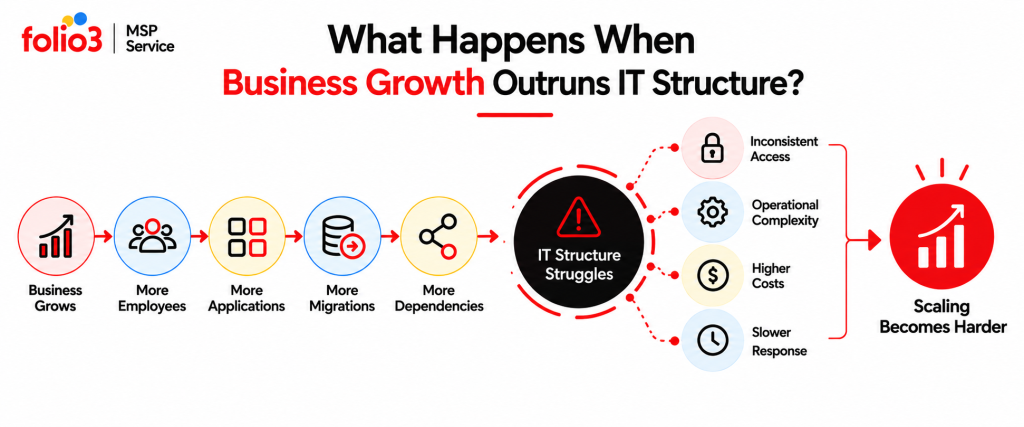
There are more accounts to manage, more SaaS applications exchanging data, more people changing roles, more administrators, and more integrations that nobody thinks about until one stops working. Acquisitions can add another tenant overnight. AI projects can give new applications access to business data long before anyone decides how that access should be governed.
Some of the most useful examples of technical problems appear at this stage. The technology itself may still work. The processes around it no longer fit the size or complexity of the business.
That is a different kind of IT problem, and repeatedly adding more support tickets will not fix it.
Growth Usually Exposes Process Gaps Before Technology Failures
Small IT environments can survive on individual knowledge for a surprisingly long time.
One administrator remembers which groups a new Finance employee needs. Someone in Operations knows who owns the logistics application. A developer remembers that an old application sends email through a specific connector.
This works because the number of people, systems, and relationships between them is still manageable.
Growth changes the maths. A process that depends on five people remembering the right information becomes much less reliable when the business has several departments, multiple locations, dozens of SaaS products, contractors, acquisitions, and more frequent technology changes.
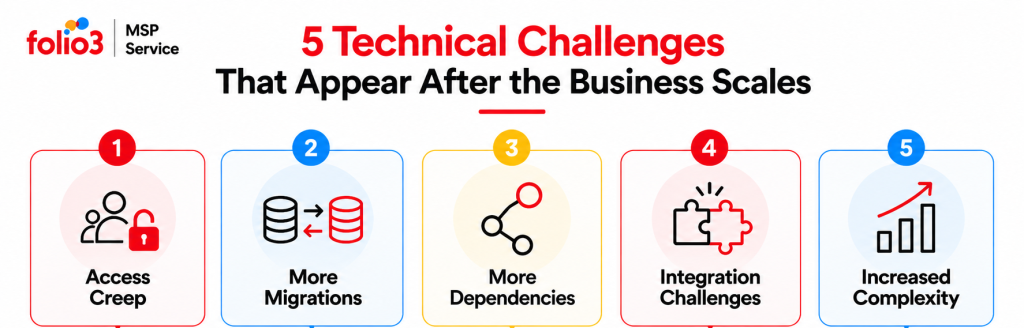
The first warning signs are often inconsistencies rather than outages. Two employees with the same role have different access. A migration breaks an integration nobody documented. Those are technical problems, but their causes usually sit in governance, ownership, or architecture.
Identity Management Starts to Struggle With Employee Movement
Hiring is usually where businesses first notice the pressure.
At a smaller company, onboarding may involve creating an account, assigning a Microsoft 365 licence, adding a few groups, and asking the manager what else the employee needs. It works well enough when new starters arrive occasionally.
Now imagine the same process during rapid growth. Ten people start in one month. Employees move between departments. Contractors join for temporary projects. Managers change. Some people need privileged access for only a few weeks.
Permissions begin to accumulate.
A Finance employee moves into Operations but keeps access to several Finance resources. Another employee with the same new role has a completely different set of permissions because their manager requested access manually. Offboarding becomes harder because nobody has one record of every application the person could use.
Microsoft addresses this directly through Microsoft Entra Lifecycle Workflows, which organizes identity processes around joiner, mover, and leaver events. Workflows can automate actions as users enter the organization, change roles, or leave.
Automation helps, but the business still needs an access model first. If nobody has defined what an Operations Manager should have access to, automating the request simply makes an inconsistent process run faster.
The better approach starts with role-based access. Define a baseline for common roles, identify privileged access separately, and treat department moves as a removal-and-addition exercise rather than simply adding new permissions.
Access also needs periodic review. Microsoft Entra access reviews can be used to review continued access to applications and groups, which is useful when permissions have built up over time.
This changes the question from “Can this person access the system?” to “Do they still need to?”
SaaS Growth Creates an Ownership Problem
The next pressure point often arrives through applications rather than infrastructure.
Marketing adopts a reporting platform. Finance introduces another expense-management tool. HR buys a recruitment system. A project team signs up for a collaboration product. Someone creates an automation account to connect two of them.
Each decision may make sense.
The problem appears after two or three years, when the company has a large application estate but no single view of who owns it.
This is one of the more understated examples of technical problems because nothing needs to be broken. The risk shows up through questions the company cannot answer quickly.
Who owns the application contract? Which department approves access? Does it use single sign-on? Which business data is stored there? Is there an administrator account tied to an employee who has already left? What other applications depend on it?
These questions become especially important during offboarding, licence reviews, security incidents, and migrations.
A growing company needs an application register that records business ownership, technical ownership, authentication, major integrations, renewal dates, administrative access, and the data involved. Applications connected through Microsoft Entra can also be brought into recurring access reviews, which Microsoft recommends as a way to deal with access that changes over time.
The register does not need to become a giant configuration database. It needs to tell IT who to call, what depends on the service, and what would be affected if the application changed tomorrow.
Mergers Turn Identity Into a Business Integration Project
An acquisition creates an unusual technology problem: both environments may work perfectly well on their own.
The difficulty starts when people need to work across them.
The acquiring company may have one Microsoft 365 tenant, security model, domain structure, group design, and application estate. The acquired company arrives with another set of each.
For a while, both environments may need to stay active.
Employees need access across tenant boundaries while email domains, applications, SharePoint content, identities, and business processes are gradually brought together. Moving everything immediately may create more disruption than coexistence.
Microsoft explicitly lists mergers and acquisitions among the common scenarios that create multiple Entra tenants. Its cross-tenant synchronization capability can automate the creation, updating, and removal of B2B collaboration users across tenants while organizations continue to operate separately.
That does not mean every acquisition should use the same architecture.
The technical decision depends on where the company wants to end up. One tenant may eventually become authoritative. Certain systems may remain separate because of regulatory or business requirements. Other applications may be consolidated early because running duplicates creates unnecessary cost.
The important work happens before migration. Decide how collaboration works during the transition, which identities are authoritative, what access crosses tenant boundaries, and how the temporary model will eventually be removed.
Temporary coexistence is manageable.
Coexistence with no exit plan becomes another permanent environment to support.
Hidden Integrations Make Simple Changes Riskier Than They Look
As businesses scale, applications become connected in ways that are easy to overlook.
An HR platform may trigger identity provisioning. A CRM sends information into a reporting database. A scanner sends mail using a Microsoft 365 connector. A finance application depends on a database hosted somewhere else. A legacy system authenticates against an old directory.
Most of these connections attract very little attention while they are working.
Then something changes.
A tenant is migrated. DNS is updated. An application moves to a new server. A certificate is replaced. An API credential expires.
Suddenly, a business process stops even though the system that was changed appears healthy.
Tools only tell part of the story. Microsoft also recommends involving workload owners because informal integrations and business dependencies may not appear in automated discovery.
A useful dependency record should therefore contain both technical and business information. Which systems communicate? What does the connection do? Who owns it? How does it authenticate? What happens if it fails?
That work can feel slow during planning.
It is much slower to discover the dependency during cutover.
AI Pilots Introduce a New Kind of Access Sprawl
AI creates a different scaling problem because experiments can reach production systems very quickly.
A team starts with a chatbot using public information. The next version connects to internal documents. Someone links it with SharePoint. Another integration gives it CRM data. An agent is then allowed to perform an action using a service account.
The technical risk has changed significantly, even if everybody still calls the project a pilot.
The questions become familiar to anyone who has managed identity or SaaS governance before.
What information can the system read? Which identity does it use? What actions can it perform? Are prompts and outputs logged? Can its permissions be reviewed? Who owns the AI application after the person who built the proof of concept moves on?
NIST’s Generative AI Profile extends the AI Risk Management Framework to risks that arise across the design, development, use, and evaluation of generative AI systems.
For an MSP or internal IT team, the practical lesson is straightforward. Once an AI system connects to company identities, data, applications, or workflows, it belongs in the same governance processes used for other production technology.
That means an owner, documented permissions, access reviews, security controls, logging, and an offboarding plan.
“Pilot” should describe the stage of the project.
It should not become an exemption from normal IT controls.
The Real Scaling Problem Is Change Without Context
Once an IT environment becomes large enough, even sensible changes can create unexpected effects.
A new identity policy affects a business application. A tenant migration moves users successfully but misses an external integration. An AI application gains access to a dataset that was never intended for that workflow.
The individual change may have been technically correct.
The missing piece was context.
This is why change planning needs to mature as the environment grows. Larger changes should document the systems involved, business owners, dependencies, testing steps, rollback conditions, and post-change checks before implementation begins.
Microsoft’s migration guidance places particular emphasis on workload dependencies and migration sequencing because connected systems can fail when components move separately. That principle applies well beyond migrations.
Business technology has become highly interconnected. Good change management acknowledges those connections before the maintenance window starts.
Solving These Technical Problems Requires a Different Operating Model
The pattern across these examples of technical problems is remarkably consistent.
The company grew, but one of its IT processes stayed roughly the same.
Onboarding stayed manual while headcount doubled. SaaS purchasing stayed decentralized while the application estate expanded. Mergers introduced multiple tenants without a long-term identity model. AI experiments gained production access without becoming governed applications.
The solution is less about adding another tool and more about deciding how the environment should operate.
A mature approach usually develops in five stages.
| Stage | What changes |
| Discover | Identify users, applications, migration environments, tenants, owners, and dependencies |
| Standardize | Define repeatable onboarding, access, subscription, application, and change processes |
| Govern | Establish ownership, permissions, policy, cost responsibility, and review cycles |
| Automate | Automate repeatable work where the rules are already understood |
| Review | Recheck access, ownership, dependencies, and exceptions as the business changes |
The sequence matters.
Automating a poorly defined process creates faster inconsistency. Governance works better once the business knows what it owns. Monitoring is more useful when someone is responsible for responding to what it finds.
Where Folio3 MSP Fits Into a Growing IT Environment
Growth problems rarely stay inside one technical category.
An onboarding issue can involve identity, Microsoft 365, SaaS licences, application access, and security groups. A merger may involve tenants, domains, user data, applications, and access between two organizations. An AI deployment can touch identity, data, security, hosted platforms, and governance at the same time.
Folio3’s Managed IT offering spans Managed IT Support, Cybersecurity, IT Strategy & vCTO, Network Design, and Disaster Recovery, which allows those connected problems to be addressed through a broader operating model rather than separate support conversations.
Identity and Access Need to Follow the Business
Folio3 can help connect onboarding, role changes, privileged access, MFA, application permissions, and tenant changes with the way employees actually move through the organization.
That becomes particularly useful when access has been built through years of individual requests and the company needs to move toward a repeatable model.
IT Strategy Helps Turn Technical Symptoms Into Planned Work
Some scaling problems cannot be closed inside a support ticket.
Tenant consolidation, identity redesign, SaaS rationalization, and AI governance all require decisions about architecture, budget, business priorities, and timing.
Folio3’s IT Strategy & vCTO service is positioned around technology planning, budgeting, and roadmap decisions alongside its operational services.
Managed Support Keeps the New Model Running
A new operating model still needs day-to-day ownership.
Folio3’s managed offering includes 24/7 support and proactive infrastructure management alongside its other services. The value here is continuity: the people operating the environment can also see where recurring operational issues are exposing weaknesses in the underlying design.
Cybersecurity Applies the Same Structure to Risk
Growth creates more users, identities, applications, and data connections. Each one adds another access path that needs to be understood.
Folio3’s current cybersecurity offering includes zero-trust architecture, threat detection, managed firewall capabilities, and compliance-oriented support.
For growing companies, this gives identity, hosted environments, applications, and infrastructure a security process that can evolve alongside the business rather than being reviewed only after a major change.
Growth Should Make IT More Structured, Not More Complicated
The most revealing examples of technical problems during business growth rarely begin with a system going completely offline.
They start with things becoming harder to explain.
- Why does this employee still have access?
- Who owns this application?
- What else depends on this server?
- Why can this AI agent read that folder?
- Which tenant should this employee belong to after the acquisition?
Those questions are warnings that complexity is growing faster than the processes used to manage it.
Folio3 MSP can help businesses bring structure back through identity management, migration services, managed support, cybersecurity, technology planning, infrastructure management, and recovery services.
Growth will always add complexity.
It does not have to add confusion.
Frequently Asked Questions
Look for inconsistency rather than outages. If employees with similar roles receive different access, applications are difficult to inventory, or technology changes repeatedly uncover undocumented dependencies, the operating model probably needs attention.
Automation becomes useful once the access requirements for common roles are understood. Microsoft Entra Lifecycle Workflows can automate joiner, mover, and leaver tasks, but the organization still needs to define the correct access model first.
Usually, the better approach is to define the target architecture first. Cross-tenant collaboration can support a transition period while the business decides which identities, applications, domains, and data should ultimately be consolidated.
Combine technical discovery with interviews with application owners. Microsoft recommends both dependency analysis and workload-owner validation because technical tooling may not reveal every informal integration or business dependency.
As soon as it gains meaningful access to company identities, internal data, production applications, or business workflows. At that stage, ownership, permissions, logging, security review, and lifecycle management should be defined just as they would be for another production application. NIST’s Generative AI Profile provides a risk-management framework for these systems.