
The printer breaking on a Tuesday afternoon is an IT support issue.
A VPN that disconnects every Tuesday afternoon for six weeks is a maintenance issue.
The difference is useful because many businesses think IT maintenance means installing updates and fixing whatever looks old. That is only part of the job.
So, what is IT maintenance?
IT maintenance is the ongoing work required to keep business technology secure, available, updated, recoverable, and performing as expected. It includes monitoring systems, managing updates, reviewing access, checking network performance, validating backups, investigating recurring problems, and keeping configurations and documentation current.
Done properly, maintenance happens while most employees are getting on with their work.
What Does IT Maintenance Actually Involve?
IT environments change constantly, even when no major project is underway.
Employees join and leave. Applications receive updates. Microsoft 365 policies change. A new SaaS product gets connected. Firewall rules are adjusted. Certificates approach expiry. A backup succeeds on Monday and fails on Wednesday.
Maintenance keeps track of those changes.
Microsoft describes monitoring as a way to track system health, availability, resource use, and performance so teams can detect problems and identify conditions that may become problems later. Its monitoring and diagnostics guidance makes this part of normal production operations rather than something reserved for outages.
That distinction matters.
A business can have functioning systems today and still be accumulating problems for next month.
IT Maintenance Starts With Knowing What Is Happening
You cannot maintain systems you cannot see.
Monitoring provides the baseline.
A network connection may normally sit around a certain latency. An application may typically respond within a few seconds. Backup jobs should complete within an expected window. Storage growth usually follows a recognizable pattern.
When those patterns change, IT has something concrete to investigate.
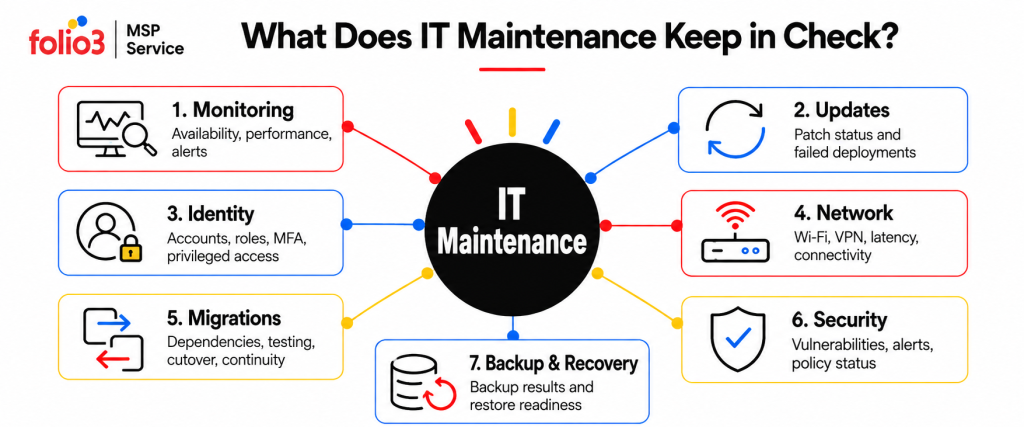
Useful maintenance monitoring can cover application availability, network connections, VPNs, update status, security events, backup jobs, databases, identity services, and business-critical integrations.
The aim is not to fill a dashboard with green lights.
The aim is to notice when something normal yesterday is behaving differently today.
Security Maintenance Happens After the Security Tool Is Installed
Installing a security product is an event.
Maintaining security is continuous.
Administrative permissions accumulate. Former contractors may still have access. Temporary firewall exceptions stay active. Security agents stop checking in. New vulnerabilities appear in software that was completely up to date a month ago.
CISA recommends regular software updates alongside MFA, logging, backups, phishing protection, and other basic cyber hygiene practices for businesses. Its guidance also advises prioritizing known exploited vulnerabilities rather than treating every update as equally urgent. CISA’s small-business cybersecurity resources bring these activities together.
NIST’s Cybersecurity Framework 2.0 organizes cyber risk work around Govern, Identify, Protect, Detect, Respond, and Recover. Those functions are continuous, which fits the reality of IT maintenance far better than a once-a-year security review.
Access deserves particular attention.
CISA recommends MFA for business systems such as email, file storage, remote access, and privileged accounts, with phishing-resistant methods preferred where practical.
An account that had the correct access six months ago may have too much today.
Network Maintenance Deals With Problems That Are Easy to Misread
Networks rarely fail in the most convenient way possible.
The internet may remain online while Teams calls break up.
Remote employees may complain about VPN disconnects while everyone at headquarters is unaffected.
These symptoms need performance data.
Network maintenance can include checking latency, packet loss, bandwidth use, VPN stability, wireless performance, firewall configurations, routing, branch connectivity, and unusual traffic patterns.
The useful question changes from:
“Is the internet up?”
to:
“Is this connection performing the way the business needs it to?”
That is a much better troubleshooting starting point.
Migration Environments Need Maintenance Too
Migration projects do not end when workloads are moved.
Applications, data, user access, configurations, dependencies, and recovery requirements still need ongoing review after the transition.
A migrated workload can retain unnecessary resources after the move. Legacy dependencies may remain active. User permissions can carry over without review. Data may be transferred without a clear retention strategy, while backup and recovery requirements can be overlooked during the transition.
None of these issues requires a major outage to become a problem.
They simply accumulate when migration environments are not reviewed and maintained.
Backup Maintenance Means Testing Recovery
A backup job saying “successful” is only the first check.
You still need to know whether the data can be restored, how long that restore takes, whether the application works afterward, and whether dependent systems come back in the correct order.
Microsoft’s current backup guidance specifically recommends testing and verifying backup and restore procedures regularly. The purpose is to confirm both the backup data and the process used to recover it.
Its reliability guidance goes further and recommends establishing a restore-testing schedule based partly on how frequently the workload, backup configuration, data structure, or infrastructure changes.
This is where an untested backup can create false confidence.
Imagine the finance application has been backed up every night for six months.
During a real recovery, IT discovers the database restores correctly but the application also depends on an authentication service and configuration data that were never included in the recovery plan.
The backup worked.
The business service did not.
IT maintenance closes that gap before the emergency.
Documentation Is Maintenance Work Too
Documentation has a short shelf life.
A network diagram from two years ago may show offices that have closed and miss services added last quarter. An administrator leaves, but an escalation document still lists their phone number. A VPN configuration changes, yet the support notes still describe the previous setup.
Bad documentation slows down good engineers.
Routine IT maintenance should keep records around systems, vendors, administrative access, dependencies, recovery procedures, configurations, escalation paths, and recent changes reasonably current.
Do not document everything for the sake of documentation.
Document the information somebody will need at 2:00 a.m. when the person who originally configured the system is unavailable.
Preventive, Proactive, and Reactive Maintenance Are Different
These terms often get mixed together.
| Type | What it looks like |
| Preventive maintenance | Scheduled work intended to reduce predictable problems, such as updates, access reviews, configuration checks, and backup testing |
| Proactive maintenance | Monitoring and trend analysis used to spot conditions that are moving in the wrong direction before a failure |
| Reactive maintenance | Work performed after something has already failed or affected a user |
All three are necessary.
A company cannot remove reactive support completely. Microsoft can have an outage tomorrow. A carrier can lose connectivity. A software update can behave unexpectedly.
The problem starts when reactive work becomes the entire IT model.
If employees are consistently the first people to notice system problems, maintenance is probably happening too late.
How Often Should IT Maintenance Be Performed?
There is no sensible universal answer such as “once a month.”
Different checks need different schedules.
A business-critical monitoring alert may need attention within minutes. Operating-system updates might follow monthly deployment cycles plus urgent out-of-band remediation. Access reviews could happen monthly or quarterly depending on the system and risk. Restore tests may follow a defined recovery-testing schedule.
A practical maintenance calendar can look something like this:
| Frequency | Typical maintenance work |
| Continuous | Availability monitoring, security alerts, network status, backup failures |
| Daily | Failed-job review, critical alerts, service health, priority incidents |
| Weekly | Recurring-ticket review, update failures, capacity warnings, unresolved vendor issues |
| Monthly | Patch compliance, network trends, maintenance reporting |
| Quarterly | Access review, recovery testing, configuration cleanup, risk review |
| Annually / as required | Larger continuity exercises, architecture reviews, roadmap updates |
The frequency should follow business impact.
A payroll service and an unused test application should not receive identical maintenance attention.
Some Maintenance Should Be Automated. Some Shouldn’t.
Automation works well for repetitive tasks with clear rules.
Monitoring can generate alerts automatically. Updates can follow deployment rings. Backup jobs can run on schedules. Reports can flag systems that have fallen outside policy.
Microsoft’s Windows Autopatch, for example, supports automated update deployment and reporting while still giving administrators control over rollout timing and update approvals.
Automation should not make the final judgment on every maintenance decision.
A sudden storage increase could mean unused data is accumulating. It could also mean the company has just onboarded its largest customer.
The metric needs context.
The best maintenance model automates collection and repetitive action, then gives engineers enough information to make the decisions that require judgment.
What Happens When IT Maintenance Is Deferred?
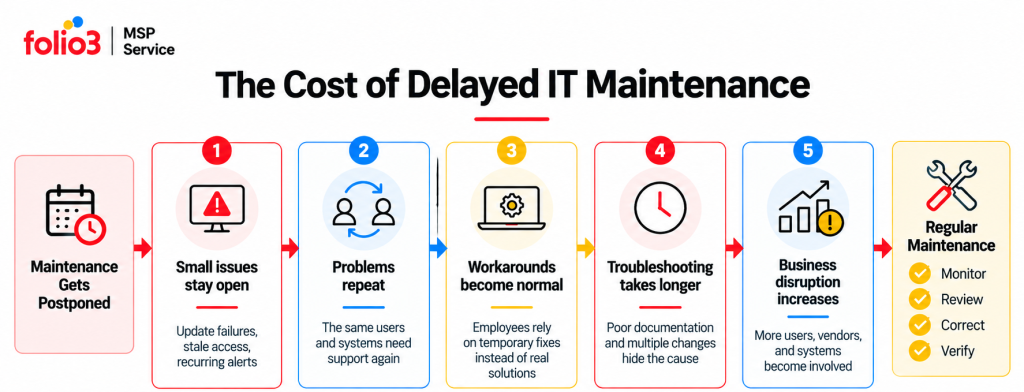
Deferred maintenance rarely creates one obvious bill.
It creates several smaller ones.
The same tickets return. Old access remains active. Update failures stack up. Documentation becomes unreliable. Network complaints become accepted as normal.
Then something larger happens and the environment is harder to troubleshoot because nobody has a clean baseline.
This is sometimes described as technical debt, but in day-to-day IT operations the symptoms are very ordinary.
People waste twenty minutes reconnecting to VPN.
IT spends two hours proving an ISP problem to a carrier.
A server reaches capacity even though the trend had been visible for months.
A backup turns out to be incomplete during recovery.
Each problem was giving warning signs.
What Should an IT Maintenance Report Tell You?
A twenty-page report of closed tickets is not a maintenance report.
Management needs to know what changed.
A useful monthly view should answer questions such as:
- Which systems had recurring problems?
- Which updates failed?
- Are backup jobs and recovery tests current?
- Which security findings remain open?
- Are any applications or network connections deteriorating?
- Which actions need management approval?
- What should be addressed next month?
Good maintenance reporting should make decisions easier.
If the report requires an engineer to spend forty minutes explaining what the numbers mean, it probably contains too many numbers.
When Does IT Maintenance Become an MSP Responsibility?
Some businesses handle maintenance entirely in-house.
Others split it.
An internal IT team might keep responsibility for business applications and user relationships while an MSP handles monitoring, updates, network operations, cybersecurity, backup validation, and escalations.
This arrangement makes sense when the internal team already understands the company well but does not have enough time to perform every routine check consistently.
The boundary needs to be specific.
- Who reviews failed updates?
- Who responds to a backup alert?
- Who contacts the ISP?
- Who reviews privileged access?
- Who owns an alert outside business hours?
If both teams assume the other one is doing something, maintenance has already failed.
What Does IT Maintenance Look Like With Folio3?
Folio3’s Managed IT Services cover ongoing support, monitoring, security, maintenance, optimization, network operations, disaster recovery, and technology planning. Its current service model includes proactive helpdesk support, automated patch management, cybersecurity, Network & Infrastructure Management, IT Strategy & vCTO, and Disaster Recovery.
For maintenance specifically, those services connect in a few useful ways.
Managed IT Support
Folio3’s Managed IT Support includes proactive helpdesk coverage, automated patch and update management, vendor coordination, technical support, and performance reporting.
That gives recurring support issues somewhere to go after the immediate ticket has been fixed.
Cybersecurity
Security maintenance can include endpoint monitoring, managed firewall and VPN services, security-event response, awareness work, access controls, and compliance-focused reviews. Folio3 currently includes these areas within its cybersecurity services.
Migration Services
Folio3 migration work covers servers, operating systems, applications, databases, email, data, storage, networks, directory environments, virtual workloads, and tenant consolidation, with dependencies and post-move validation built into the plan.
Network & Infrastructure
Folio3’s network services include LAN/WAN environments, SD-WAN, Wi-Fi, firewall, routing and switching management, performance monitoring, and multi-site connectivity.
This gives network maintenance a measurable baseline instead of relying only on employee complaints.
Disaster Recovery
Folio3’s Disaster Recovery services include backup management, recovery planning, RTO and RPO requirements, ransomware recovery preparation, and failover or recovery testing.
IT Strategy & vCTO
Maintenance can expose problems that cannot be fixed with another support ticket. An ageing platform may need migration. A recurring capacity issue may need budget. A vendor contract may need replacing.
Folio3’s IT Strategy & vCTO services connect those findings with roadmaps, budgeting, risk reviews, vendor decisions, and management reporting.
What Is IT Maintenance Really Trying to Prevent?
The goal is not a world where nothing ever fails.
That world does not exist.
Good maintenance reduces the number of avoidable surprises.
It means knowing an update failed before the device becomes a security concern. Finding repeated packet loss before employees decide bad calls are simply part of working from that office.
It also means knowing whether the backup can actually be restored.
That is the practical answer to what is IT maintenance: routine technical work that keeps the environment understood, current, monitored, secure, and ready for recovery.
Problems will still happen.
They should not have to introduce themselves six times before someone notices the pattern.
Frequently Asked Questions
Not all maintenance does. Changes that could interrupt users are usually placed into agreed maintenance windows, while monitoring, reporting, and many administrative checks can run during normal operations.
That depends on the work. Many monitoring, policy, access, and reporting activities require no user downtime, while some updates or infrastructure changes may require a restart or scheduled service window.
Yes, provided responsibilities and access are clear. The MSP can monitor and coordinate the wider environment while specialist vendors retain responsibility for particular applications or services.
Expect a discovery process covering administrative access, applications, networks, cloud and SaaS services, security tools, vendors, backup processes, current documentation, and known problems. Missing documentation can be rebuilt during onboarding.
Yes. Co-managed IT is common when internal staff want to keep business-facing work while an MSP takes responsibility for defined operational tasks such as monitoring, updates, security, cloud administration, networks, or recovery.
Look at what keeps returning. Repeated update failures, recurring support tickets, stale access, unexplained cloud costs, users discovering outages first, and untested backups all suggest the current maintenance process has gaps.
Scope should be explicit about systems covered, monitoring, maintenance windows, patch responsibilities, security tasks, escalation, vendor coordination, reporting, backup checks, response expectations, and which responsibilities remain with the customer.