
A business application does not need to go completely offline to cause trouble.
Maybe it gets slower every afternoon. VPN connections drop often enough that employees have stopped reporting them. Backups show green, although no one remembers the last time a full recovery was tested.
Each issue looks manageable on its own.
Together, they usually point to an infrastructure problem.
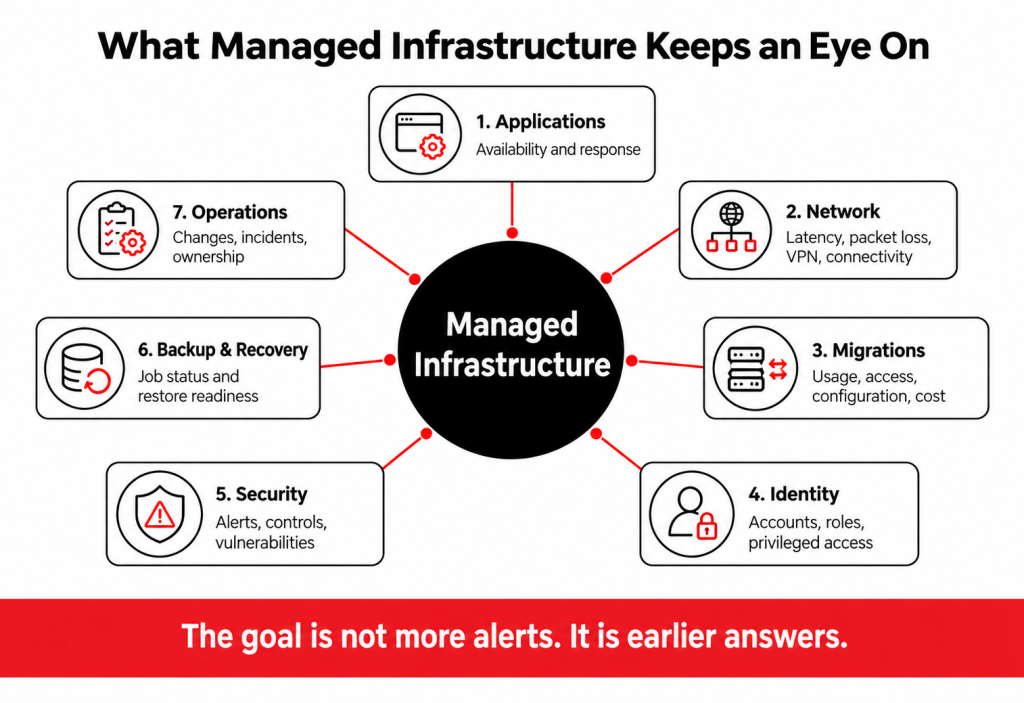
Managed infrastructure gives ongoing ownership to the systems supporting daily work, including networks, identities, applications, security controls, monitoring, databases, connectivity, and recovery processes.
The value comes from what happens between incidents. Systems are watched, unusual behavior is investigated, recurring problems are connected, and changes are recorded before they become another mystery for the support desk.
What Is Managed Infrastructure?
Managed infrastructure is the ongoing monitoring, administration, security, maintenance, and improvement of the technology environment that supports business applications and users.
Depending on the organization, that environment may span identity platforms, business databases, LAN and WAN networks, VPNs, firewalls, backup services, and connections between offices.
Managing that environment means more than confirming whether services are online.
Good infrastructure management should answer a few basic questions at any time:
- Which systems are business-critical?
- Who owns each service?
- What is being monitored?
- Which problems are currently open?
- Which access or security risks need attention?
- Can critical services be recovered?
- What needs to change over the next few months?
If those answers require several meetings and three different vendors, the infrastructure is harder to manage than it needs to be.
1. Problems Are Found Before Users Have to Report Them
One of the clearest benefits of managed infrastructure is visibility.
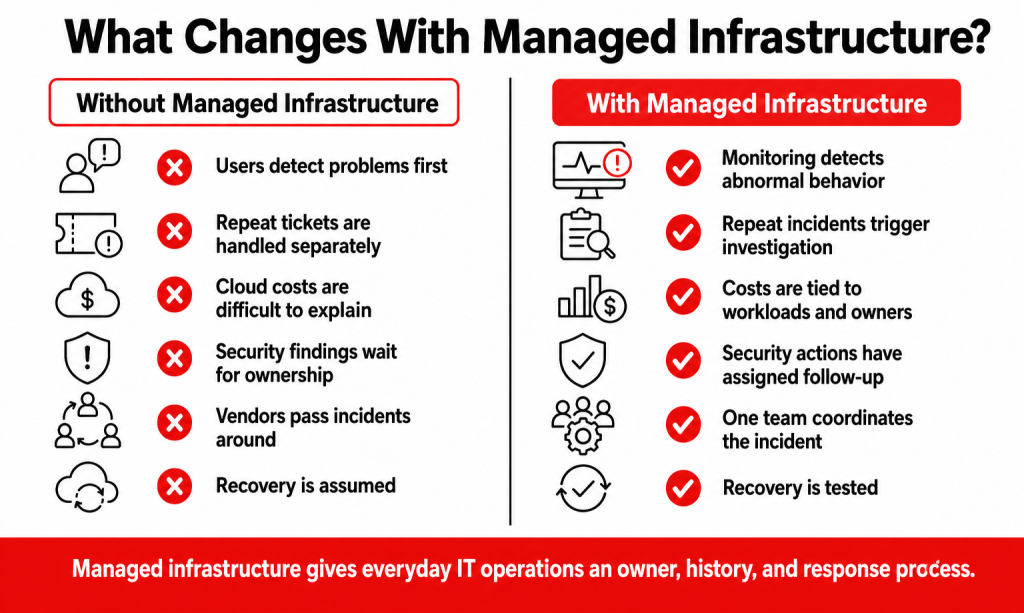
Without active monitoring, employees become the monitoring system.
Someone notices an application is slow. Another person reports that the VPN disconnected. A department discovers that a shared service is unavailable.
By then, the issue is already affecting work.
Managed infrastructure monitoring can watch service availability, latency, network traffic, application response, security events, backup results, failed updates, and certificate expiry.
Microsoft describes observability as the collection of metrics, logs, traces, and events that allow teams to understand the internal state of workloads and spot reliability, performance, security, and cost problems earlier.
The useful part is not the alert itself.
Suppose an application normally responds in two seconds but gradually moves to six, then eight. Nothing has technically failed. Monitoring shows that the behavior has changed.
That gives IT time to investigate before Monday morning starts with forty support tickets.
2. Recurring IT Problems Stop Looking Like Separate Incidents
The same problem can hide behind slightly different tickets.
One employee reports a failed login. Another says a mapped resource disappeared. A third complains that the business application will not open.
A support desk can close all three tickets without noticing that the same identity or network issue caused each one.
Managed infrastructure makes it easier to look across incidents.
A workaround can restore service today. Root-cause work is what stops the ticket from returning next Friday.
3. Network Performance Becomes Measurable
Network problems often get described in remarkably vague terms.
“The Wi-Fi is bad.” “The VPN keeps dropping.”
Those statements tell you where employees feel the problem. They do not tell you where the problem is.
Managed infrastructure can bring network monitoring into the wider IT picture by reviewing latency, packet loss, bandwidth usage, VPN stability, routing, branch connectivity, and performance by location.
That matters when several components are involved.
An application might be running normally in Azure while one office is experiencing packet loss. The ISP may report that the circuit is technically online. Users still cannot work properly.
A managed network team can compare those layers instead of passing the ticket between providers.
Cisco’s guidance for managed SD-WAN also emphasizes correlated visibility across network layers because troubleshooting becomes harder when organizations operate traditional WAN, VPN, and SD-WAN environments together.
4. Security Controls Get Looked After After They Are Installed
Security controls are rarely “set once and done.”
Permissions change. Employees move roles. Contractors leave. VPN access gets added. Security products stop reporting. Temporary exclusions remain active longer than anyone intended.
This is why security is closely tied to infrastructure management.
NIST’s Cybersecurity Framework 2.0 organizes cybersecurity work around Govern, Identify, Protect, Detect, Respond, and Recover. The addition of Govern puts ownership, policy, and risk decisions alongside technical security controls.
Within managed infrastructure, that can translate into regular checks around:
- Administrative access
- Identity and permissions
- Endpoint and security-policy status
- Firewall and VPN controls
- Security alerts
- Vulnerability findings
- Monitoring coverage
- Incident escalation
A security dashboard saying an account has excessive access is only useful if someone owns the next action.
5. Migration Planning Becomes More Predictable
Migration projects involve many moving parts, from application dependencies and data transfers to user access and cutover schedules.
Without a clear plan, unexpected dependencies can delay workloads, increase downtime, or require last-minute changes.
A structured migration approach maps workloads, dependencies, risks, timelines, and rollback requirements before the move begins. This gives teams better visibility into what needs to happen, when it needs to happen, and what could affect the transition.
The result is a more controlled migration with fewer surprises and clearer expectations for business stakeholders.
6. Internal IT Teams Spend Less Time Chasing Operational Noise
Many internal IT teams are already capable of handling infrastructure.
The constraint is time.
User support, onboarding, security alerts, SaaS administration, vendor cases, migrations, reporting, and project work all compete for attention.
Preventive work tends to lose because nothing is currently broken.
Managed infrastructure can move agreed operational work to an MSP, including monitoring, alert investigation, network escalation, update oversight, backup checks, documentation, and reporting.
The internal team can then keep ownership of business priorities, application decisions, employee relationships, and projects where company knowledge matters most.
This model works best when responsibilities are written down.
If a backup fails at 2:00 a.m., nobody should need a meeting the next morning to work out who was supposed to see it.
7. Changes Become Less Risky
Infrastructure changes tend to affect more systems than expected.
Move an application and identity may be involved. Change the network and remote access can change with it. Consolidate tenants and email, permissions, SaaS integrations, and user profiles may all need attention.
Managed infrastructure gives those dependencies somewhere to live before the work begins.
That same principle applies to infrastructure changes.
A migration plan should identify:
- Systems and integrations affected
- Identity dependencies
- Acceptable downtime
- Pilot users
- Validation steps
- Rollback conditions
- Monitoring after cutover
Moving the workload is only part of the job.
The business process needs to work afterward.
8. Vendors Stop Passing the Same Ticket Around
This may be one of the least glamorous benefits of managed infrastructure, but it is one people notice quickly.
A business application slows down. The SaaS vendor says the platform is healthy. The ISP says the connection is up. The firewall provider says traffic is passing. Everyone may technically be correct. The employee still cannot work.
Managed infrastructure gives the incident a coordinating owner. That team can collect evidence, check the surrounding environment, escalate to the relevant provider, compare responses, and test the service after each change.
The customer no longer has to translate technical findings between four companies.
9. Recovery Planning Becomes Part of Normal Operations
Backups are easy to discuss when everything is working.
Recovery is different.
The useful questions are:
- How quickly can the application return?
- How much recent data can the business afford to lose?
- Will users be able to sign in?
- Do integrations reconnect?
- Who decides when disaster recovery is activated?
Microsoft’s reliability guidance separates resilience from recoverability. Resilience is about continuing through disruption; recoverability is about getting back to normal operation after a disruption has occurred.
Managed infrastructure can keep those requirements connected to regular operations through backup monitoring, restore testing, recovery documentation, and planned exercises.
A successful backup job is a good sign.
A successful recovery test is much better evidence.
What Does Managed Infrastructure Not Solve?
Managed infrastructure does not make every outage disappear.
Internet carriers still fail. SaaS platforms have incidents. Users make mistakes. Software changes can behave unexpectedly.
The improvement is in detection, ownership, and response.
A managed environment should know that something changed sooner, have better information about the cause, and know who needs to act.
It also does not remove business responsibility.
Management still decides budgets. Application owners still decide which services the company needs. Internal teams still provide business context.
The MSP takes responsibility for the technical work defined in the agreement.
When Do the Benefits of Managed Infrastructure Matter Most?
The strongest signal is usually operational complexity.
You may benefit from managed infrastructure when:
- Several vendors support connected parts of the environment
- Employees regularly report issues before IT knows about them
- Recurring problems keep receiving temporary fixes
- Security findings remain open too long
- Network performance differs between offices
- Internal IT rarely has time for scheduled reviews
- Recovery testing is inconsistent
- Major migrations are approaching
- Management has little visibility into upcoming infrastructure risks
One of these can be fixed as an isolated problem.
Five or six together usually indicate that the operating model needs work.
Managed Infrastructure vs. Traditional IT Support
The services overlap, but the emphasis differs.
| Traditional IT support | Managed infrastructure |
| Helps when users report problems | Watches the underlying environment continuously |
| Focuses heavily on tickets | Includes monitoring, operations, governance, and trends |
| May resolve the immediate symptom | Can investigate recurring causes |
| Changes are often project-based | Infrastructure is reviewed between projects |
| Reporting centers on support activity | Reporting includes risk, performance, cost, and recovery |
| Vendor coordination varies | Ownership can include multi-vendor escalation |
Both are useful.
A business still needs someone to reset an account or troubleshoot an application issue.
Managed infrastructure adds the operating layer underneath that support.
How Folio3 Supports Managed Infrastructure
Folio3 positions its managed IT services around proactive infrastructure management, 24/7 support, cybersecurity, IT strategy, network operations, and disaster recovery.
Managed IT Support
Folio3’s Managed IT Support connects day-to-day user support with monitoring, update oversight, vendor coordination, escalation, and performance reporting. This helps recurring incidents move beyond ticket closure when the cause sits in the surrounding environment.
Cybersecurity
Folio3’s cybersecurity services cover areas such as zero-trust security, endpoint detection and response, managed firewall and VPN services, monitoring, incident response, and compliance support. These controls can be managed alongside the wider infrastructure rather than operating as a separate alert queue.
Migration Services
Migration work coversserver and operating-system moves, data and databases, applications, email, networks, storage, Active Directory and Microsoft Entra ID, virtual workloads, and tenant consolidation, with dependencies and validation considered before and after cutover.
IT Strategy & vCTO
IT Strategy and vCTO support connects infrastructure findings with budgets, roadmaps, vendor decisions, and future projects. A recurring technical issue can then become a planned improvement rather than another open recommendation.
Network & Infrastructure
Folio3’s network offering covers LAN/WAN design, SD-WAN, wireless planning, network monitoring, routing, switching, firewall management, and multi-site connectivity. This gives distributed networks a defined operating model rather than separate troubleshooting at each location.
Disaster Recovery
Disaster Recovery services cover business continuity, backup, and recovery planning so infrastructure management includes what happens after a serious outage as well as what happens during normal operations.
Managed Infrastructure Is Really About Operational Control
The main benefits of managed infrastructure are not hidden inside one tool.
They show up in how the environment behaves.
Problems are noticed sooner. Repeat incidents get connected. Network performance is measured.
The business gains a clearer picture of what is working, what is drifting, and what needs attention next.
That is a much better position than waiting for users to tell IT something has gone wrong.
Frequently Asked Questions
Yes. An MSP can take responsibility for selected areas such as networks, cloud operations, monitoring, security, or disaster recovery while the internal IT team manages the rest. Responsibilities should be documented before service begins.
The provider normally starts with discovery, administrative access, vendor information, current monitoring, known issues, and service dependencies. Missing documentation can be rebuilt during onboarding before higher-risk changes are made.
Not automatically. Existing services can often remain in place while monitoring, administration, access, governance, and support processes are improved. Replacement should follow a documented business or technical requirement.
Look beyond ticket totals. Recurring incidents, detection time, service availability, unresolved security findings, restore-test results, cloud-cost variance, and vendor escalations provide a better view.
Yes. Network, identity, cloud, security, and support services can be managed across multiple offices, provided the scope and connectivity are documented. Reporting should also make it possible to compare issues and performance by site.
Where vendor management is included, the MSP can collect technical evidence, open or follow the vendor case, coordinate troubleshooting, and verify the fix. This avoids leaving the customer to move the same ticket between suppliers.