
The shared drive stops responding on Monday morning. It comes back after a restart, so the ticket is closed.
Two weeks later, it happens again.
This pattern is common in businesses that rely on reactive IT support. Each interruption is treated as a separate event, even when the same configuration error, capacity limit, permission problem, or failing service sits behind all of them.
Reliable IT support should reduce repeat incidents. It should also tell the business which systems are at risk, who owns the response, and what needs to change next.
That is where a managed service provider fits. An MSP brings monitoring, technical ownership, security controls, recovery planning, and ongoing administration into one service model. The most useful way to understand technology problems and solutions is to look at what keeps going wrong when those responsibilities are missing.
Why Technology Problems Keep Returning
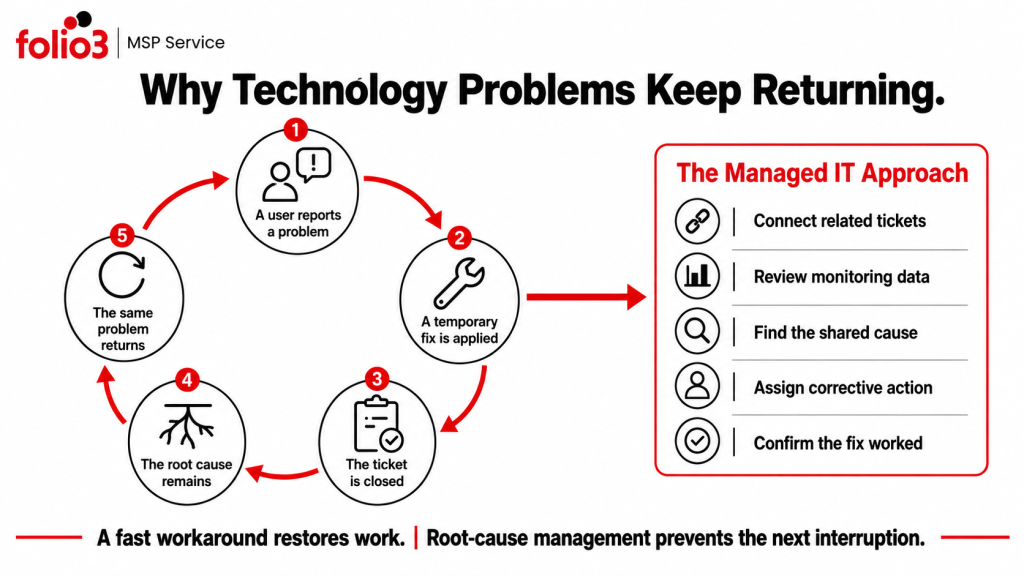
Most technology problems do not return because employees failed to follow instructions. They return because the original fix addressed the symptom.
Restarting an application may restore access. It does not explain why the application freezes every afternoon. Resetting a password may help one user sign in, but it will not correct an old credential stored on another device.
Without central monitoring and documented ownership, IT work becomes a queue of unrelated tickets. Useful patterns remain hidden:
- Several users report the same application error.
- One office experiences frequent connection drops.
- Password lockouts occur at the same time each week.
- Backup jobs complete, but no restore test is recorded.
A managed service model connects these events. Ticket history, monitoring data, security alerts, service health, and configuration records can be reviewed together.
That changes the question from “How do we close this ticket?” to “Why did this happen again?”
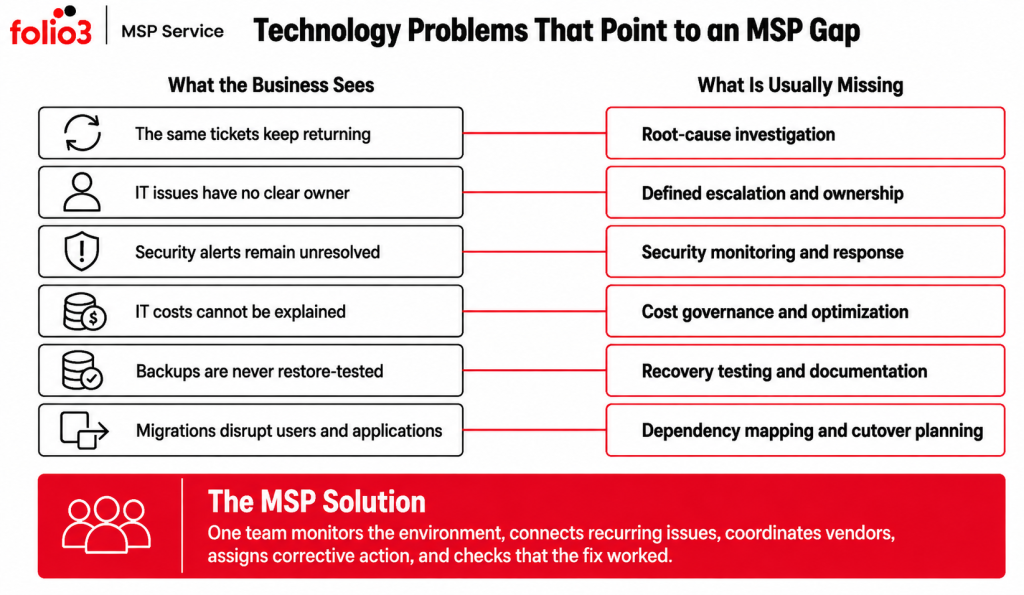
1. Recurring Incidents With No Root-Cause Investigation
One of the clearest signs of weak IT support is a problem that keeps being “fixed.”
Employees reconnect the same mapped drive every week. Outlook profiles are rebuilt repeatedly. A business application slows down at the end of each month. Each occurrence receives a temporary workaround.
This wastes time twice. Employees lose productive hours, and the support team repeats work it has already completed.
- The MSP solution
A managed service provider should group related incidents by user, location, application, time, and error type. The support team can then investigate the shared cause.
For example, repeated file-access failures may lead back to an identity policy, DNS problem, expired authentication token, or inconsistent permissions. A capacity trend may explain why an application fails during monthly reporting.
The corrective action should be documented and monitored after implementation. Closing a ticket is not proof that the fault has been removed.
2. Slow Responses and Unclear Escalation
Some technology problems become expensive because nobody knows how urgent they are.
A locked account affecting one employee and an unavailable customer platform affecting an entire company should not enter the same queue with the same priority.
Weak support arrangements often rely on informal escalation. An employee sends an email, waits, follows up, and eventually contacts someone else. By that point, several people may be working on the issue without a clear owner.
- The MSP solution
A managed service provider should define priority levels, response targets, escalation routes, and coverage hours before an incident occurs.
The process should distinguish between response and resolution. A fast acknowledgement is useful, but it does not restore the service.
Good escalation also preserves context. The engineer receiving the issue should see the affected users, recent changes, monitoring alerts, troubleshooting history, and business impact without asking the customer to repeat everything.
3. Limited Visibility Across the IT Environment
A business cannot manage systems it cannot see.
Common visibility gaps include unmanaged user accounts, unknown SaaS subscriptions, inactive services that still generate costs, missing security coverage, undocumented integrations, and applications with no assigned owner.
These gaps often become visible during an incident. A service fails, and the support team discovers that nobody knows which vendor manages it or which other systems depend on it.
- The MSP solution
An MSP should maintain a current view of identities, applications, network services, security controls, backup jobs, and vendor responsibilities.
Monitoring should cover availability, storage, performance, service failures, backup results, security alerts, certificate expiry, and update status. For Microsoft 365 environments, administrators can use the Service Health dashboard to confirm whether an incident is limited to their organization or forms part of a wider Microsoft service disruption.
Visibility reduces guesswork. It also helps the business plan changes without discovering dependencies during the cutover.
4. Security Tools Are Installed but Poorly Managed
Security software can be present without providing effective protection.
An endpoint may have stopped reporting. A former employee may still belong to a sensitive group. Multifactor authentication may cover email but not VPN access. A security alert may remain open because the support provider assumes someone else is handling it.
These are operational failures.
The NIST Cybersecurity Framework 2.0 organizes cybersecurity work around Govern, Identify, Protect, Detect, Respond, and Recover. That structure is useful because it places ownership and recovery beside preventive controls.
- The MSP solution
A security-focused MSP should manage access reviews, update status, endpoint protection, firewall and VPN rules, alert investigation, incident escalation, and recovery preparation.
Multifactor authentication should also be applied to email, remote access, administrative accounts, and other sensitive services. CISA recommends phishing-resistant MFA where possible because a stolen password alone should not provide access to company systems.
Security reviews should produce actions with owners and deadlines. A dashboard full of warnings is only another unattended queue.
5. Backups Run, but Nobody Tests Recovery
Backup reports can create false confidence.
A report may show that a job completed successfully, while the stored data is incomplete, encrypted by the same ransomware incident, or too slow to restore within the time the business can tolerate.
The problem usually appears when data is already needed.
- The MSP solution
Backup management should include failure investigation, retention review, protected storage, recovery priorities, and scheduled restore testing.
The business should define:
- How quickly each critical service must return
- How much recent data it can afford to lose
- Which services must be recovered first
- Who authorizes disaster recovery
- How restored systems will be validated
CISA recommends maintaining backups and testing recovery procedures rather than relying solely on successful backup-job notifications.
A useful report states when the last restore test took place and whether it met the agreed recovery target.
6. Migration Costs Keep Increasing
During a migration, teams may move workloads quickly to meet project timelines. Temporary migration resources remain active, duplicate environments continue running, licences stay assigned to users who no longer need access, and storage grows without clear ownership.
Over time, these small decisions can increase operational costs and make the new environment harder to manage.
- The MSP solution
A successful migration does not end when workloads are moved. Ongoing management is required to ensure the new environment remains secure, optimized, and aligned with business needs.
Managed providers support post-migration optimization through security and financial audits, resource ownership reviews, cost analysis, permission assessments, SaaS administration, governance checks, and regular reviews of unused or underutilized services.
A reliable MSP should be able to identify what is driving increased costs, which workloads depend on specific resources, who owns each service, and whether those resources are still required after migration.
7. Network Problems Are Treated as Random Events
A network can remain technically online while providing a poor working experience.
Calls break up. Remote sessions disconnect. One part of the office has weak wireless coverage. Uploads become slow during certain hours.
Restarting a router may temporarily clear the issue, but it removes useful evidence and rarely explains the pattern.
- The MSP solution
Managed network support should examine latency, packet loss, bandwidth use, wireless coverage, firewall activity, VPN performance, internet circuits, and configuration changes.
Time and location matter. Complaints from one meeting room suggest a different cause from company-wide performance problems at 3:00 p.m.
Configuration backups should also be maintained for firewalls, switches, routing, and wireless services. Recovery takes longer when nobody can confirm what the working configuration looked like.
8. Every Vendor Thinks Someone Else Owns the Problem
Modern business services are connected.
A user may access an application through Microsoft Entra ID over an office network managed by one provider, while the application itself is supported by another vendor.
When something breaks, each provider can show that its own service appears healthy. The employee still cannot work.
This is one of the most frustrating technology problems because the customer becomes the coordinator.
- The MSP solution
An MSP should take ownership of the incident even when another vendor needs to make the final correction.
That means collecting evidence, opening vendor cases, following up, testing proposed fixes, and keeping the customer informed. The service provider should understand where its responsibility ends without using that boundary as a reason to abandon the issue.
Vendor coordination should also be documented. Contact details, service references, escalation routes, renewal dates, and dependencies belong in one central record.
9. Migrations Begin Before Dependencies Are Understood
Migration failures rarely begin during the cutover. The problem usually started earlier, when planning focused on the main system and ignored everything connected to it.
An email migration may overlook shared mailboxes, forwarding rules, mobile devices, archives, applications that send email, and domain records. An Active Directory migration may miss service accounts, group policies, file permissions, or applications tied to the old domain.
The move may technically complete while employees lose access to the systems they need.
- The MSP solution
A managed migration should start with discovery, dependency mapping, identity review, data validation, acceptable downtime, testing, rollback planning, and named cutover responsibilities.
Migration support may cover server and operating-system migrations, data transfers, database migrations, application moves, email migrations, network and storage migrations, Active Directory and Microsoft Entra ID transitions, P2V, V2V and V2C virtualization moves, and full workload or tenant migrations during consolidation, restructuring, mergers, or acquisitions.
Post-migration validation should check user access, data integrity, application availability, integrations, security settings, and backup coverage. A successful login by the project engineer is not enough.
10. Technology Decisions Have No Roadmap
Some of the hardest technology problems and solutions involve decisions that are repeatedly delayed.
An application is approaching end of support, but no replacement has been selected. Migration costs are rising, yet nobody owns the budget. Security recommendations remain open because funding was never planned.
Day-to-day support continues. The underlying risk grows.
- The MSP solution
A managed IT relationship should connect operational findings with a technology roadmap.
The roadmap should identify upcoming migrations, security work, SaaS renewals, network changes, recovery requirements, compliance needs, and budget priorities. It should also explain what happens if an action is delayed.
A roadmap is useful when it supports decisions. A long document filled with generic recommendations will be ignored.
What Effective Technology Problems and Solutions Look Like
An MSP should provide the business with more than just access to a support desk.
| Technology problem | Managed service response | Evidence the response worked |
| Recurring user incidents | Root-cause review and corrective action | Repeat-ticket volume falls |
| Slow or unstable systems | Monitoring and capacity analysis | Performance remains within defined thresholds |
| Security gaps | Access, patching, monitoring, and incident ownership | Open findings have owners and target dates |
| Backup uncertainty | Restore testing and recovery planning | Recovery targets are tested and recorded |
| Migration cost growth | Financial audit and resource review | Charges are mapped to owners and business use |
| Vendor confusion | Central coordination and escalation | One team owns communication through resolution |
| Migration risk | Dependency mapping, testing, and rollback planning | Access, data, integrations, and backups pass validation |
| Unplanned IT spending | Technology roadmap and budget review | Projects are prioritized before urgent replacement is required |
The evidence column matters. Without it, the business only knows that activity took place.
How to Tell Whether MSP Support Is Improving the Environment
Ticket volume alone can be misleading. A new provider may initially uncover old problems, which creates more tickets before the environment settles.
Look for changes in the quality of support:
- Are repeated incidents being grouped and investigated?
- Are alerts assigned before users report a failure?
- Are access and security findings closed on schedule?
- Are backup restores tested?
- Are vendors being coordinated through one support route?
- Does management receive a roadmap rather than a list of technical warnings?
The goal is not to make every dashboard green. It is to understand the remaining risk and know who is dealing with it.
How Folio3 Addresses Technology Problems
Folio3’s current managed IT portfolio covers Managed IT Support, Cybersecurity, IT Strategy and vCTO guidance, Network and Infrastructure services, and Disaster Recovery.
- Managed IT Support
Folio3 provides proactive monitoring, helpdesk support, patch and update management, vendor coordination, escalation, and performance reporting. Recurring tickets can be reviewed alongside the applications, identities, networks, and services behind them.
- Cybersecurity Solutions
Cybersecurity support includes zero-trust planning, endpoint detection and response, managed firewall and VPN services, security monitoring, incident response, employee awareness, and compliance-readiness work.
- Migration Services
Migration support covers server and operating-system migrations, data and database transfers, application moves, email migrations, network and storage migrations, Active Directory and Microsoft Entra ID transitions, P2V, V2V, and V2C virtualization projects, and complete workload or tenant migrations.
- IT Strategy and vCTO
IT Strategy and vCTO support connects technical findings with budgeting, risk decisions, service planning, technology roadmaps, vendor reviews, and future projects.
- Network and Infrastructure
Network services cover LAN and WAN design, wireless planning, SD-WAN, routing, switching, firewall management, performance monitoring, VPN connectivity, and communication between business locations.
- Disaster Recovery
Disaster recovery support includes backup validation, recovery-objective planning, ransomware recovery preparation, continuity documentation, restore testing, and disaster-recovery exercises.
Frequently Asked Questions
Yes. The transition should include access handover, documentation review, open-ticket transfer, vendor contact, monitoring coverage, and confirmation that the former provider’s accounts have been removed.
An MSP can own selected areas such as monitoring, cybersecurity, cloud administration, networking, recovery, or escalations. Responsibilities should be written down so incidents do not stall between teams.
The agreement should define covered systems, support hours, priority levels, response targets, escalation routes, security responsibilities, backup ownership, and exclusions. Response time and expected resolution handling should be stated separately.
The timeline depends on the number of users, applications, cloud environments, vendors, and existing documentation. Early onboarding should focus on access, critical risks, support routing, monitoring, backups, and unresolved incidents.
Most transitions can happen with limited user impact when access, support tools, vendor relationships, and monitoring are moved in stages. The main risk comes from undocumented systems or administrative accounts controlled only by the outgoing provider.
Monthly operational reviews work well for incidents, alerts, backups, security actions, and service levels. Roadmap, budget, risk, and major project decisions can be reviewed quarterly.