
IT problems rarely begin when a user submits a support ticket. A server may already be running low on storage, an endpoint may have missed several patches, or a backup job may have been failing for days.
Proactive IT maintenance identifies and addresses these conditions before they interrupt employees or expose the business to avoidable risk. It replaces irregular technical fixes with continuous monitoring, scheduled maintenance, documented ownership, and evidence that critical controls are working.
A complete maintenance program should answer four questions:
- What is being monitored?
- What requires action?
- Who owns the response?
- How is the result verified?
What Is Proactive IT Maintenance?
Proactive IT maintenance is the ongoing process of monitoring, updating, testing, and managing business technology before a failure affects normal operations.
It covers endpoints, servers, networks, business applications, identities, SaaS platforms, backups, and supporting infrastructure. Unlike break-fix support, it does not depend on an employee noticing and reporting every problem.
The distinction is practical:
| Reactive IT support | Proactive IT maintenance |
| Begins after a failure | Looks for early signs of failure |
| Focuses on the immediate ticket | Investigates the underlying cause |
| Updates systems when problems appear | Uses scheduled patch and maintenance cycles |
| Assumes backups are usable | Tests whether data can be restored |
| Replaces equipment after failure | Plans replacements against lifecycle and condition |
| Responds to individual alerts | Tracks alerts through ownership and escalation |
Proactive maintenance does not eliminate every incident. It reduces the number of preventable failures and improves the response when an unexpected problem occurs.
The Core Components of Proactive IT Maintenance
1. Continuous System Monitoring
Monitoring creates visibility across the environment without waiting for users to report symptoms.
A maintenance platform should track device availability, processor and memory usage, disk capacity, failed services, network performance, endpoint-security status, certificate expiration, and backup results. Alerts should be based on meaningful thresholds rather than generating a notification for every minor change.
Monitoring only creates value when each alert has an owner and escalation path. A disk-capacity warning, for example, should lead to investigation, remediation, and verification before the server runs out of storage.
The NIST Cybersecurity Framework 2.0 places ongoing governance, identification, protection, and detection alongside response and recovery. This reinforces that IT resilience depends on continuous operational activities, not only incident handling. Review the NIST Cybersecurity Framework 2.0.
2. Patch and Vulnerability Management
Operating systems, applications, browsers, firewalls, network devices, and firmware require regular security and stability updates.
A controlled patching process should identify available updates, evaluate risk, test changes where necessary, deploy them within defined windows, restart affected systems, and confirm successful installation. Failed or excluded updates should remain visible until they are resolved or formally accepted.
Patch priority should reflect exposure and exploitation risk rather than release date alone. CISA recommends using its Known Exploited Vulnerabilities Catalog as an input when prioritizing vulnerability remediation.
Automatic updates are useful, but they do not replace reporting. The maintenance team still needs to know which devices are offline, unsupported, excluded, or repeatedly failing installation.
3. Software Lifecycle Management
A business cannot maintain systems effectively without an accurate record of what it owns and operates.
An asset register should link each device or application to its owner, location, version, warranty status, support status, security status, and expected replacement date. This makes it easier to identify unsupported systems and unused licences.
Lifecycle planning should begin before a product reaches end of support. Microsoft explains that products reaching the end of servicing may stop receiving quality or security updates, while products reaching end of support no longer receive normal support and servicing. Its product lifecycle documentation can be used to plan upgrades and replacements.
Asset management also supports security investigations. When a vulnerable application is discovered, the business should be able to identify every affected device without relying on a manual email survey.
4. Backup Validation and Recovery Testing
A successful backup notification confirms that a job completed. It does not confirm that the required data can be recovered.
Proactive IT maintenance should monitor backup jobs, investigate failures, review retention, confirm storage separation, and test restoration. Testing may range from restoring a single document to recovering an application, server, or complete environment.
Recovery requirements should be tied to two business measures:
- Recovery Time Objective: How quickly a system must return
- Recovery Point Objective: How much recent data the business can afford to lose
CISA recommends maintaining protected backups and testing recovery procedures rather than assuming backup data will remain available during a ransomware incident. Read CISA’s StopRansomware guidance.
A maintenance report should therefore show the result of the latest restore test, not only the percentage of completed backup jobs.
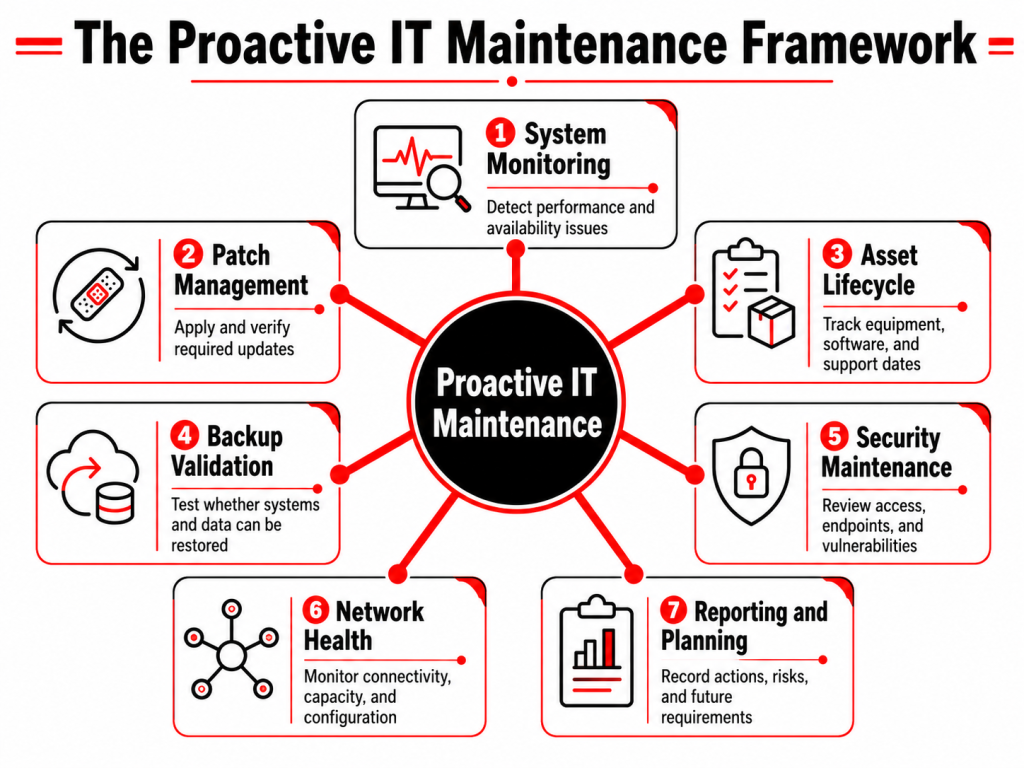
5. Security Control Maintenance
Security controls require continuing attention after deployment.
Endpoint protection may stop reporting. Multifactor authentication may not cover every applicable user. Former employees may remain in groups, and administrative permissions may accumulate as people change roles.
Maintenance should include regular reviews of:
- Endpoint protection and device compliance
- Multifactor authentication coverage
- Administrative accounts
- User onboarding and offboarding
- Firewall and VPN access
- Security alerts
- Vulnerability status
These checks should be connected to documented remediation. A security dashboard showing a missing control is not enough if no one is responsible for correcting it.
CISA’s business guidance specifically recommends patching, tested backups, multifactor authentication, and the removal of unnecessary access as baseline protective actions.
6. Network Performance and Configuration Management
Network problems often appear as slow applications, dropped calls, unstable wireless access, or repeated VPN disconnections.
Proactive network maintenance examines bandwidth use, latency, packet loss, device health, firmware, internet circuits, wireless coverage, and configuration changes. It also maintains current backups of firewall, switch, and routing configurations.
Capacity matters as much as availability. A connection can remain online while providing insufficient performance for video meetings, business applications, remote desktops, or transfers between sites.
Configuration reviews should also remove obsolete firewall rules, unused VPN accounts, and temporary changes that were never reversed.
7. Performance and Capacity Planning
Systems tend to slow down gradually rather than fail without warning.
Storage consumption, database growth, memory pressure, licence usage, internet demand, and backup duration should be reviewed as trends. This helps the business act before a limit is reached.
Capacity planning should consider upcoming changes such as new employees, additional offices, application deployments, acquisitions, and migrations. A system that meets current demand may not support the next stage of growth.
The objective is not to purchase excess infrastructure. It is to understand when demand will exceed available capacity and prepare a justified response.
8. Documentation, Reporting, and Ownership
Proactive IT maintenance depends on records that another engineer can understand and use.
Documentation should cover the asset inventory, network design, key configurations, vendor contacts, administrative procedures, maintenance schedules, backup requirements, and recovery instructions.
Reporting should focus on decisions rather than activity volume. A useful report explains what changed, which risks remain, which systems require investment, and which recurring issues need root-cause remediation.
What Should a Proactive IT Maintenance Report Show?
A monthly report should be concise enough for management to review but detailed enough to establish accountability.
| Reporting area | Useful evidence |
| System health | Availability, capacity alerts, failed services, and open incidents |
| Patch status | Compliant, failed, excluded, and unsupported devices |
| Security | Endpoint coverage, vulnerabilities, access issues, and investigated alerts |
| Backup | Job results, latest restore test, recovery gaps, and retention status |
| Assets | Ageing equipment, expiring warranties, and unsupported software |
| Network | Availability, performance trends, configuration issues, and circuit incidents |
| Recurring problems | Root cause, affected users, corrective action, and owner |
| Roadmap | Upcoming renewals, replacements, projects, and budget requirements |
Ticket totals alone do not show whether the environment is becoming more stable. The report should connect maintenance activity to reduced exposure and fewer repeated failures.
When Should Proactive Maintenance Be Outsourced?
Outsourcing becomes relevant when maintenance tasks are inconsistent, depend on one employee, or are repeatedly postponed because daily support takes priority.
A managed provider may also be appropriate when the business needs continuous monitoring, specialist escalation, after-hours coverage, or a broader skill set than an internal team can maintain.
The service agreement should clearly define:
- Systems included in monitoring
- Maintenance and patching responsibilities
- Coverage hours
- Alert escalation
- Backup testing
- Security ownership
- Reporting frequency
- Excluded applications or vendors
The key question is not whether the business has an internal IT employee. It is whether every maintenance responsibility has an owner, a schedule, and a verification process.
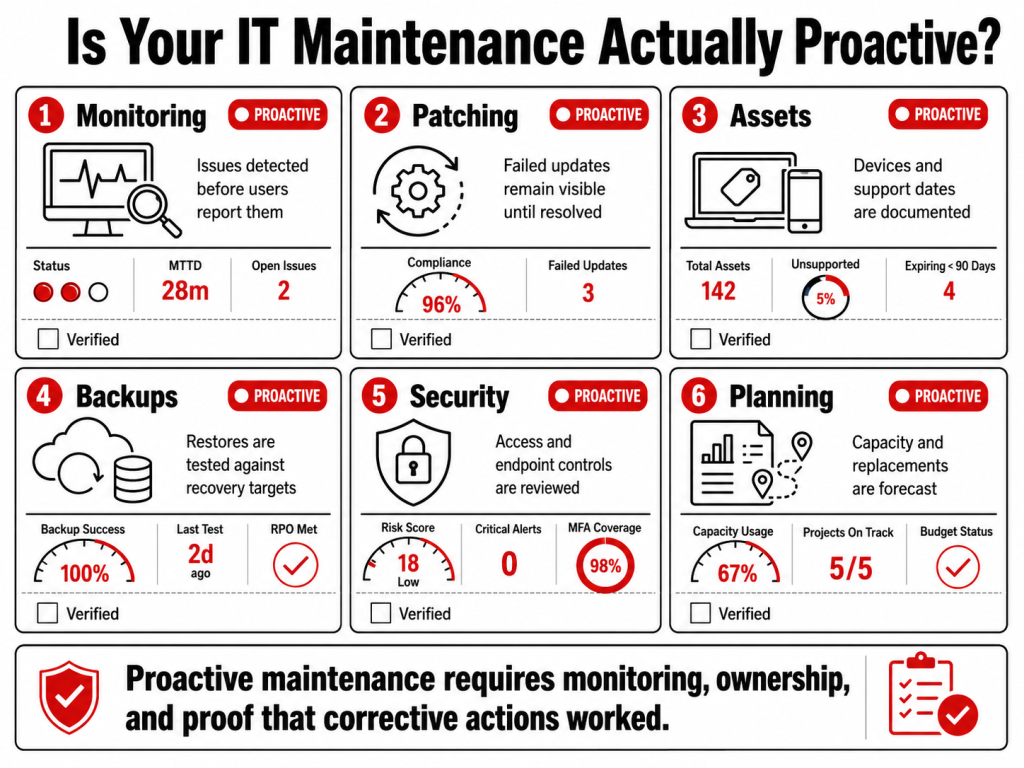
How Folio3 Supports Proactive IT Maintenance
Folio3’s managed IT model combines daily support with infrastructure monitoring, security, network management, recovery planning, and technology strategy. Its current service portfolio covers the main operational areas required for proactive maintenance.
Managed IT Support
Folio3’s Managed IT Support includes a 24/7 helpdesk, remote and onsite assistance, automated patch management,, vendor coordination, and monthly health reporting.
Support tickets are managed alongside system monitoring, allowing recurring user problems to be connected to the device, application, or infrastructure condition behind them.
Cybersecurity Solutions
Cybersecurity support extends maintenance to identity controls, endpoint detection and response, managed firewalls, VPNs, security awareness, SOC monitoring, and incident handling.
This allows patch failures, missing endpoint protection, suspicious sign-ins, and access-control gaps to enter the same remediation process as wider IT issues.
Migration Services
Folio3 migration work covers servers, operating systems, applications, databases, email, data, storage, networks, directory environments, virtual workloads, and tenant consolidation, with dependencies and post-move validation built into the plan.
IT Strategy and vCTO
Folio3’s IT Strategy and vCTO service connects operational maintenance with budgeting, total cost of ownership, infrastructure planning, technology roadmaps, management reporting, and vendor decisions.
Lifecycle and capacity findings can therefore become funded projects instead of remaining open technical recommendations.
Network and Infrastructure
Network services cover LAN and WAN design, SD-WAN, wireless planning, performance monitoring, routing, switching, firewall management, and multi-site connectivity.
This provides proactive oversight of the infrastructure carrying business applications, calls, remote sessions, and traffic between offices.
Disaster Recovery
Folio3’s disaster recovery coverage includes backup validation, defined recovery objectives, on-site and off-site backup options, ransomware recovery planning, business continuity documentation, and recovery testing.
These activities establish whether systems can be restored within the time and data-loss limits accepted by the business.
Frequently Asked Questions
Proactive IT maintenance includes monitoring, patching, asset management, backup testing, security reviews, network maintenance, capacity planning, documentation, and reporting.
Managed IT support is the broader service relationship. Proactive maintenance is one part of that relationship, focused on preventing failures and controlling technology condition before users are affected.
Monitoring is continuous, while patching, access reviews, backup testing, asset reviews, and reporting follow schedules based on system risk and business requirements. Critical findings should not wait for the next scheduled review.
Monitoring should cover endpoints, servers, storage, networks, key services, backup jobs, endpoint protection, certificates, and business-critical applications.
A backup job can complete successfully while the stored data remains incomplete, corrupted, or too slow to restore. Testing verifies whether recovery requirements can actually be met.