
Professional services firms depend on information, communication, and timely delivery. A failed laptop, inaccessible client file, compromised mailbox, or unreliable business application can delay work that is billed by the hour or tied to a fixed deadline.
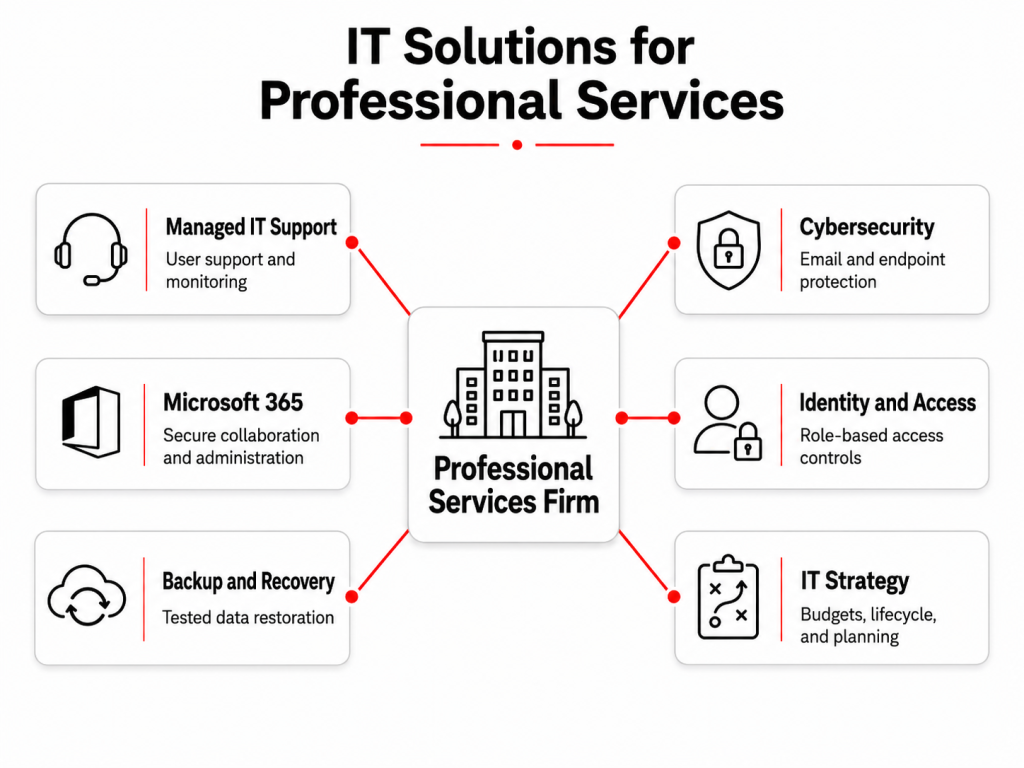
IT solutions for professional services bring user support, cybersecurity, collaboration, infrastructure management, backup, and technology planning into one operating model. They help law firms, accounting practices, consultancies, engineering companies, architects, recruiters, and advisory businesses keep systems available without building a large internal IT department.
A managed IT service can take responsibility for daily support while also addressing the operational risks behind repeated technical problems.
What Are IT Solutions for Professional Services?
IT solutions for professional services are technology services designed around client confidentiality, employee productivity, secure collaboration, and reliable access to business information.
Coverage typically includes:
- User and device support
- Microsoft 365 administration
- Identity and access controls
- Endpoint and email security
- Network monitoring
- Backup and disaster recovery
- Software lifecycle management
- Technology budgeting and planning
The important difference is not the number of services included. It is whether those services are managed as one connected environment.
For example, an employee-access issue may involve Microsoft Entra ID, multifactor authentication, device compliance, SharePoint permissions, and a line-of-business application. A managed IT service should resolve the complete issue rather than treating each platform as a separate ticket.
Why Professional Services Firms Need a Different IT Approach
Professional services businesses do not usually operate large production facilities or physical supply chains. Their primary assets are client relationships, specialist knowledge, documents, communications, and employee time.
This creates several specific technology requirements.
- Client Information Must Remain Controlled
Employees may work with contracts, legal records, financial information, strategic plans, personal data, design documents, or confidential communications.
Access should be based on the employee’s role and client assignment. It should also be removed when a person changes responsibilities or leaves the company.
Microsoft’s Zero Trust guidance recommends verifying access explicitly, applying least privilege, and assuming that a breach may occur. For professional services firms, this means controlling access according to identity, device status, risk, and business need rather than trusting every user already inside the network.
- Downtime Directly Affects Client Delivery
When consultants, accountants, lawyers, or designers cannot access email, files, project systems, or specialist applications, client work slows down.
The effect may appear as missed deadlines, unrecoverable billable time, delayed approvals, or employees working outside approved systems to complete urgent tasks.
IT solutions for professional services should therefore address both incident response and prevention. Monitoring, patching, capacity reviews, and device lifecycle planning reduce the number of interruptions that reach users.
- Hybrid Work Expands the Technology Boundary
Client-facing teams frequently work from home, customer offices, shared workspaces, or multiple company locations.
Security can no longer depend only on the office firewall. Identities, endpoints, applications, and information require consistent controls wherever employees work.
Microsoft’s Zero Trust deployment guidance for Microsoft 365 coordinates identity, device, application, network, and data controls rather than treating remote access as a VPN-only issue.
Core IT Solutions for Professional Services
A professional services technology environment should be managed around the way employees deliver work.
- Managed IT Support and Monitoring
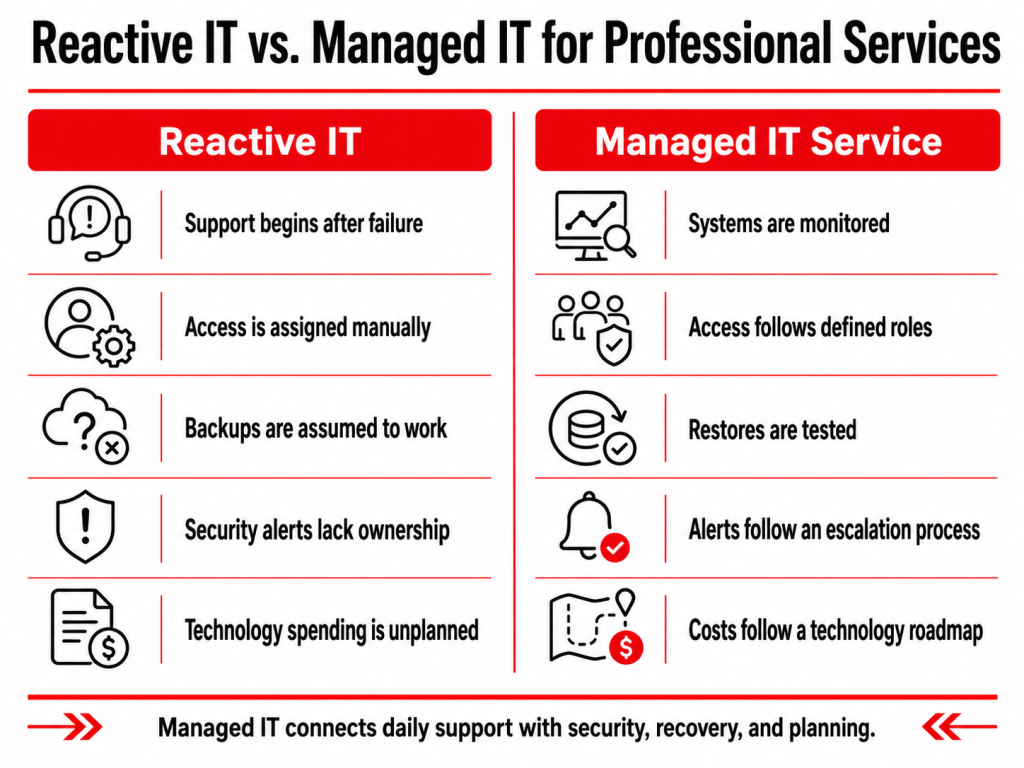
A managed IT service provides a defined support channel for users and an escalation route for more complex problems.
Support may cover device performance, account access, Microsoft 365, printers, remote connectivity, and application errors. Monitoring adds visibility into server health, available storage, failed services, backup status, endpoint security, and patch compliance.
The objective is not simply to close tickets. Recurring issues should be investigated to determine whether they are caused by an ageing device, incorrect configuration, unreliable network, missing update, or insufficient system capacity.
- Identity and Access Management
Professional services firms need to control access across Microsoft 365, document repositories, business applications, remote systems, and shared mailboxes.
A managed access model should cover:
- Multifactor authentication
- Role-based permissions
- Administrative accounts
- Joiner, mover, and leaver processes
- Shared-resource access
- Periodic access reviews
CISA advises smaller organizations to mandate multifactor authentication, patch systems, perform and test backups, and remove unnecessary access as part of their core cyber practices.
- Cybersecurity and Email Protection
Professional services firms can be targeted through phishing, account compromise, malicious attachments, payment fraud, and ransomware.
Security therefore needs to extend across user identities, email, endpoints, network access, and incident response.
The NIST Cybersecurity Framework 2.0 organizes cybersecurity around six functions: Govern, Identify, Protect, Detect, Respond, and Recover. This is useful for evaluating whether a firm has operational ownership across the complete incident lifecycle rather than relying on antivirus alone.
- Microsoft 365 and Collaboration Management
Microsoft 365 often supports email, meetings, document sharing, internal communication, and remote work across a professional services firm.
Administration should include licence management, group membership, mailbox permissions, SharePoint access, Teams configuration, security policies, and user onboarding.
A managed IT service can also establish consistent document-sharing rules. This reduces the risk of client files being shared through personal accounts, unrestricted links, or unmanaged devices.
- Backup and Disaster Recovery
The firm should know which systems and data are protected, how often backups run, how long copies are retained, and whether critical information can be restored within an acceptable period.
CISA’s StopRansomware Guide recommends maintaining protected backups and regularly testing recovery procedures because ransomware operators often attempt to encrypt or delete accessible backup data.
- IT Strategy and Vendor Management
Technology decisions should support the firm’s service model, growth plans, client requirements, and budget.
This includes reviewing software subscriptions, evaluating new offices, assessing business applications, coordinating suppliers, and documenting technology priorities.
A managed IT service with strategic support can also review security and financial controls, assess governance gaps, identify cost-reduction opportunities, and plan on-premises migrations.
Signs Your Firm Has Outgrown Its Current IT Setup
A professional services business may need structured IT support when technical work is spread across employees, independent contractors, and multiple vendors.
Common signs include recurring problems that never receive root-cause analysis, inconsistent access permissions, delayed user onboarding, untested backups, unsupported software, and no documented IT roadmap.
Another warning sign is the absence of reliable reporting. Management should be able to see open risks, device status, backup results, security incidents, upcoming renewals, and planned technology work without requesting information from several suppliers.
IT solutions for professional services are most useful when the firm needs both immediate support and continuing ownership.
In-House IT or a Managed IT Service?
The right model depends on the firm’s size, applications, internal expertise, operating hours, and risk requirements.
A small firm may use a managed IT service for its complete environment. A larger practice may retain an internal IT manager while outsourcing helpdesk coverage, cybersecurity, monitoring, infrastructure, or project work.
A co-managed arrangement is often appropriate when the internal team understands the business but does not have enough capacity for continuous monitoring, specialist security work, after-hours support, or major technology projects.
The decision should be based on responsibilities rather than job titles. The firm needs to know who owns each system, control, vendor, and incident.
How to Choose IT Solutions for Professional Services
A provider should be evaluated against the firm’s real operating requirements.
Ask whether the proposed service covers specialist business applications as well as general office technology. Confirm how the provider secures privileged access, manages leavers, validates backups, handles after-hours incidents, and coordinates with external vendors.
The provider should also explain how performance will be reported. Useful reporting includes recurring incident trends, patch status, endpoint protection coverage, backup results, ageing assets, open security risks, and roadmap progress.
Avoid selecting a managed IT service solely on the number of included tools. Technology products are useful only when someone configures them correctly, investigates their alerts, and remains accountable for remediation. A managed IT service should be proactive, not reactive.
Folio3 IT Solutions for Professional Services
Folio3 provides IT solutions for professional services through a managed service model covering support, security, infrastructure, recovery, and technology strategy.
Folio3’s services are designed for law firms, consultancies, advisory groups, and other professional services businesses that require secure access to client information and reliable technology operations.
- Managed IT Support
Folio3’s managed IT support covers helpdesk requests, remote and onsite troubleshooting, patch management, vendor coordination, and operational reporting.
Support can be provided as the firm’s primary IT function or as additional capacity for an internal team.
- Cybersecurity Management
Security coverage can include endpoint detection, firewall and VPN management, identity controls, security awareness, monitoring, and incident response.
These controls are coordinated with device management and user support so incidents can move from detection to containment and remediation through one service structure. Folio3 lists cybersecurity as part of its wider managed IT portfolio.
- Microsoft 365 and Identity Administration
Folio3 supports Microsoft 365 accounts, licences, mailboxes, Teams, SharePoint permissions, groups, onboarding, offboarding, and access changes.
Identity and device controls can be aligned with the firm’s roles, data, and remote-working requirements.
- Network and Infrastructure Management
Network support can include wired and wireless design, monitoring, routing, switching, firewall management, remote access, and connectivity across multiple sites.
This is particularly relevant for firms expanding into new offices or experiencing inconsistent application and call performance.
- Disaster Recovery and Business Continuity
Folio3’s service portfolio includes backup validation, recovery objectives, ransomware recovery planning, business continuity procedures, and disaster recovery testing.
Recovery planning is based on which systems must return first and how much data loss the business can accept.
- IT Strategy and vCTO Support
Strategic support connects daily IT operations with budgets, lifecycle planning, security priorities, supplier decisions, and future projects.
Folio3’s service portfolio includes IT budgeting, infrastructure design, roadmap development, board-level reporting, and vendor selection support.
- Migration Planning and Execution
Folio3 migration work covers servers, operating systems, applications, databases, email, data, storage, networks, directory environments, virtual workloads, and tenant consolidation, with dependencies and post-move validation built into the plan.
Frequently Asked Questions
IT solutions for professional services support the technology used by law firms, consultancies, accountants, architects, recruiters, engineering practices, and advisory businesses. They can include user support, Microsoft 365, security, networks, backups, access management, and technology planning.
A managed IT service usually includes an agreed combination of helpdesk support, monitoring, patching, security, backup oversight, asset management, vendor coordination, and reporting. The exact scope should be documented in the service agreement.
Yes. Under a co-managed model, the internal employee can retain business ownership while the provider handles agreed areas such as helpdesk support, monitoring, cybersecurity, backups, infrastructure, or project delivery.
Professional services firms often manage confidential client documents, communications, credentials, and business records. Security controls help restrict access, detect suspicious activity, protect devices, and define how incidents are contained and investigated.
Review service coverage, response targets, security practices, backup testing, reporting, vendor coordination, specialist application support, escalation procedures, and exit arrangements. The firm should also verify who owns each operational and security responsibility.