
A slow connection, failed login, unavailable application, or missing file may look like a single IT problem. It rarely is.
A user who cannot open a shared document may be dealing with an identity policy, a network issue, an application outage, or a permissions error. Fixing the visible symptom without checking the connected systems usually means the problem returns.
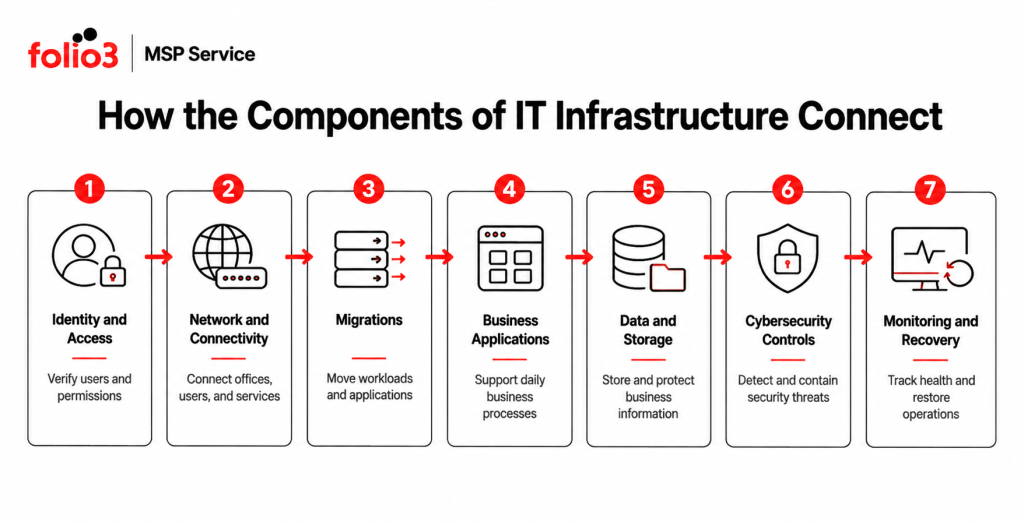
That is why businesses need to understand the components of IT infrastructure as one operating environment. Networks, applications, identities, security controls, data, monitoring, and recovery processes all depend on one another.
A well-managed IT environment keeps those connections visible. It also makes ownership clear when something fails.
What Are the Components of IT Infrastructure?
The components of IT infrastructure are the systems and services that allow employees to access applications, communicate, store information, and complete business processes.
For most organizations, the main components are:
- Network and connectivity
- Business applications and SaaS platforms
- Identity and access management
- Data storage and protection
- Cybersecurity controls
- Monitoring and IT operations
- Backup and disaster recovery
- IT governance and planning
The exact design will vary. A consultancy working mainly in Microsoft 365 has different requirements from a multi-site organization running databases, remote desktops, and specialist applications.
The underlying principle stays the same: each component needs a defined purpose, an owner, and a way to measure whether it is working.
The Main Components of IT Infrastructure
1. Network and Connectivity
The network carries traffic between users, applications, offices, and external services. When it performs poorly, almost every other part of the environment feels slow.
This component includes wired and wireless networks, internet connections, routing, switching, firewalls, VPN access, SD-WAN, and links between business locations.
A network review should answer practical questions. Is there enough capacity for current usage? Are remote employees connecting securely? Do separate offices have reliable access to the same systems? Can network activity be monitored and investigated?
Network design also affects security. Poor segmentation may allow a compromised account or system to reach parts of the environment it does not need.
Folio3’s network services cover LAN and WAN architecture, SD-WAN, wireless planning, routing, switching, firewall management, performance monitoring, and multi-site connectivity.
2. Migration Across Modern IT Environments
Modern migrations often involve moving applications, databases, identity systems, storage, backups, and business workloads across different environments.
A successful migration reduces operational complexity, but it requires careful planning around dependencies, security, access, cost, data protection, and service continuity.
Migration projects can become challenging when workloads are moved without proper assessment. Dependencies remain undocumented, legacy systems continue running, permissions are not reviewed, and resources are migrated without clear ownership or optimization plans.
Migration planning should therefore include workload assessments, dependency mapping, staged cutovers, rollback preparation, and post-migration validation. Folio3 provides migration planning and ongoing management across different environments to help organizations transition smoothly while maintaining performance, security, and business continuity.
3. Business Applications and SaaS Platforms
Applications are where employees do most of their work. These may include Microsoft 365, CRM platforms, accounting systems, practice-management software, collaboration tools, databases, and industry-specific platforms.
Application management covers access, licences, integrations, updates, configuration, availability, and vendor support. It also needs a clear view of which system owns each piece of business data.
Problems often appear at the connections between applications. A user may exist in the identity platform but lack the correct role in a SaaS product. A workflow may fail because an API credential expired. A document may be available in SharePoint but blocked by a device policy.
These dependencies should be documented. Otherwise, support teams end up troubleshooting each platform in isolation.
4. Identity and Access Management
Identity has become the control point for modern IT environments.
Employees use the same account to access email, files, SaaS tools, and remote systems. A compromised identity can therefore provide access to several systems at once.
Identity and access management should cover authentication, multifactor authentication, single sign-on, role-based permissions, administrative access, account reviews, and joiner, mover, and leaver processes.
Microsoft’s Zero Trust guidance recommends checking identity, device condition, application, data sensitivity, location, and risk before access is granted. It treats identity, devices, applications, networks, data, and infrastructure as connected security areas rather than separate projects.
Access rules should be enforced through the identity and application layers. A policy document saying that users should only access relevant information is not an access control.
5. Data Storage and Protection
Business data may sit in databases, Microsoft 365, SaaS systems, shared drives, or archived repositories.
Managing this part of the environment requires more than available storage. The organization needs to know what information it holds, where it is stored, who can access it, how long it must be retained, and how it can be recovered.
Poor data management creates several problems at once. Employees may work from duplicate files. Sensitive information may remain accessible after a role change. Retention rules may differ between platforms. Backups may protect some systems while leaving others outside the recovery plan.
Data ownership should be assigned to the business, with technical controls supporting its decisions.
6. Cybersecurity Controls
Cybersecurity runs across every other component. It protects identities, applications, networks, data, and user activity.
Relevant controls may include endpoint detection and response, managed firewalls, VPN policies, multifactor authentication, email protection, vulnerability management, security monitoring, incident response, and employee awareness training.
The NIST Cybersecurity Framework 2.0 organizes cybersecurity activity into Govern, Identify, Protect, Detect, Respond, and Recover. This is useful because it forces businesses to look beyond preventive tools. Someone must also monitor controls, investigate events, coordinate response, and manage recovery.
Cybersecurity should be reviewed whenever the other components of IT infrastructure change. A new SaaS application, office connection, or user group creates new access paths.
7. Monitoring and IT Operations
Monitoring tells the IT team what is happening before a user raises a ticket.
Useful monitoring covers service availability, application health, network performance, security alerts, backup status, failed updates, storage use, account activity, and certificate expiry.
The alert itself is only the starting point.
A storage warning should trigger investigation before the service stops. A failed backup should remain open until the job succeeds and recovery is verified. A suspicious sign-in should lead to account, device, and session checks.
Proactive IT operations connect monitoring with ownership. Every important alert needs a response path, an escalation point, and a record of what was done.
This is also where recurring issues should be reviewed. Five similar tickets from different users may point to one underlying application or network fault.
8. Backup and Disaster Recovery
Backup and disaster recovery are related, but they are not interchangeable.
A backup is a copy of data or a system. Disaster recovery is the plan for restoring priority services within an agreed period.
A recovery plan should define which systems return first, how much recent data can be lost, who authorizes recovery, and how restored services are tested.
CISA recommends maintaining protected backups and regularly testing their availability and integrity under disaster-recovery conditions. That testing matters because a completed backup job does not prove the system can be restored within the time the business requires.
The backup strategy should cover each relevant platform. Email, SaaS data, databases, and shared files may all require different recovery methods.
9. IT Governance and Planning
The technical environment needs business direction.
IT governance defines who owns technology decisions, which risks the organization accepts, how projects are approved, and where budget should be spent.
Without that structure, the components of IT infrastructure tend to grow separately. One department buys an application. Access is granted through email requests. Renewal dates arrive without usage reviews.
A technology roadmap brings these decisions together. It should cover capacity, security priorities, migration work, service renewals, business continuity, compliance requirements, and expected changes to the organization.
Governance also improves support. Engineers can make better decisions when they understand which applications are business-critical and how much downtime is acceptable.
How the Components Work Together
Consider a remote employee opening a client file in Microsoft 365.
The identity platform checks the account and authentication method. Device and access policies determine whether the session is allowed. The network carries the request. Microsoft 365 retrieves the document. Permissions decide whether the user can open or edit it. Security systems inspect the session. Monitoring tools record failures or suspicious activity. Backup and recovery processes protect the data if it is deleted or corrupted.
One action touches several components of IT infrastructure.
That is why isolated management creates gaps. The network team may confirm that connectivity works while the identity policy blocks access. The application team may confirm the file exists while the permissions are wrong.
The user still cannot work.
How Folio3 Manages the Components of IT Infrastructure
Folio3 manages the connected services that keep business technology operating, protected, and recoverable. Its managed IT portfolio covers support, cybersecurity, network infrastructure, technology planning, and disaster recovery.
Managed IT Support
Folio3’s Managed IT Support combines a 24/7 helpdesk with monitoring, automated patch and update management, vendor coordination, and performance reporting.
User issues are handled alongside the surrounding infrastructure. That makes it easier to connect repeated tickets with problems in an application, identity policy, network, or service configuration.
Cybersecurity Solutions
Cybersecurity services cover zero-trust architecture, endpoint detection and response, managed firewall and VPN services, security awareness, SOC monitoring, incident response, and compliance-readiness support.
These controls protect the identities, applications, data, and networks discussed throughout this blog.
Migration Services
Migration support includes server and operating system migrations, data and database transfers, application moves, email migrations, network changes, storage migrations, Active Directory and Microsoft Entra ID migrations, virtualization projects, and tenant-to-tenant workload migrations.
IT Strategy and vCTO
Folio3’s IT Strategy and vCTO services connect infrastructure decisions with budgets, risk tolerance, growth plans, and business priorities.
Coverage includes IT budgeting, total cost analysis, infrastructure design, technology roadmaps, management reporting, and vendor decisions.
Network and Infrastructure
Network services include LAN and WAN architecture, SD-WAN, wireless planning, routing, switching, firewall management, network monitoring, and connectivity between offices.
This work gives the other components of IT infrastructure a stable and measurable communication layer.
Disaster Recovery
Folio3’s disaster recovery services include backup validation, defined recovery objectives, ransomware recovery planning, business continuity documentation, disaster-recovery drills, and failover testing.
The focus is straightforward: confirm which services can be restored, in what order, and within what time.
Manage the Infrastructure as One Environment
The components of IT infrastructure cannot be managed effectively as separate products.
Networks carry application traffic. Identity controls access. Security systems watch for misuse. Monitoring detects failure. Disaster recovery determines how the business returns to operation.
Folio3 brings these responsibilities into one managed IT model, with defined ownership across support, security, network management, planning, and recovery.
Frequently Asked Questions
A formal review should take place at least once a year and after a major change such as an office move, migration, merger, or new business application. Higher-risk environments may need quarterly reviews of access, capacity, security, and recovery readiness.
Yes. Most discovery work can be completed through documentation review, monitoring data, configuration checks, and stakeholder interviews. Any live testing that could affect production should be scheduled and approved in advance.
The final report should show system dependencies, ownership gaps, security risks, capacity concerns, recovery weaknesses, and recommended actions. Each finding should have a priority, responsible owner, and proposed timeline.
Yes. SaaS platforms often hold business data, control user access, and connect to other systems through APIs. Leaving them out creates an incomplete view of the environment.
Create one central record showing the service, vendor, business owner, technical contact, renewal date, dependencies, and escalation route. This prevents responsibility gaps when an incident affects several providers.
Start with issues that could interrupt critical services, expose sensitive data, or prevent recovery. Cosmetic improvements and low-impact configuration changes can follow once the higher-risk dependencies are addressed.
Yes. Folio3 can take responsibility for selected areas such as monitoring, cybersecurity, network management, cloud administration, disaster recovery, or project work. The division of responsibility should be documented before the engagement begins.
The timeline depends on the number of systems, the condition of existing documentation, and the severity of the findings. Some access or configuration issues can be corrected quickly, while migrations, network redesign, and recovery projects require staged planning.